Processing Server Issues
Most processing failures are due to one of the following:
Unsupported GPU (see Supported NVIDIA GPU Hardware)
Video frame rate below 5 FPS
GPU driver outdated
Missing decoders
Wrong GPU setting in the BriefCam Administrator Console
Services down
Permissions issue
If you suspect that you have encountered an error related to processing, try the following:
From
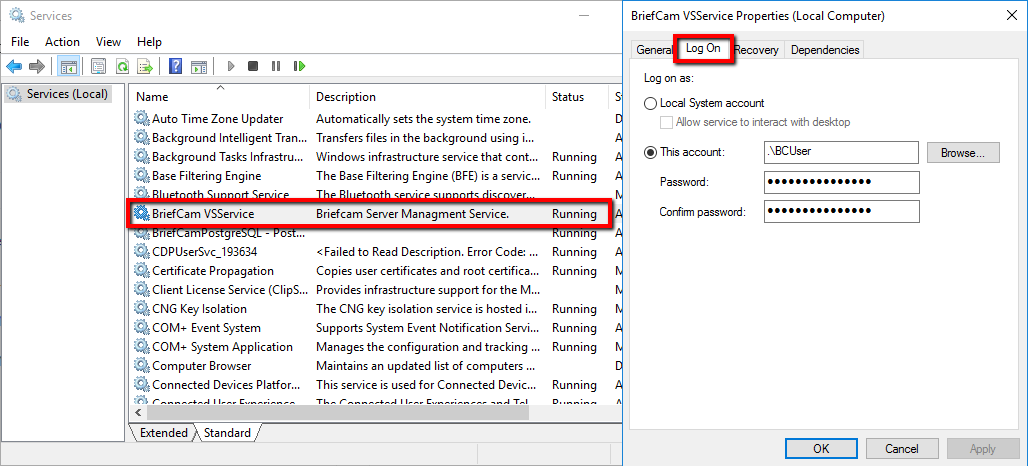
services.msc, check that the BriefCam VSService status is running.If it is running, right-click, select Properties and check that you are logged in with the correct user credentials:
The service should be run by the user selected during the installation of BriefCam.
Check that the password is correct.
For all-in-one environments, check that the user has Admin privileges.
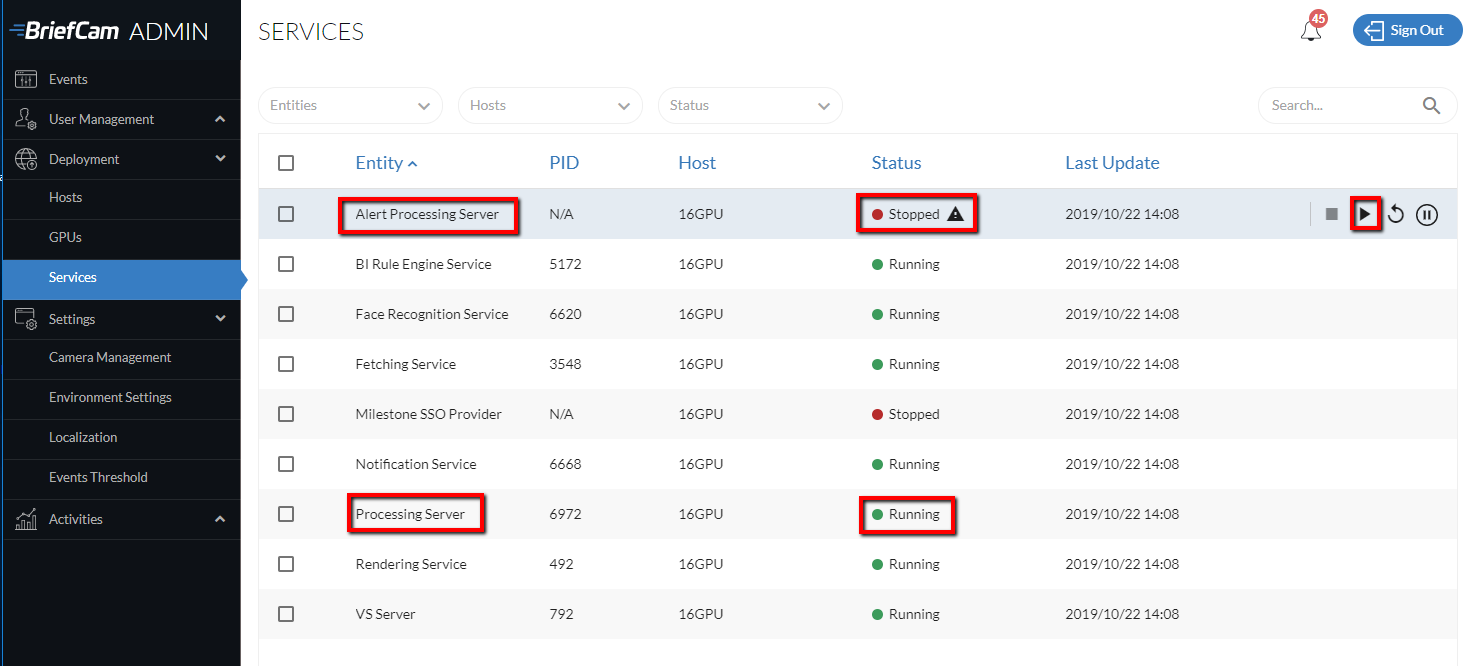
In the BriefCam Administrator Console, confirm that the Processing Server and Alert Processing Server services are running.
Check the ProcessingServer.log file located at:
C:\Program Files\BriefCam\BriefCam Server\logs. This gives information about the required decoder and plugin and processing info (processing duration, FPS, video format and more). In the log file, click Ctrl+End to go to the end of the file and search backwards for the words:task taken. This is when the processing server actually took the video to process. You'll also see here the name of the video, start and end time, and more.
Check that the following firewall ports are open:
TCP 1112 – Used by the Rendering service, to communicate with the server: VSService
TCP 1113 – Used by the Fetching service
TCP 2552 – Used by the Face Recognition Matching service
TCP 7080 – Used by the Notification server
In certain cases, following a crash, the processing server moves to a 'suspended' state, causing active processing requests to stall. To resolve this issue, disable the Windows dump files by opening the
regedit, clicking on the following registry key:HKEY_LOCAL_MACHINE\SYSTEM\CurrentControlSet\Control\CrashControland changing the value ofCrashDumpEnabledto0.Or, set the Agent.AggressiveShutdownOnCrashRecovery environment setting to true.
See also:
Why is the loading or processing of a video taking a long time?
Why is the loading or processing not working?
Why am I getting a Missing OXWrapper dll error?
Why is the processing failing and I'm seeing Can't open codec : 27 in the log file?
Why is the processing crashing and I'm seeing BriefCam.VSDB.dll in the log file?
Why am I getting the Throw: NvEncOpenEncodeSessionEx error?
Why am I seeing the following TensorRT Error in the Processing Server/Alert Processing Server log?