Enabling Hub Users Access to All Rules and Alerts Across Sites
To enable Hub users to access all the Hub’s rules and alerts defined in all sites:
The Hub administrator should share a list of all Hub users that require this level of access with each site administrator. For example, if the Hub administrator wants HubUser1 and HubUser2 to be able to see all the rules and alerts from all the sites, they should inform all site administrators to add HubUser1 and HubUser2 as site users.
On each site, a site administrator should add these users to the site.
Note
If one or more of the users on the list does not exist on the site, the user needs to be created using the exact user name given and assign a password based on the policy of the organization. The passwords can be different across sites, but the user name needs to be the same on all sites.
If you are using SSO, you do not need to create the users, but rather have each of the Hub users sign into each of the sites at least once.
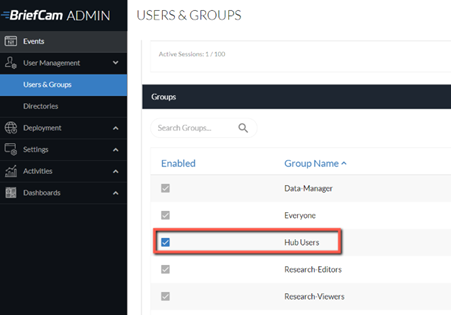
Each site administrator should create a group called Hub Users and add the users added in step 2.
Every time a user creates a rule on the site, they should share the rule with the Hub Users group. This means that the site administrator should instruct all users to share their rules with the Hub Users group. The share can be done with All users to modify resource content checked or unchecked, based on the policy of the organization.