Nexus Deployment
Hub Deployment
Prerequisites
A BriefCam installation including RESEARCH and NGINX as described in the BriefCam Installation Guide. It is mandatory to use NGINX in the Hub to allow load balancing of multiple components. You can install the Hub on an all-in-one environment or a distributed environment.
HTTPS is highly recommended, but it depends on the organization’s policies. If HTTPS is used, the organization needs to provide the certificates.
Configuration Steps
Log into the BriefCam Administrator Console.
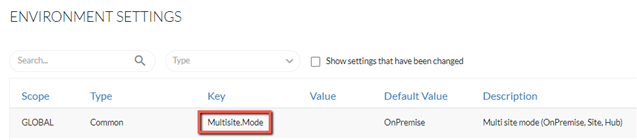
From the Settings section, open the Environment Settings screen.
You’ll now configure the system to work as a Hub.
Set the Multisite.Mode environment setting to Hub.
You’ll now set up the services that receive RESPOND alerts and RESEARCH data from the sites.
(Optional). The default port for the Hub BI Gateway service on the Hub is 5007. This can be adjusted by changing the value in the Nexus.HubBIGatewayAddress.InternalPort environment setting.
Note
If you change the internal port, you also need to change the NGINX configuration to match.
(Optional). Set up an external system for the Hub to forward the RESPOND alerts. You do this by setting the Multisite.ExternalUrlForHubAlerts environment setting to the endpoint that is configured to receive alerts from the Hub. This requires additional setup and configurations on the receiving side. For additional information, you can request the Developer Tools document at: https://www.briefcam.com/lp/request-briefcams-developer-tools-documentation/.