RESEARCH Prerequisites
Note
When installing or upgrading an environment that uses an extended Research license, contact BriefCam’s Support team by logging into the BriefCam Portal at https://www.briefcam.com/support/ and opening a ticket.
.NET 4.8 Framework Runtime is required. The installer will check if this is installed on your machine but will not install it for you. Download it and install it on your machine from this link: https://dotnet.microsoft.com/en-us/download/dotnet-framework/net48.
On the machine where you are installing the RESEARCH component, the Automatically adjust clock for Daylight Saving Time option must be selected.
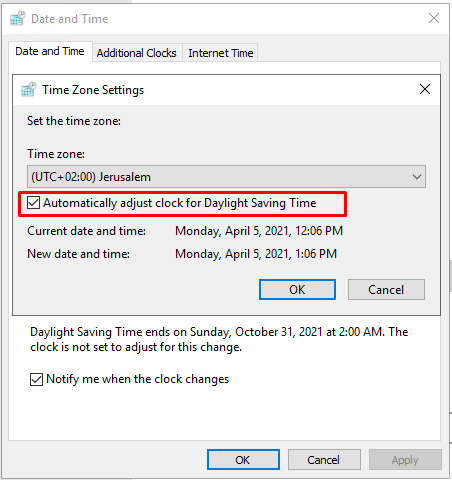
The following prerequisites are also required. However, if you are installing on a machine with the operating system only, you will not need to check for these prerequisites.
Make sure that the ports detailed in the RESEARCH Ports section are available before starting the installation (see: Firewall Consideration and Ports Availability ).
Close the Task Manager, Services, Computer Management and MMC Console applications.
Temporarily disable the User Account Control (UAC).
Ensure that the current logged in user has full local admin rights and full Registry Read/Write permissions.
Disable the firewall when possible.
Stop the Antivirus, AntiMalware and any GPO activity on the server (all can be re-enabled after the installation) when possible. Or, ensure that the following folders are excluded:
C:\ProgramData\QlikC:\Program Files\BriefCam\RESEARCH\QlikC:\Program Files\Common Files\QlikC:\qlikshareC:\Users\YourId\AppData\Local\Temp
Reboot the server for changes to take effect.
Note
When installing RESEARCH in an Offline environment, the installation has to be done manually. Contact BriefCam Support for assistance.
RESEARCH and Web Service on Separate Machines
If you are working with a distributed environment where the Web Services component and the RESEARCH component are on separate machines, you either need to:
Use a load balancer (see: Installing and Configuring NGINX)
Use an FQDN (preferable) or an alias/CNAME
For additional information, see: Configuring a RESEARCH and Web Services Distributed Environment.