Enable Milestone Map Service
Milestone Map Service is an online service that lets you connect to Milestone Systems's tile server. This tile server uses a free, commercially available map service.
After you enable Milestone Map Service on your smart map, the smart map will use Milestone Map Service as its geographic background.
Steps:
In the Site Navigation pane, expand the Client node and click Smart Client Profiles.
In the overview pane, select the relevant Smart Client profile.
In the Properties pane, click the Smart map tab.
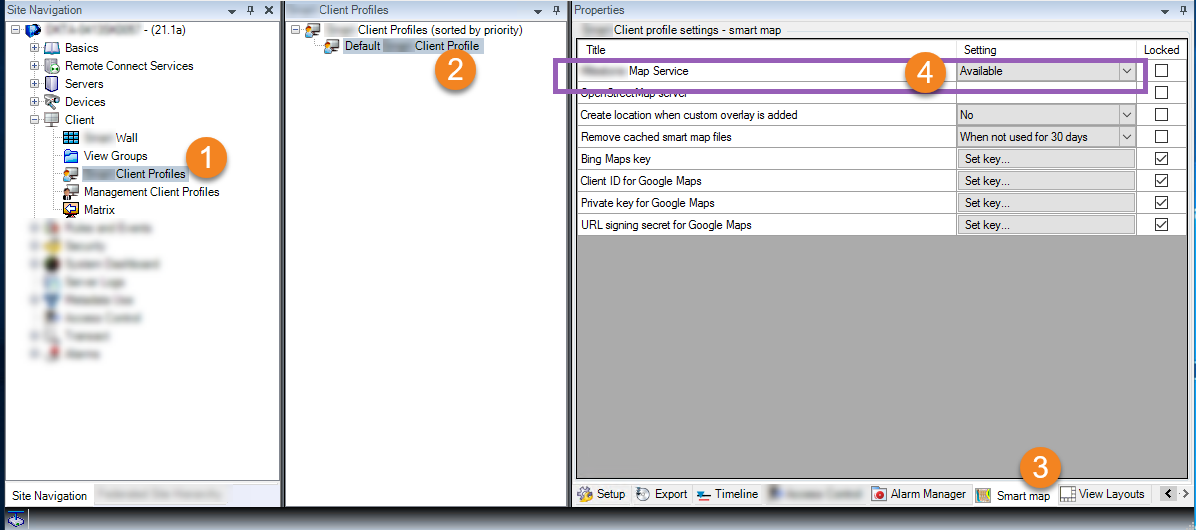
In the Milestone Map Service field, select Available.
To enforce this setting in XProtect Smart Client, select the Locked check box. Then the XProtect Smart Client operators cannot enable or disable Milestone Map Service.
Save the changes.
Tip
You can also enable Milestone Map Service in the Settings window in XProtect Smart Client.
Important
Milestone Map Service requires internet access.
Note
If you are behind a restrictive firewall, allowing access to the used domains is important. You may need to allow for outgoing traffic for Milestone Map Service using maps.milestonesys.com on each machine on which the Smart Client is running.