Specify OpenStreetMap tile server
If you use the OpenStreetMap option as the geographic background for your smart map, you must specify where the tiled images are retrieved from. You do this by specifying the tile server address, either a commercial tile server or a local tile server, for example if your organization has its own maps for areas such as airports or harbors.
Tip
You can also specify the tile server address in the Settings window in XProtect Smart Client.
Steps:
In the Site Navigation pane, expand the Client node and click Smart Client Profiles.
In the overview pane, select the relevant Smart Client profile.
In the Properties pane, click the Smart map tab.
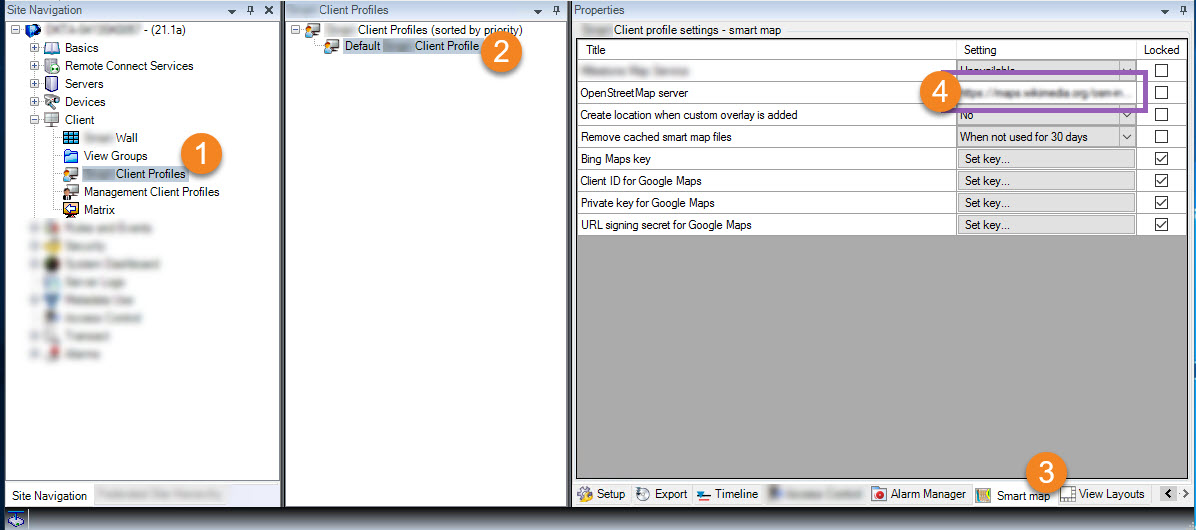
In the OpenStreetMap server field, enter the address of the tile server.
To enforce this setting in XProtect Smart Client, select the Locked check box. Then the XProtect Smart Client operators cannot change the address.
Save the changes.