Configuring metadata on the device (Axis camera web page)
Some Axis devices require additional configuration on the device itself to enable metadata publishing to MQTT.
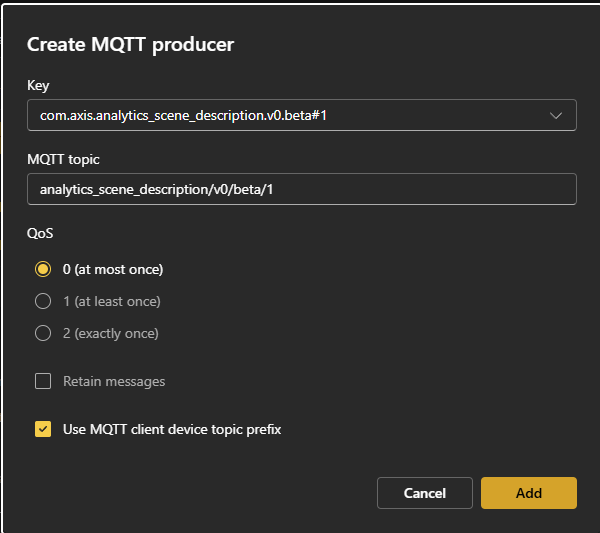
To receive metadata, you must create a metadata producer for each metadata topic you want to use. Available topics are listed in the Key field when creating a producer. For each topic, ensure that Use MQTT client device topic prefix is enabled so the MQTT topic name matches what Axis Cloud Access expects.
On some devices, access to the Metadata configuration menu requires logging in with an administrator (AM) user. If you are logged in with a device management (DM) user, the Metadata configuration menu may not be visible. For details on user roles, see Managing local device users.
On other devices, metadata publishing is enabled by default. If the Metadata configuration menu is not available even when logged in as an AM user, no additional configuration is required and metadata is published automatically.
If configuration is required:
Log in with the administrator (AM) user.
Open the device’s web interface.
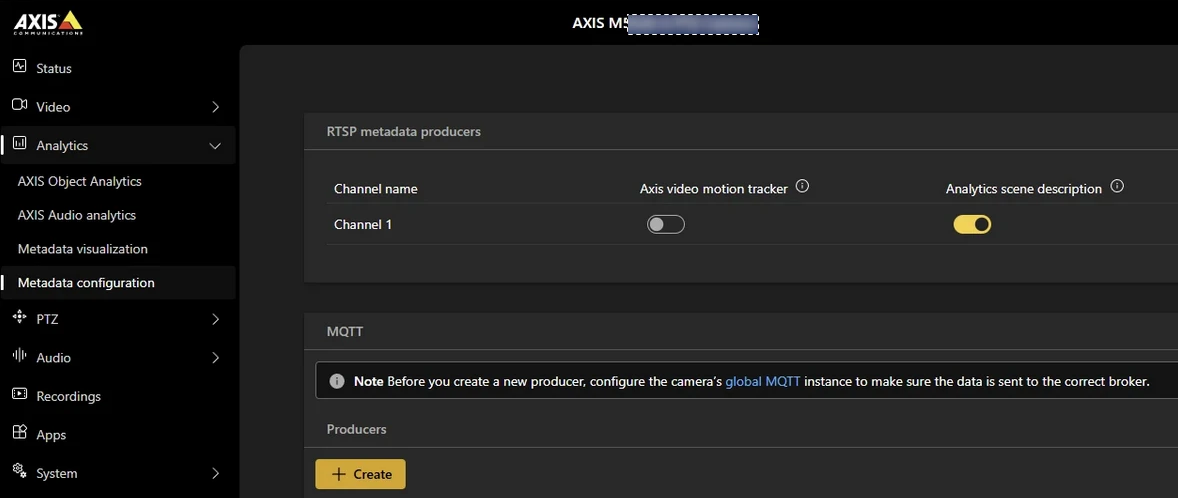
Go to Metadata configuration.
In the Producers section, click .
From the Key field, select a topic.
Select the Use MQTT client device topic prefix check box.
Repeat for each required metadata topic.
 |
 |