Opening or decrypting a Case-Pak
Opening a Case-Pak in Data Central. Once you receive the encrypted Case-Pak, you simply drag and drop the icon anywhere into the software interface. It will ask you for the password (if there is one) and then open the Import Case window.
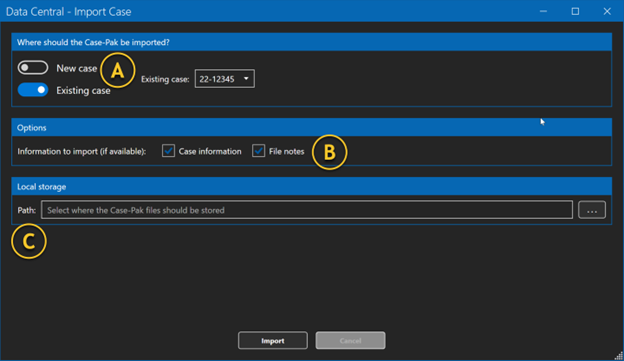
A | Case-Pak import location | You have two options. If you select “New case,” you will be given the option to create the case number. If you select “Existing case,” you will be presented with a dropdown and a current list of open cases. |
B | Information to import | If the sender of the Case-Pak included the “Case information” and the “File notes,” you can opt to bring that information into the case. |
C | Path | This is the location where you would like the decrypted files to be placed once Data Central is complete. |