Sharing a case
Sharing a case will encrypt (AES-256) all contents within the case and give you the option to include the metadata. Each file will be given a unique ID and hashed (SHA-256).
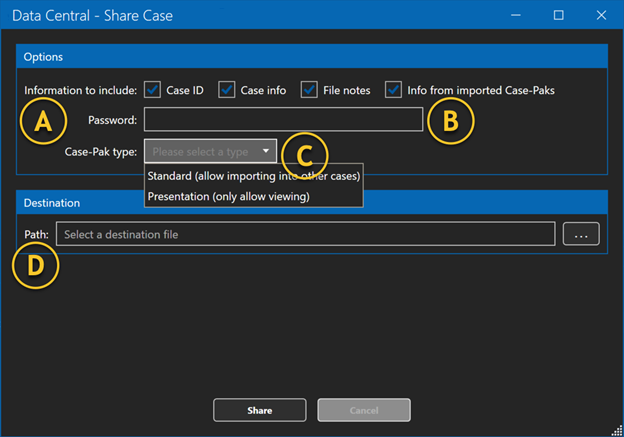
A | Information to include | Each checkbox allows you to include metadata to be encrypted into the Case-Pak. “Case ID” is the assigned Case ID when the case was created. “Case info” is the metadata from the metaform/ Information section. “File notes” are the individual notes created for each file. “Info from the imported Case-Pak” is all the metadata from a previously shared Case-Pak. |
B | Password | You can create any password as long as it meets the admin configured strength requirements. This password will be used to decrypt the Case-Pak. |
C | Case-Pak type | You have two options to select from for the Case-Pak type. “Standard” allows the recipient of the Case-Pak to import the files into other cases, add new files and metadata as if the case were their case from the beginning. “Presentation” only allows the recipient to open the Case-Pak and view the files and metadata. |
D | Path | “Path” is the desired location to place the encrypted Case-Pak once it has been created. |