Uploading Images in BriefCam
Using BriefCam , you can search for faces across sources regardless of the date of the sources.
The supported file types for images are .png, .jpg, .gif, .jpeg, and .bmp.
The minimum face size in pixels is 40x40. A larger face size will result in better facial feature extraction and a higher matching accuracy.
It is recommended to:
Upload images where the face is in the center of the image.
Upload images with not too much context around the face; the face should not be less than one quarter of the image.
Upload images that have not been resized.
Add several images of the same identity to a watchlist. This will increase the reliability and the success of the face recognition.
Upload additional images when you know that there has been a significant change in the appearance of the person, for example a different haircut or the shaving off of a beard.
Uploading Multiple Faces from a Monitored Folder
You can upload multiple faces from a monitored folder that will be synced to a watchlist every 60 minutes. You can upload multiple faces for identities and multiple identities for each batch.
The default settings for this functionality can be changed by an administrator.
Note that all images added using a monitored folder will be added to the watchlist, including images that are below the minimum threshold for face matching, such as no-star images (no face detected) and 1-star images. BriefCam will ignore the non-matchable images. If you do not want these images to appear on the watchlist, you need to manually delete them from the folder.
For more information, see: Uploading Multiple Faces from a Monitored Folder.
Face Recognition Quality
The accuracy of face recognition is highly dependent on scene characteristics, video quality and face image quality.
Each image is assigned one, two or three stars.
Note that the images are blurred in this document to protect the identities of the people. They do not appear blurred in BriefCam.
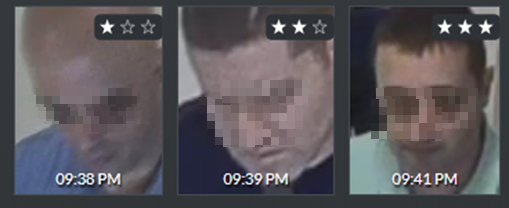
The star rating is assigned by BriefCam and is a combination of:
Face detection
Face resolution
Face image quality
Face landmarks
Face pose
Post analysis of the person’s identity feature vector
In general, 1 star is for faces that are not possible for BriefCam to extract facial features from and compare to other faces, 2 stars is for faces that BriefCam can extract facial features from with medium confidence and 3 stars is for faces that BriefCam can extract facial features from with high confidence.
In the REVIEW module, 2-star and 3-star images can be added to the filter. 1-star images cannot be added.
In the RESPOND module, 3-star images can trigger alerts and 1-star images cannot trigger alerts. By default, 2-star images cannot trigger alerts; however, for high RESPOND sensitivity configurations, 2-star images can trigger alerts. For additional information, see the High-Sensitivity Mode in the BriefCam Administrator Guide. The administrator can configure the system for high RESPOND sensitivity.
Note that high-sensitivity is only available with the Windows-based OX5 engine.
The table below summarizes this:
REVIEW | RESPOND | |
1 star | X | X |
2 stars | √ | X - default √ - high RESPOND sensitivity |
3 stars | √ | √ |
The presenting of 1-star images is important because it allows users to see what types of images are not of good quality. This can help them to improve their environment by, for example, repositioning the camera or adding illumination.
Face Recognition Quality Calculations
In the Face Recognition pipeline, BriefCam first detects the face and then extracts facial features:
If a face was detected but the feature vector was not calculated, the face will have 1 star.
If a face was detected and a feature vector was calculated, the face will have at least 2 stars.
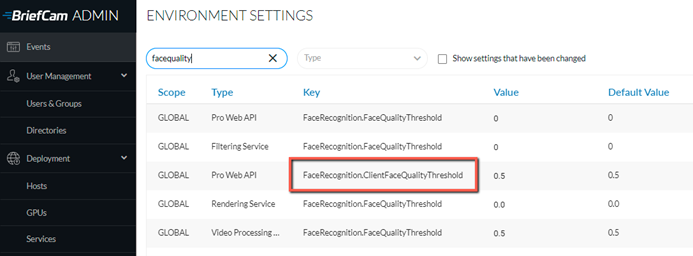
Whether a face is 2 or 3 stars is determined by the FaceRecognition.ClientFaceQualityThreshold environment setting (default 0.5)
If the face score is greater than the value in the FaceRecognition.ClientFaceQualityThreshold setting, the face will be 3 stars.
If the face score is smaller than the value in the FaceRecognition.ClientFaceQualityThreshold setting, the face will be 2 stars.
Quality by Scene
The quality of the scene effects the accuracy of the face recognition. The quality is based on various parameters including camera location, orientation, resolution, illumination and video compression as detailed in the table below.
Category | CameraLocation | Orientation | Typical Resolution | Illumination | Video Compression | |
 | RESPOND  | Distance <2m People walking towards camera Indoor & Outdoor (e.g. entrance door or passageway) | Frontal | 1080p-4K | Special Lighting or Daylight | Bitrate > 7Mbps |
 | REVIEW  | Indoor: Distance 4m | Frontal or Profile or Look Down (partial) | 1080p | Normal | Bitrate > 7Mbps |
 | Outdoor: Distance < 20m (e.g. Light pole, traffic light) | Look Down | 4K | Daylight |