Watchlists - Face Recognition White Paper
BriefCam provides scalable face recognition watchlist management and powerful alert rule configuration enabling rapid notification of events in your environment.
When using a watchlist, you can search for people that are in the watchlist or people that are not in the watchlist.
From within BriefCam, you can upload up to 500 images at a time. If you have more than 500 images, divide them up into batches of up to 500 or upload the images using the monitored folder feature (described below).
When using a Chrome version below 72.0.3626.81, the limit is 125 images per upload.
Watchlist Size
The size of the watchlist impacts accuracy and performance.
Intuitively, one can understand that the larger the watchlist – the higher the chance of false positives.
In addition, the larger the watchlist – the longer it will take to perform the matching procedure. Face feature extraction uses the system’s GPU while face matching utilizes the system’s CPU. It takes BriefCam approximately 0.15 seconds to match a subject against a database of 50,000 faces on CPUs, such as i7-9700K and Xeon Silver 4215R.
Uploading Multiple Faces from a Monitored Folder
You can upload multiple faces from a monitored folder that will be synced to a watchlist. You can upload multiple faces for identities and multiple identities for each batch.
The monitored folder is on the VS server machine. The default path is: C:\briefcam\ServerData\ExternalWatchLists. Your administrator can change this path for you.
To use this folder on a distributed environment, make sure that BCUser has permissions to access the folder. For an all-in-one installation, this is not necessary.
Every 60 minutes the system checks whether there is anything new and then imports it to a watchlist or watchlists. In the ExternalWatchList folder you can create a subfolder using the name of the watchlist. In the subfolder you need to create folders with names of identities and in each identity’s folder place at least one photo of the identity’s face.
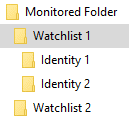
There is an option to either overwrite the watchlist every sync (so if you delete identities from the folder they’ll be deleted in the system) or merge to only load new items. The default is to overwrite.
The default settings for this functionality can be changed by an admin.
Note that all images added using a monitored folder will be added to the watchlist, including images that are below the minimum threshold for face matching, such as no-star images (no face detected) and 1-star images (a face was detected but insufficient quality for Face Recognition). BriefCam will ignore the non-matchable images. If you do not want these images to appear on the watchlist, you need to manually delete them from the folder.