BriefCam Video Analytics white paper
The formidable challenges posed by video surveillance are being solved by the emergence of Video Content Analytics (VCA) technology. VCA solutions use Artificial Intelligence (AI) to evaluate video and make it searchable, quantifiable and actionable.
Using Deep Learning techniques, software is trained to detect and distinguish between objects in video content through exposure to large amounts of tagged examples, known as supervised learning. Detected objects are then extracted from the footage, identified and classified, and analyzed to understand their behaviors and attributes. Video metadata is collated and structured in a database into an index of objects, so automated systems can quickly and effectively “understand” what has appeared or is now appearing in the analyzed footage by simply using the structured data.
In addition to AI-based object classification, computer vision algorithms are used to extract other types of data, such as absolute speed and size, direction, color, path and area.
This data can then be searched to help focus efforts on relevant information. The data also can be visualized as a VIDEO SYNOPSIS® or in dashboards and heat-maps for drawing deeper intelligence to guide security and operational decision making.
Deep Learning
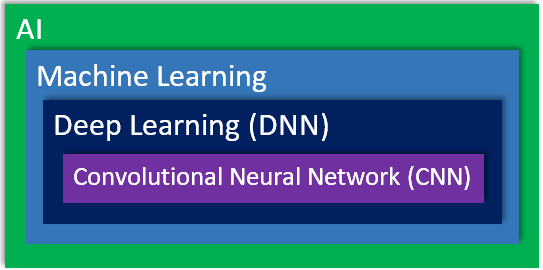
Artificial intelligence (AI), machine learning, deep learning and convolutional neural networks (CNN) are all technologies that attempt to imitate human behavior.
AI is the most general term. Machine learning is a type of AI, deep learning is a specific discipline of machine learning and CNN is a specific type of deep learning.
Deep learning is a machine learning method that uses deep neural networks and has been around for a long time. In 2012, researchers took the already existing deep learning technology and with the introduction of significant amounts of data and the availability of increased computation power, were able to take the theoretical ideas of deep learning and put them to practical use.
With the advent of these advances, deep learning has gained huge popularity, since it outperforms other methods, and has been gradually applied to more and more disciplines, replacing hand-crafted algorithms.
BriefCam started utilizing deep learning around 2014 and, today, it is a major part of BriefCam’s core technology.
In addition to deep learning, BriefCam also utilizes classic computer vision algorithms to complement, enhance and enrich the data it extracts from video.
BriefCam’s Video-to-Insight Pipeline
At the core of BriefCam is a highly refined video content analytics engine, which analyzes the entire content of video and creates a structured database of information out of the unstructured video data.
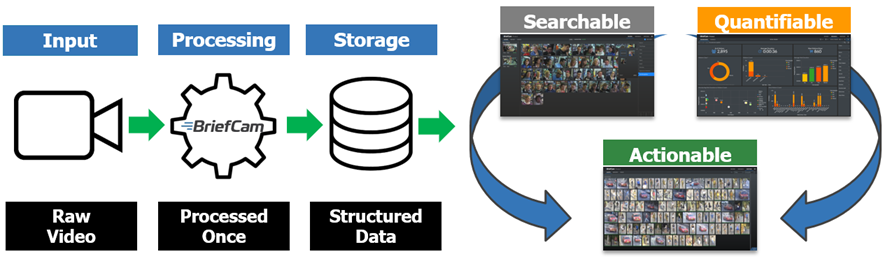
The first stage in BriefCam’s video-to-insight pipeline is to take the raw video stream, which can be a video file or a camera, and convert it from its proprietary format so it’s ready for processing. BriefCam then processes the video with its proprietary computer vision and deep learning technology. Processing can be done in real-time or scheduled, so that video is always ready for review.
As BriefCam processes video, it detects and recognizes objects, along with information about their type and attributes.
Objects are then classified according to different classes, for example, people, vehicles, and animals; and their attributes such as gender, age, wearing a hat or carrying a bag; type of vehicle; color, size, speed and direction; and then saved into the database together with the object’s location throughout the scene.
The video is processed once and all possible data is stored in a database. The data is then used to provide interactive applications. BriefCam’s three main solutions, REVIEW, RESEARCH, and RESPOND, are used to make the videos searchable, quantifiable and actionable.
Object Extraction
The main part of the second phase in the pipeline, the processing phase, is object extraction. The objective of object extraction is to detect and track every object with no limitation on the number of concurrent objects. BriefCam’s goal is to identify everything a person watching the video can learn and understand by detailed review of the video.
Note
BriefCam invests a lot of resources into improving both the accuracy and processing efficiency as well as enriching the metadata in every release.
BriefCam detects an object and then tracks the object throughout the scene. BriefCam then analyzes as much information as possible about the object. BriefCam can detect, for example, if the object is a woman or a man, if they’re riding on a bicycle, what color clothing they’re wearing, the speed they are traveling, and more. This information is detected without any manual intervention and by learning the three-dimensional geometry of the scene over time.
Object Extraction Pipeline
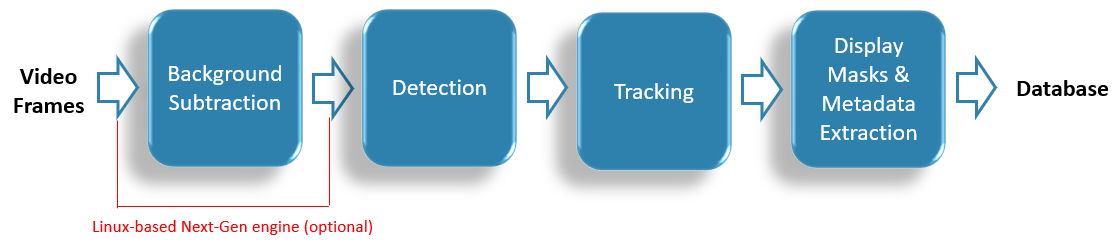
This section will drill down into each of the stages in this pipeline.
Video Frames
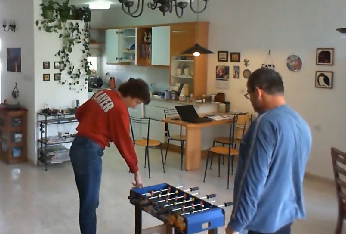
The first stage is that video is inputted into BriefCam. Let’s look, for example, at what happens with the following image.
Background Subtraction
A technology called background subtraction is applied to the image with the objective of separating, on a per pixel level, the foreground from the background. The technology, at this stage, analyzes differences compared to the learned background of the scene.
The result is something like this:
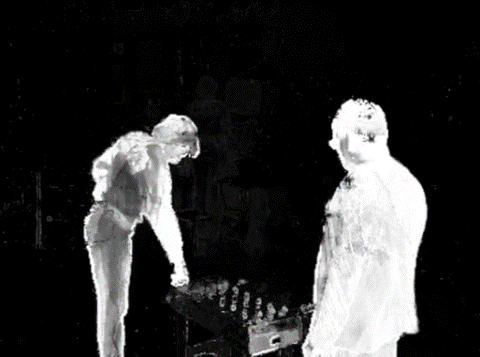
Ideally, the people would be completely white and the background completely black.
In our example, the grey parts on the woman are caused because the object stood still for a while in the same place, which is more difficult for the technology. In addition, the table is grey because in our example, the table was just moved from a different room.
In cases where the colors of the objects (or parts of them) are very similar to the background color, it may be more difficult to separate the object from the background.
As you can see from the object extraction pipeline diagram, this is the first stage in both of our algorithmic engines: the Windows-based OX5 engine and the Next-Gen Linux-based OX6 engine. However, with the Windows-based OX5 engine, this stage is mandatory and only its outputs are sent to the detection module. In the Linux-based OX6 engine, this is not the case. The video frames also go directly to the detection module and are analyzed by it in parallel. Furthermore, this stage in OX6 can be bypassed completely and only used as an optimization aid and, if configured accordingly, for detecting objects that the detection module is not trained to detect.
Detection
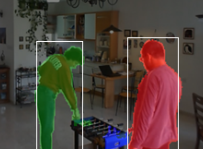
BriefCam's object detection uses motion detection, semantic detection and classification.
In our example below, you can see that BriefCam assigned a different color labelling to each person, which is the ideal result.
Using the Windows-based OX Engine
In the Windows-based OX5 engine, BriefCam does not discard objects that it is unable to classify correctly (also called non-semantic objects). This ensures that important events are not missed. Sometimes, an investigation breakthrough is obtained by identifying a subtle movement that is hardly identifiable and classifiable by the human eye. Note that these objects are usually not classified correctly because the DNNs have not been trained with similar data.
In the Windows-based OX5 engine, even though BriefCam detects non-semantic objects by default, there are still two different detection sensitivity configurations. BriefCam is optimized to filter out items that are not detected as objects, such as shadows, lighting and small unclear objects. However, when these objects are of interest, a high-sensitivity mode can be defined. The high sensitivity of detection comes at the expense of more expensive or slower processing and a higher probability of getting false detections. However, it is sometimes important to customers. For example, a customer may have a very crowded scene at night and in a small area there’s a very small change in a few pixels. This small change may turn out to be a major event that helps solve a case.
Even with the high-sensitivity detection, BriefCam has an advanced noise filtering mechanism, so that even if you are working in high sensitivity, you still will not be detecting snowflakes, waves and moving branches in most cases. However, some conditions, such as raindrops or insects on the window of the camera, might trigger BriefCam’s detection algorithms.
Using the Linux-based OX6 Engine
In the Linux-based OX6 engine, BriefCam does not detect non-semantic objects by default. If you want to detect non-semantic objects, you need to activate the mode. Otherwise, only trained object classes (semantic objects), i.e., vehicles, people and animals are detected. The price of activating this mode is slower processing and a higher probability of getting false detections.
Tracking
Once the detections are achieved, BriefCam takes every detection in the frame and matches them to previous found objects using motion prediction and appearance similarity technologies to produce objects’ tracks.
Display Masks and Metadata Extraction
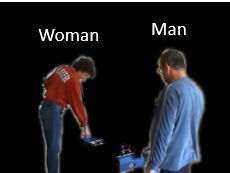
BriefCam then applies a refinement phase and applies deep learning classification and recognition to extract as much metadata as possible and create accurate display masks of each object.
Object Classification
Object classification is performed after the object is detected and tracked.
For every object detected, tracked and extracted in the scene, BriefCam classifies the properties of that object, such as its gender, vehicle type, color, speed, direction, and more, and catalogs the metadata.
BriefCam’s Two-Tier Classification Approach
BriefCam uses a two-tier classification approach. First, BriefCam classifies the class category (marked in blue in the image below) using mostly a deep learning-based specification. BriefCam also adds additional information, such as the movement analysis and the size analysis on the objects as well as other learned statistics.
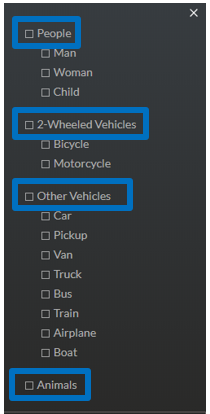
For this top level, BriefCam has accuracy of 96% or above. The numbers given here are averages based on all types of typical customer videos.
Once we have the class category, BriefCam classifies the subclass category. The subclasses are all of the items under the classes marked in blue in the image above.
For subclasses, the filtering is more detailed and the accuracy might not be the same as the top-level classes, such as specific vehicle type. For sub-classes the filtering is more detailed, and the accuracy might not be the same as the top-level classes (e.g. specific vehicle type). In some cases, the fine-grain classification of subclasses is not attempted if the conditions won’t allow it.
The accuracy very much depends on the quality of the object, resolution, blurriness, and lighting condition.
For example, if you have an object with a very low resolution then it might be possible to detect that it’s a 2-wheeled vehicle, but the resolution is not high enough to determine if it’s a bicycle or a motorcycle.
Note
The OX6 (Linux-based) engine is optimized for advanced object classification, which may result in reduced accuracy when detecting very small or distant objects.
Note on human detection accuracy
Objects that visually resemble humans — such as paintings, posters, or curved shapes that resemble a human head or body — may, in some cases, be classified as a person and trigger alerts. This is more likely in environments with complex visuals or limited image clarity.
Image Quality Recommendations
The following are recommendations for high image quality to achieve successful video analytics when working with surveillance videos:
Resolution – A higher resolution is preferable to increase accuracy and, in particular, when you want to detect and classify objects that are far away from the camera and when the camera’s field of view is very wide. Resolution is always of importance, but it's by no means the only factor that determines BriefCam’s minimum detection or minimum accuracy because there are so many other challenging characteristics to a video. For example, if you are using face recognition, you may have an image of a face that is 40 x 40 pixels, is quite sharp and with good conditions. You might also have an image of a face that is 60 x 60 pixels, but it is completely blurred or the video compression is corrupted. With these two examples, you will get better results with the 40 x 40 pixel image.
Lighting conditions – Good illumination is recommended to achieve a higher degree of accuracy. When a scene is dark, for example, you may get a grainy image because of the limited amount of light that can come into the camera sensor.
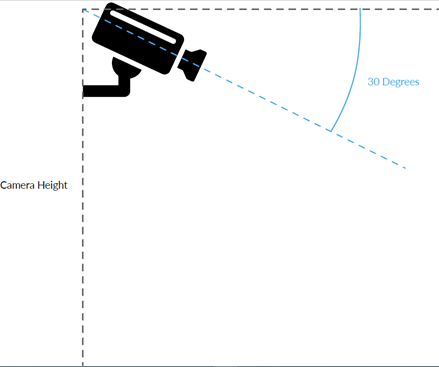
Tilt angle – A tilt angle of between 15 and 45 degrees is recommended for object detection. However, for face recognition, a tilt angle of between 0 and 15 degrees is recommended.
Motion blur – If you use a longer shutter time, you might get a blurring effect. For high quality images, ensure that the lighting is sufficient, which will result in a quick shutter speed and crisper video.
Focus – To ensure that the images are sharp, it’s recommended to configure the camera with the correct focus point in accordance to the location of the target objects.
Video compression – Video compression is a big challenge in the video analytics industry because many times the customer will want high-resolution cameras. However, what often happens is you run into issues with bandwidth or cost of storage and then the customer might manipulate the bit rate of the video, essentially playing with the frame rate and the compression. In addition, you might have a 1080P video or 4K video, but it can be distorted and changed so drastically that when it’s time to process it, even though the resolution is good, the compression distorts all the information that we need to get accurate face recognition, for example. It is recommended to select a compression point that balances between efficient storage space and networking bandwidth.
Face Mask Detection Guidelines
Like in Face Recognition, the best results for face mask detection are achieved when the camera is at eye level, at a shallow angle, and with no occlusions and good lighting.
Face mask detection requires a captured face quality of at least 1-star. This also means that the face resolution should be more than 40x40 pixels across the face.
Accuracy should be above 90% in scenes with good conditions.
See also:
Proximity Filter – Geometry Modeling
For the first time processing a camera – or when uploading a file from a single camera – you need to fetch a video time range with a margin at the beginning.
The scene geometry is saved across different tasks of the same source (camera). If one of the cameras is moved, the saved geometry should be reset since there is currently no mechanism to detect that the field of view (FOV) has changed. To reset it, change the Processing.UseSavedSceneGeometry environment setting to false.
X-Y Location Sampling Rate
There is an environment setting named XYLocations.SampleRate that lets the administrator change how often (in seconds) a person’s XY location is sampled. The valid input for this setting is 1-900. For Proximity detection, set the sampling interval so that is small enough to ensure that there is continuous proximity – but not too small as to waste CPU resources unnecessarily. For example, if you would like to detect proximities of 5 minutes, changing the sampling rate to 2 minutes might be too slow as perhaps during these 2 minutes objects moved further away from each other. A 30-60 second sampling rate might be adequate, but a sampling rate of every second might be excessive.