Face Recognition Challenges
There are many factors that affect the performance of face recognition including changes to a face, camera placement, bitrates and more.
Face Changes
Face recognition needs to take into account changes to the face including:
Aging and wrinkles
Facial expressions
Makeup
Beards
Glasses
Hats
Disguises
Partially hidden face – At least one eye visible is needed by BriefCam to attempt to recognize the face.
Masks – See also the Impact of Masks on BriefCam Face Recognition section.
Camera Types
The type of cameras that are installed effect the performance of the face recognition.
Fish eye cameras, which provide a 180 or 360 degree view of the scene, and thermal (infrared) cameras, which are useful in poorly lit areas or at night, produce less quality results for face recognition than regular videos.
Surveillance (CCTV) cameras, in general, produce smaller and low quality face images, resulting in poorer results for face recognition.
In addition it is recommended that color cameras be used wherever possible.
Camera Placement
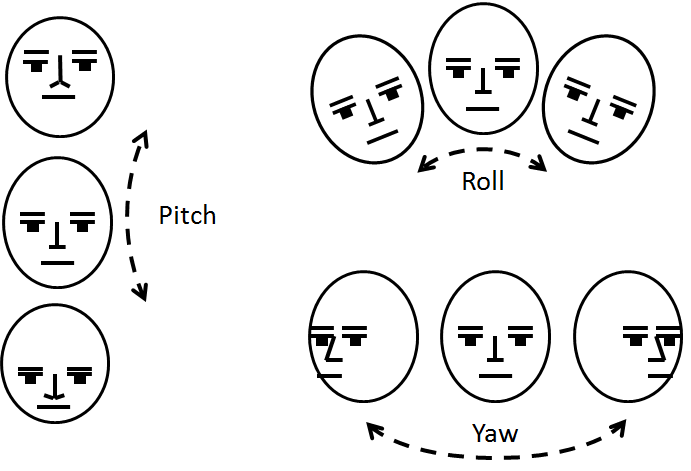
In general, face recognition works best when the face is clearly seen and with minimum pitch and yaw, since pitch and yaw may hide some of the facial landmarks.
For face recognition, a good recommendation when using BriefCam, is to place cameras in all entrances and exits, and the cameras should be positioned in such a way that the occlusions are minimal, with a vertical angle of approximately 45 degrees or more. In addition, it’s best to have the scene set up, when possible, where the people are walking in and out individually and not in groups, such as through a turnstile.
In general, face recognition produces the best results when:
Variable FPS
BriefCam assumes a constant frame rate when determining down-sampling ratios.
For example, the video frame rate is detected during a 5-minute warmup period and a down-sampling ratio is determined so that the resulting frame rate will be 3 FPS (our frame rate for detection). If the input video is 15 FPS, every 5th frame is used for detection.
In the case of variable FPS, the above 1/5 ratio might not always be correct – and could result in a lower or higher frame rate reaching the detector, which can degrade its performance.
Therefore, when possible, always set the video input to a constant frame rate.
Bitrate
The bitrate is the rate in seconds that bits are transmitted from one location to another. However, bitrate is not directly related to the number of pixels per frame (the resolution).
Bitrate can be used to control the quality of the video. On the one hand, the higher the bitrate, the better the quality. On the other hand, low bitrates save storage and transmission bandwidth. Two video streams of the same resolution can be configured to a different bitrate, where the higher the bitrate, the higher the quality, if all other parameters are identical.
Because the bitrate determines the quality of the video, the bitrate affects the performance of face recognition. The better the quality of the video and images, the better the performance of face recognition since more facial features will be extracted accurately.
To achieve successful face recognition, higher bitrates are necessary in scenes that are more challenging, such as partial occlusions or dark scenes. When the camera’s field of view is very wide and objects look smaller, a higher resolution and bitrate contribute to the face recognition accuracy.
Speed of Objects
The speed that a person is traveling affects the accuracy of the face recognition. This is because the person may become blurred as the speed increases, due to the way cameras capture the image. Another factor is that when an object is traveling faster, it appears in less frames, which also affects the accuracy.
The cameras are positioned at eye level.
People are not occluded and do not move in groups.
The lighting is sufficient, resulting in a quick shutter speed that produces a crisp image.
The lighting gives good contrast, but the faces are not lit from behind.
The focus of the camera is on the area where you expect faces to appear.
The camera is steady to prevent image smearing.