BriefCam High Availability Deployment with VMware or Veem White Paper
Disclaimer
The information provided in this document contains some of the possibilities of adding high availability to your network and is provided as general guidelines only.
BriefCam advises using professional services, such as system integrators, who have the knowledge and can produce the best results based on the type of network, system architect, bandwidth limitations, and other factors.
Introduction
Using VMware high availability (HA) with BriefCam allows organizations to provide high availability for the BriefCam services and components running on virtual machines. It provides a cost-effective and non- complex HA solution. BriefCam with VMWare HA provides a basic failover for all BriefCam services and components with minimum cost and management overhead.
Note
If you will not be using VMware in your high availability deployment, see the BriefCam High Availability Deployment White Paper.
BriefCam Services and Components
BriefCam Services
BriefCam is driven by a microservices architecture, enabling scalability, flexibility and redundancy of the software. The BriefCam services are: Alert Processing, BI Rule Engine, BI Face Recognition, Face Recognition, Face Recognition Matching, Fetching, Filtering, Lighthouse, LPR Matching, Maintenance, Notification, Processing, Task Management, Rendering, and VSServer.
Core Components
In addition to the BriefCam internal services described above, there are several core components that are not internal BriefCam services. These services are as follows: PostgreSQL, MongoDB, Redis, RabbitMQ, and Qlik. All the core components will function as ”one instance running at a time” and their hosting servers must have the same address. This is so that in case of failover, the connection string used by BriefCam to communicate with these services remains valid.
Licensing Component
To achieve high availability for the licensing component, there must be a single licensing server instance running at a time, and any replica of this instance must have identical resources and hardware components. In the most standard scenario (as shown in diagram #1 below), the matching hardware and assigned resources are done on the ESXI level. It is possible to replicate this setup by using multiple physical or virtual servers while always keeping in mind that identical resources (CPU type, RAM, and MAC address) and hardware are a must.
Web Services
To achieve redundancy and higher throughput of all procedures related to the BriefCam Web Services, a load balancer must be configured on top of the Web Services. BriefCam recommends using the NGINX load balancer as described in the BriefCam Installation Guide. Every deployed Web Services instance will handle API calls coming from different modules including the web client, web admin, Processing Gateway, and the BriefCam Open API.
Qlik
The RESEARCH module (Qlik) is deployed on a server of its own and it operates as a server engine with a list of different services, which essentially point to a number of locations on the local disk. If the storage and all information stored on the disk is replicated, it is possible to set up multiple instances of the Qlik module to run simultaneously. From the BriefCam side you must point to the location of the Qlik server in which case you must make sure that the name it points to will be taken by any instance in case of another instance’s downtime.
Storage Array
BriefCam solutions involve a common UNC share for storing artifacts, such as images and video clips. This share is provided by one of the virtual machines running on a hypervisor. To provide high availability for this virtual machine as well for all the others, all the virtual machines' disks need to be stored on a redundant storage array connected to two (or more) hypervisor physical machines.
Diagram #1:
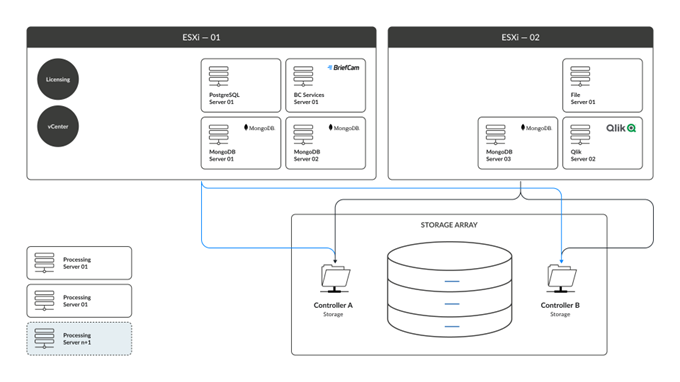
Note that:
ESXi is a hypervisor, which is software that creates and runs virtual machines, providing CPU/RAM.
Storage array hosts all the virtual machines’ data and provides HA connectivity to both hypervisors allowing running a specific virtual machine on a single hypervisor and in case it fails to ”move” the virtual machine to the other hypervisor.
vCenter Server is VMware’s centralized management utility. It is used for managing virtual machines.
Diagram #2 – with Veeam:
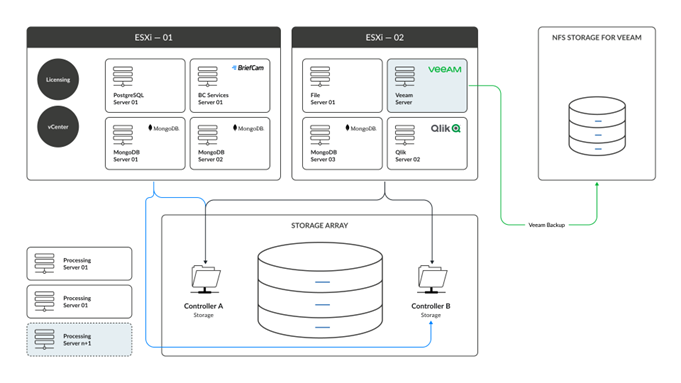
The addition of Veeam (a backup and recovery solution) allows for a higher degree of backup that does not rely on ESXi.
How Many ESXi Servers Do I Need?
The N+1 HA design offers low-cost deployment and redundancy for controllers across geographically distinct data centers. When a component fails, system availability is guaranteed by N+1 redundancy, a type of resilience. There is at least one independent backup component (+1) for each component (N). Since backup components do not actively participate in the system during normal operation, the level of resilience is referred to as active/passive or standby. While system resilience will suffer during failover, the degree of transparency (disruption to system availability) depends on the particular solution.
The standard VMWare HA solution proposed is comprised of two main components, which are the ESXi server(s) and the storage array. The basic setup would consist of just two ESXi servers but adding additional ESXi servers will influence both high availability and system performance.
In a setup of three ESXi servers, you can afford to ”lose” two ESXi servers, assuming that the one left is powerful enough to run all the virtual machines, effectively achieving a more robust HA solution. In scenarios where you only have two ESXi servers and you ”lose” one, then the remaining ESXi server could perform worse due to it being overloaded in terms of resources. This is because all virtual machines will reside on a single ESXi until the second one is brought back up.
Failover Auto/Manual
In the standard HA setup (diagram #1), the failover process is manual. To achieve automatic failover, the purchase of a VMWare license will be required. In such a case, an additional virtual machine could be set up to host the VCenter itself.
Files and Storage
All the actual data in terms of files on the operating system will reside on the shared storage. The ESXi servers will only provide the compute resources and not the file system/storage. Each ESXi will be connected to the storage array with a logical unit number (LUN).
Veeam
With the addition of Veeam you can achieve a higher degree of backups as you are not only relying on multiple ESXi instances that are connected to shared storage, but you are also backing up the virtual machines themselves, into an ”external” location. Note that setting up Veeam has additional licensing considerations and is not considered as part of the standard setup described in this document.
In Conclusion
Since all virtual machines can run on either of the ESXi instances at the same time, and their entire file system is stored on the same storage, there is no requirement for multiple service instances at all. The only reason for setting up more than one instance of the same service to be running simultaneously is to achieve higher performance and throughput – and that is relevant only for specific services, such as Processing, Alert Processing, Filtering, Rendering, Fetching, and Web Services.
Reference Links
https://www.vmware.com/pdf/ha_datasheet.pdf
https://www.veeam.com/wp-making-backup-replication-databases-sql-available.html