FLIR Integration
Integration Summary
VMS Partner | Product | Version | Last Tested BriefCam Version | Integration Level | H.265 Support | Additional License Required |
FLIR | Latitude | 9.3.1 | 2025 R1 SP1 | Integration for on-demand and real-time (L2) | Yes | Yes. See the FLIR licenses section below. |
FLIR | Latitude | 9.0-9.2 | 6.0 | Integration for on-demand and real-time (L2) | Yes | Yes. See the FLIR licenses section below. |
Ports Required
The following ports should be available when installing the plugin.
Port # |
554, 1116, 5000 (± 100), and 5554 |
VMS SDK
VMS SDK for FLIR 9.3.1
DVTEL Latitude SDK 9.3.1.1324 is required to be installed on the main server, where the FLIR plugin is installed, and all machines that run the following services: VSServer, Fetching Service, Alert Processing Service.
VMS SDK for FLIR 9.0 and 9.2
DVTEL Latitude 7.0.0.5780 and 8 SDK (updates should be installed both on the VMS and on the BriefCam Server), is required to be installed on every machine where any of the following BriefCam services are installed: VSServer service, Processing Server service, Alert Processing Server service, and Filtering service. It does not need to be installed on the client PC.
FLIR Licenses
The following FLIR certificates are required for the integration to work properly.
The licenses should be ordered from FLIR. Once you have received the license, apply it following FLIR’s instructions on the VMS environment.
FLIR License | BriefCam Component | |
Server Certificate for v9 | SDK Connection | 1 Server license with at least 3 SDK connections, to serve the BriefCam VSServer service and Fetching services. In addition, if there are more Fetching services, the SDK connections should be incremented accordingly, +1 for every additional Fetching service. |
Respond Real-time Processing | Mobile User License | 1 per GPU that is configured for the Alert Processing Server service (RESPOND module). |
RTSP Connection | 1 per real-time channel (this depends on how many workers your GPU can utilize). 1 for the VSServer service. |
FLIR 9 Settings for Real-Time
If you are using FLIR 9 for real-time, you need to set up the following:
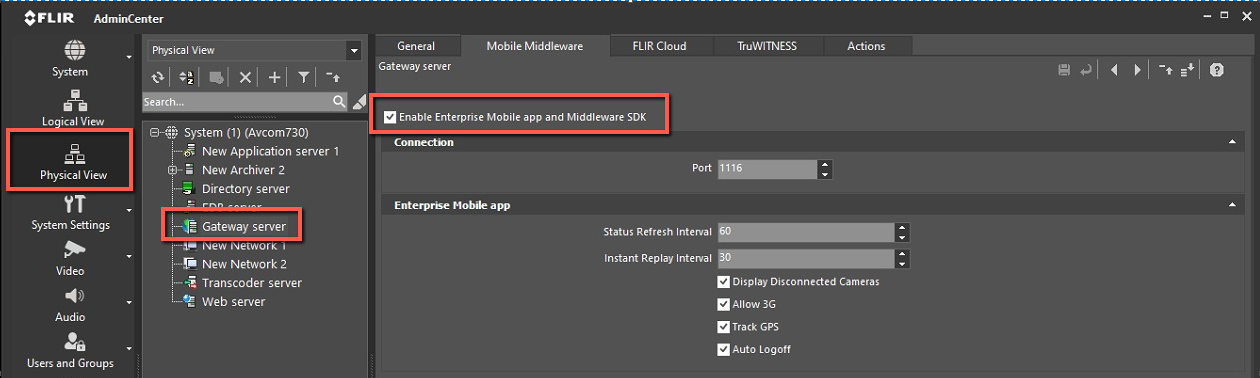
Open the FLIR 9 AdminCenter.
Click Physical View.
Click Gateway server.
In the Mobile Middleware tab, check the Enable Enterprise Mobile app and Middleware SDK checkbox.
Steps needed for FLIR 9.0 through 9.2 only
Post Installation Script
Note
The post installation script is only required for FLIR 9.0 through 9.2.
For new installations, after installing this VMS plugin you need to run a script that gives the BriefCam user permissions to access the relevant files.
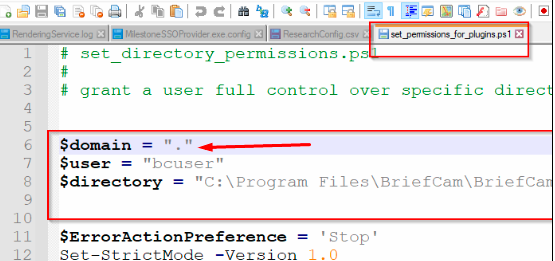
If you will be running the BriefCam user as a domain user, you need to edit the script before running it. To do this:
Open the
set_permissions_for_pluginsfile, which is located at:C:\Program Files\BriefCam\BriefCam Server\tools\post_plugin_installation.Edit the script with the correct parameters, including the domain and user.
In all places where the plugin is installed:
Open PowerShell as administrator.
Navigate to the following folder:
cd {where briefcam server is installed}\tools\post_plugin_installationRun the following command:
.\set_permissions_for_plugins.ps1
Enabling MP4 Decoding
Note
For FLIR 9.3.1, MP4 decoding is enabled by default.
To enable MP4 decoding for FLIR 9.0 and 9.2:
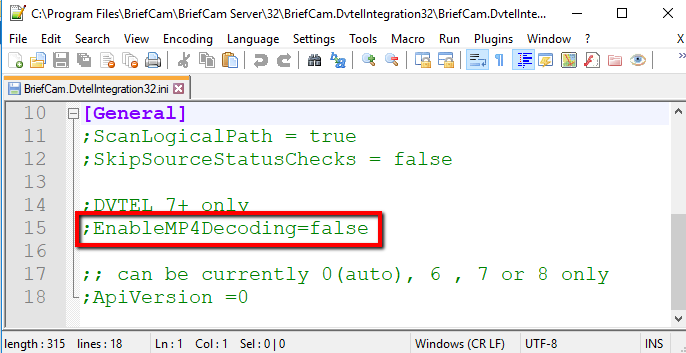
Open the
BriefCam.DvtelIntegration32.inifile, located at:Program Files\BriefCam\BriefCam Server\32\BriefCam.DvtelIntegration32\.Change the following line:
;EnableMP4Decoding=falsetoEnableMP4Decoding=true(remove the semicolon (;) and set the value to true).
Known Limitations
In FLIR integrations, bounding boxes when playing the original video are not supported.
In the RESPOND module, when working with FLIR and recording in resolutions above 1080p, the original video bounding boxes do not match objects due to timestamp issues.
In FLIR 9 integrations, in some scenarios, fetching from the VMS failed. To solve this issue, additional FLIR licenses are required.
In FLIR 9 integrations, in some scenarios, the original video of RESPOND alerts does not play. To solve this issue, additional FLIR licenses are required.
In FLIR integrations, when downgrading FLIR 9 to a previous version, a directory for the previous version is not installed. To solve this issue, contact the Support team.