Exacq Integration
Integration Summary
VMS Partner | Product | Version | Last Tested BriefCam Version | Integration Level | H.265 Support |
Exacq | ExacqVision | 25.1 | 2025 R1 (including Classic and Next-Gen engine) | Integration for on-demand and real-time (L2) | Yes |
Exacq | ExacqVision | 23.09 | 2024 R2 HF4 (including Classic and Next-Gen engine) | Integration for on-demand and real-time (L2) | Yes |
Exacq | ExacqVision | 20.09 | 2023 M1 | Integration for on-demand and real-time (L2) | No |
Ports Required
The following ports should be available when installing the plugin.
Port # |
8554 and 22609 |
Notes for Exacq 25.1
For motion recording cameras, if you want the original video of alerts to be accessible, set the VMS's Pre Motion and Post Motion settings to a minimum of 8 seconds. These settings are available at: Exacq Vision client -> Configuration -> Exacq Vision server -> Configure system -> Add IP Cameras -> Camera Recording -> [select the camera with motion recording] -> Motion menu.

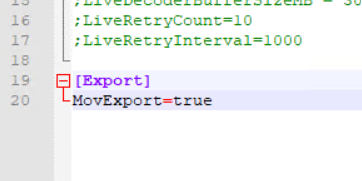
For cameras with H265 codec for the L1 and L2 level of integration to work properly, open the
BriefCam.ExacqIntegration.inifile (located at:C:\Program Files\BriefCam\BriefCam Server\plugins) and set theMovExportparameter totrue. This will ensure that the Processing Server and Rendering Service work properly and the VIDEO SYNOPSIS, closeup clip and original video are accessible.
Integration Notes
When using the Exacq integration, note the following:
The username used on Exacq is case-sensitive.
The specified Exacq user account must have export privileges.
When you install the Exacq plugin, the default hardware acceleration method is changed from CUVID to CUDA (in the
ProcessingServer.inifile’sHwAcceleratedDecoderparameter).
Known Limitations
Bounding boxes when playing the original video are not supported.
Only K-Lite Mega Codec Pack versions 14.6 and above with the Exacq integration are supported.