Fields in Expressions
In the Expression Editor, there is a Field drop-down list.
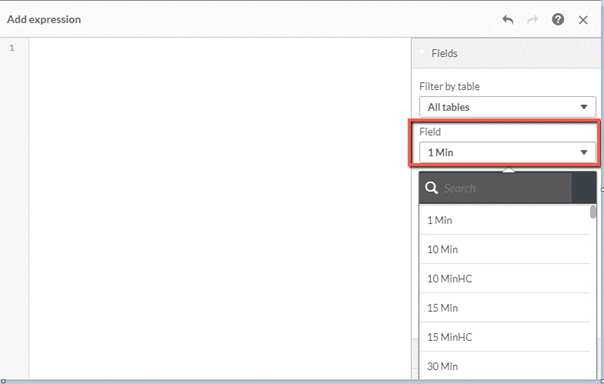
Most of the fields are for internal use by BriefCam programmers or already in use in the various Master Items. However, you can use them in your expression as well. For example, if you're looking to fine tune date or time information, you can make use of these fields:
Year,Qtr,Median,Month,Week,DayWeekDay_Num,Day (Num),Month NumMedian,Median Year,Median DiffYear-Qtr,Year-Month,Year-Month Num,Year-Week,Year DiffDate Diff,Week Diff,Month Diff,Qtr DiffYYYYMM
A number of other useful fields that are not currently part of the Master Items or are not self-explanatory are listed below:
isnew– Indicates whether this is a new customer (=1) or returning customer (=0). A new customer means that this is the first occurrence of this face within the Source Group. Note that this indication is dependent on the history saved in the database (by default it's 30 days). For example, if the same customer appeared on the current day and 60 days ago, then it will be identified as a new customer on both occurrences.Faceid– Retrieved to identify an object according to his/her face feature vector. The same Face ID can be returned multiple times in a view. For example, if the same person appeared in a few cameras within the same Source Group, or if the same person appeared both on current and previous days in the same camera.headcountid– The Source snapshot ID (a record is added every 2 minutes) for People Counting alerts.motiondirection– The object’s direction (degrees).motionquality– The object’s quality.