Adding Measures
Measures are the results of calculations (these are often aggregates, such as sum, count, or average).
Click Edit sheet
 to see the Master items.
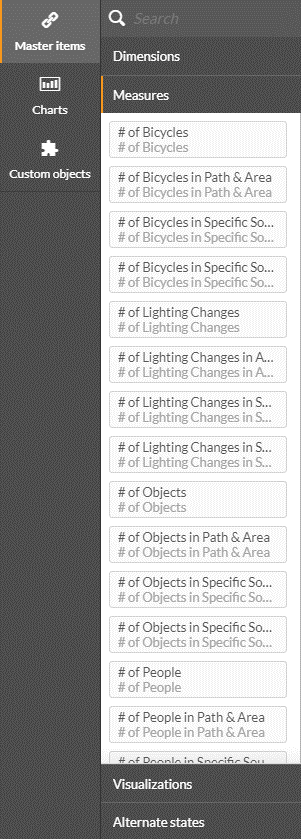
See also: Creating a Customized Dimension or Measure
The following table provides a brief description of each of the measures available:
Measure Name | Description | Sample Values |
# of Bicycles | Total count of objects identified as bicycles | 104, 50 |
# of Bicycles in Custom Dimensions | Total count of objects identified as bicycles within the custom dimensions, areas, paths or line crossing. An object can be counted in more than one area/path/line crossing. | 104, 50 |
# of Bicycles in Specific Source | Total count of objects identified as bicycles in a specific source. | 104, 50 |
# of Bicycles in Specific Source and Custom Dimensions | Total count of objects identified as bicycles in a specific source and path, area or line crossing. To use this measure, unlink the measure as detailed in the Setting a Specific Source and Custom Dimension section. | 104, 50 |
# of Bounced Visitors | The number of unique visitors to a particular Source Group who navigate away from the site after less than 1 minute (by default) within the same day (by default). To change the defaults, unlink the measure as defined in the Changing a Default Value in Visitors Measures section. Available in Detailed dashboards only. | |
# of Bounced Visitors in Custom Dimensions | The number of unique visitors to a particular Source Group with a custom dimension (area, path, or line crossing) who navigate away from the site after less than 1 minute (by default) within the same day (by default). To change the defaults, unlink the measure as defined in the Changing a Default Value in Visitors Measures section. Available in Detailed dashboards only. | |
# of Bounced Visitors in Specific Source, Source Group and Custom Dimensions | The number of unique visitors in a specific source, source group and custom dimension (path, area or line crossing), who navigate away from the site after less than 1 minute (by default) within the same day (by default). To use this measure, unlink the measure as detailed in the Setting a Specific Source and Custom Dimension section. To change the defaults, unlink the measure as defined in the Changing a Default Value in Visitors Measures section. Available in Detailed dashboards only. | |
# of Custom Class Objects | Number of detected objects per Custom Class | |
# of Custom Class Objects per Specific Custom Dimension | Number of detected objects per Custom Class and Custom Dimension | |
# of Custom Class Objects per Specific Source | Number of detected objects per Custom Class and Source | |
# of Custom Class Objects per Specific Source and Custom Dimension | Number of detected objects per Custom Class, Source and Custom Dimension | |
# of Illumination Changes | Total count of objects identified as illumination changes (Lights on, Lights off) | 104, 50 |
# of Illumination Changes in Area | Total count of objects identified as illumination changes within the custom dimension, area. An object can be counted in more than one area. | 104, 50 |
# of Illumination Changes in Specific Source | Total count of objects identified as illumination changes in a specific source. To use this measure, unlink the measure as detailed in the Setting a Specific Source and Custom Dimension section. | 104, 50 |
# of Illumination Changes in Specific Source and Area | Total count of objects identified as illumination changes in a specific source and area. This measure is used, for example, to count the number of illumination changes in the same sheet. To use this measure, unlink the measure as detailed in the Setting a Specific Source and Custom Dimension section. | 104, 50 |
# of License Plates | Total count of objects identified by license plates. Available in Detailed dashboards only. | 104, 50 |
# of License Plates in Custom Dimensions | Total count of objects identified by license plates within the custom dimensions, areas, paths or line crossing. An object can be counted in more than one area/path/line crossing. Available in Detailed dashboards only. | 104, 50 |
# of License Plates in Specific Site, Source and Custom Dimensions | Total count of objects identified as license plates in a specific site, source and path, area or line crossing. To use this measure, unlink the measure as detailed in the Setting a Specific Source and Custom Dimension section. Available in Detailed dashboards only. | 104,50 |
# of License Plates in Specific Source | Total count of objects identified by license plates in a specific source. To use this measure, unlink the measure as detailed in the Setting a Specific Source and Custom Dimension section. | 104, 50 |
# of License Plates in Specific Source and Custom Dimensions | Total count of objects identified as license plates in a specific source and path, area or line crossing. To use this measure, unlink the measure as detailed in the Setting a Specific Source and Custom Dimension section. | 104, 50 |
# of New Unique Identities | Total count of new identities with a unique face ID. These identities will be counted only when they are first detected on the cameras. | |
# of Objects | Total count of objects. | 104, 50 |
# of Objects in Custom Dimensions | Total count of objects within the custom dimensions, areas, paths or line crossings. An object can be counted in more than one area/path/line crossing. | 104, 50 |
# of Objects in Specific Source | Total count of objects in a specific source. This measure is used, for example, to count objects from different sources in the same sheet. To use this measure, unlink the measure as detailed in the Setting a Specific Source and Custom Dimension section. | 104, 50 |
# of Objects in Specific Source and Custom Dimensions | Total count of objects in a specific source and path, area or line crossing. This measure is used, for example, to count the number of objects in different areas in the same sheet. To use this measure, unlink the measure as detailed in the Setting a Specific Source and Custom Dimension section. | 104, 50 |
# of People | Total count of objects identified as people (Man, Woman, Child) | 104, 50 |
# of People in Custom Dimensions | Total count of objects identified as people within the custom dimensions, areas, paths or line crossings. An object can be counted in more than one area/path/line crossing. | 104, 50 |
# of People in Specific Source | Total count of objects identified as people in a specific source. To use this measure, unlink the measure as detailed in the Setting a Specific Source and Custom Dimension section. | 104, 50 |
# of People in Specific Source and Custom Dimensions | Total count of objects identified as people in a specific source and path, area or line crossing. This measure is used, for example, to count the number of people in different areas in the same sheet. To use this measure, unlink the measure as detailed in the Setting a Specific Source and Custom Dimension section. | 104, 50 |
# of People Not Wearing Face Mask | Total count of objects identified as people not wearing a face mask. | |
# of People Not Wearing Face Mask in Custom Dimensions | Total count of objects identified as people not wearing a face mask within the custom dimensions (areas, paths or line crossings). | |
# of People Not Wearing Face Mask in Specific Source | Total count of objects identified as people not wearing a face mask in a specific source. To use this measure, unlink the measure as detailed in the Setting a Specific Source and Custom Dimension section. | |
# of People Not Wearing Face Mask in Specific Source and Custom Dimensions | Total count of objects identified as people not wearing a face mask in a specific source and path, area or line crossing. To use this measure, unlink the measure as detailed in the Setting a Specific Source and Custom Dimension section. | |
# of People Wearing Face Mask | Total count of objects identified as people wearing a face mask. | |
# of People Wearing Face Mask in Custom Dimensions | Total count of objects identified as people wearing a face mask within the custom dimensions (areas, paths or line crossings). | |
# of People Wearing Face Mask in Specific Site, Source and Custom Dimensions | Total count of objects identified as people wearing a mask in a specific site, source and path, area or line crossing. To use this measure, unlink the measure as detailed in the Setting a Specific Source and Custom Dimension section | |
# of People Wearing Face Mask in Specific Source | Total count of objects identified as people wearing a face mask in a specific source. To use this measure, unlink the measure as detailed in the Setting a Specific Source and Custom Dimension section. | |
# of People Wearing Face Mask in Specific Source and Custom Dimensions | Total count of objects identified as people wearing a mask in a specific source and path, area or line crossing. To use this measure, unlink the measure as detailed in the Setting a Specific Source and Custom Dimension section. | |
# of People with Backpack | Total count of objects identified as people holding a backpack. This measure is available for aggregated dashboards only. | |
# of People with Handheld Bag | Total count of objects identified as people holding a bag | |
# of People with Handheld Bag in Custom Dimensions | Total count of objects identified as people holding a bag within the custom dimensions (areas, paths or line crossings). | |
# of People with Handheld Bag in Specific Source | Total count of objects identified as people holding a bag in a specific source. To use this measure, unlink the measure as detailed in the Setting a Specific Source and Custom Dimension section. | |
# of People with Handheld Bag in Specific Source and Custom Dimensions | Total count of objects identified as holding a bag in a specific source and path, area or line crossing. To use this measure, unlink the measure as detailed in the Setting a Specific Source and Custom Dimension section. | |
# of People without Handheld Bag | Total count of objects identified as people not holding a bag. This measure is available for aggregated dashboards only. | |
# of Returning Unique Identities | Total count of returning identities with a unique face ID. | |
# of Road Vehicles | Total count of objects identified as road vehicles (Motorcycle, Car, Pickup Truck, Van, Truck, Bus) | 104, 50 |
# of Road Vehicles in Custom Dimensions | Total count of objects identified as road vehicles within the custom dimensions: areas, paths or line crossings. An object can be counted in more than one area/path/line crossing. | 104, 50 |
# of Road Vehicles in Specific Site, Source and Custom Dimensions | Total count of objects identified as road vehicles in a specific site, source and path, area or line crossing. To use this measure, unlink the measure as detailed in the Setting a Specific Source and Custom Dimension section. | 104, 50 |
# of Road Vehicles in Specific Source | Total count of objects identified as road vehicles in a specific source. To use this measure, unlink the measure as detailed in the Setting a Specific Source and Custom Dimension section. | 104, 50 |
# of Road Vehicles in Specific Source and Custom Dimensions | Total count of objects identified as road vehicles in a specific source and path, area or line crossing. To use this measure, unlink the measure as detailed in the Setting a Specific Source and Custom Dimension section. | 104, 50 |
# of Speeding Road Vehicles | Total count of objects identified as road vehicles (Motorcycle, Car, Pickup Truck, Van, Truck, Bus) whose speed exceeds the speed specified on the Speed Limit Slider (available in the visualization folder) Available in Detailed dashboards only. | 104, 50 |
# of Unique Identities | Total count of identities with a unique face ID. | |
# of Unique Identities in Custom Dimensions | Total count of identities with a unique face ID within the custom dimensions: areas, paths or line crossings. Available in Detailed dashboards only. | |
# of Unique Identities in Specific Site, Source, Source Group and Custom Dimensions | Total count of identities with a unique face ID in a specific site, source, source group and path, area or line crossing. To use this measure, unlink the measure as detailed in the Setting a Specific Source and Custom Dimension section. Available in Detailed dashboards only. | |
# of Unique Identities in Specific Source, Source Group and Custom Dimensions | Total count of identities with a unique face ID in a specific source, source group and path, area or line crossing. To use this measure, unlink the measure as detailed in the Setting a Specific Source and Custom Dimension section. Available in Detailed dashboards only. | |
# of Unique Identities on a Specific Route | Total count of identities that appeared in specific sources (in no particular order). To use this measure:
Note that an asterisk (*) in the expression stands for plus and the hyphen (-) stands for minus. Available in Detailed dashboards only. | |
Avg # of New Unique Identities | Average count of new identities with a unique face ID. Available in Detailed dashboards only. | |
Avg # of Objects | Average object count (per day) | 104, 50 |
Avg # of Objects in Custom Dimensions | Average object count (per day) within the custom dimensions: areas, paths or line crossings. An object can be counted in more than one area/path/line crossing. | 104, 50 |
Avg # of Objects in Custom Dimensions by Hour | Average object count (per hour) within the custom dimensions: areas, paths or line crossings. An object can be counted in more than one area/path/line crossing. | 104, 50 |
Avg # of Objects in Specific Site, Source and Custom Dimensions | Average object count (per day) within the site, custom dimensions, areas, paths or line crossings. An object can be counted in more than one area/path/line crossing. This measure provides the average object counts in different areas/paths/line crossings in the same sheet. To use this measure, unlink the measure as detailed in the Setting a Specific Source and Custom Dimension section. | 104, 50 |
Avg # of Objects in Specific Source | Average object count (per day) in a specific source. This measure provides the average object count from different sources in the same sheet. To use this measure, unlink the measure as detailed in the Setting a Specific Source and Custom Dimension section. | 104, 50 |
Avg # of Objects in Specific Source and Custom Dimensions | Average object count (per day) within the custom dimensions, areas, paths or line crossings. An object can be counted in more than one area/path/line crossing. This measure provides the average object counts in different areas/paths/line crossings in the same sheet. To use this measure, unlink the measure as detailed in the Setting a Specific Source and Custom Dimension section. | 104, 50 |
Avg # of Proximity Violation Contacts | Average number of people who have passed the proximity threshold with the selected person. Note that the Proximity feature in the RESEARCH module is disabled by default. To enable this feature, contact your system administrator. | 104, 50 |
Avg # of Proximity Violation Contacts in Specific Site and Source | Average number of people who have passed the proximity threshold with the selected person in a specific site and source. This measure provides the average count of proximity threshold violations from different sources in the same sheet. To use this measure, unlink the measure as detailed in the Setting a Specific Source and Custom Dimension section. Note that the Proximity feature in the RESEARCH module is disabled by default. To enable this feature, contact your system administrator. | 104, 50 |
Avg # of Proximity Violation Contacts in Specific Source | Average number of people who have passed the proximity threshold with the selected person in a specific source. This measure provides the average count of proximity threshold violations from different sources in the same sheet. To use this measure, unlink the measure as detailed in the Setting a Specific Source and Custom Dimension section. Note that the Proximity feature in the RESEARCH module is disabled by default. To enable this feature, contact your system administrator. | 104, 50 |
Avg # of Returning Unique Identities | Average count of returning identities with a unique face ID. Available in Detailed dashboards only. | |
Avg # of Unique Identities in Custom Dimensions | Average count of identities with a unique face ID (per day) within the custom dimensions: areas, paths or line crossings. Available in Detailed dashboards only. | |
Avg # of Unique Identities in Custom Dimensions by Hour | Average count of identities with a unique face ID (per hour) within the custom dimensions: areas, paths or line crossings. Available in Detailed dashboards only. | |
Avg # of Unique Identities in Specific Site, Source, Source Group and Custom Dimensions | Average count of identities with a unique face ID (per day) within a specific site, source, source group and custom dimensions (areas, paths or line crossings). To use this measure, unlink the measure as detailed in the Setting a Specific Source and Custom Dimension section. Available in Detailed dashboards only. | |
Avg # of Unique Identities in Specific Source, Source Group and Custom Dimensions | Average count of identities with a unique face ID (per day) within specific source, source group and custom dimensions (areas, paths or line crossings). To use this measure, unlink the measure as detailed in the Setting a Specific Source and Custom Dimension section. Available in Detailed dashboards only. | |
Avg Crowd Counting | Average size of crowd counted. This measure is available for aggregated dashboards only. Since version: 2024 R2 | |
Avg Crowd Counting in Custom Dimensions | Average size of crowd counted within a specific custom dimension (areas, path, or line crossings). This measure is available for aggregated dashboards only. Since version: 2024 R2 | |
Avg Detection Duration of Custom Class objects in Specific Custom Dimension | Detection duration per Custom Class and Custom Dimension (across objects, per hour: maximum of 60 minutes, minimum of 0 minutes) Relevant for Aggregated dashboards only. | |
Avg Duration | Average object duration in seconds | 0:00:14 |
Avg Duration Bicycles | Average duration in seconds of objects identified as bicycles | 0:00:14 |
Avg Duration in Custom Dimensions | Average duration in seconds of objects within the custom dimensions: areas, paths or line crossings | 0:00:14 |
Avg Duration in Specific Site, Source and Custom Dimensions | Average object duration time in seconds of objects within a specific site, source and custom dimensions (areas, paths or line crossings). This measure provides the average duration of different areas/path in the same sheet. To use this measure, unlink the measure as detailed in the Setting a Specific Source and Custom Dimension section. | 0:00:14 |
Avg Duration in Specific Source | Average duration in seconds of objects within a specific source. This measure provides the average duration of different Sources in the same sheet. To use this measure, unlink the measure as detailed in the Setting a Specific Source and Custom Dimension section. | 0:00:14 |
Avg Duration in Specific Source and Custom Dimensions | Average object duration time in seconds of objects within the custom dimensions: areas, paths or line crossings. This measure provides the average duration of different areas/path in the same sheet. To use this measure, unlink the measure as detailed in the Setting a Specific Source and Custom Dimension section. | 0:00:14 |
Avg Duration License Plates | Average duration in seconds of objects with detected license plates Available in Detailed dashboards only. | 0:00:14 |
Avg Duration of Custom Class Objects | Average duration per Custom Class Available in Detailed dashboards only. | |
Avg Duration People | Average duration in seconds of objects identified as people (Man, Woman, Child) | 0:00:14 |
Avg Duration Road Vehicles | Average duration in seconds of objects identified as road vehicles (Motorcycle, Car, Pickup Truck, Van, Truck, Bus) | 0:00:14 |
Avg Max Proximity | Average maximum distance that a person had with other people for a certain amount of time. Note that the Proximity feature in the RESEARCH module is disabled by default. To enable this feature, contact your system administrator. Available in Detailed dashboards only. | 5.25, 6.40 |
Avg Max Proximity in Specific Site and Source | Average maximum distance that a person had with other people for a certain amount of time in a specific site and source. To use this measure, unlink the measure as detailed in the Setting a Specific Source and Custom Dimension section. Note that the Proximity feature in the RESEARCH module is disabled by default. To enable this feature, contact your system administrator. Available in Detailed dashboards only. | 5.25, 6.40 |
Avg Max Proximity in Specific Source | Average maximum distance that a person had with other people for a certain amount of time in a specific source. To use this measure, unlink the measure as detailed in the Setting a Specific Source and Custom Dimension section. Note that the Proximity feature in the RESEARCH module is disabled by default. To enable this feature, contact your system administrator. Available in Detailed dashboards only. | 5.25, 6.40 |
Avg Min Proximity | Average minimum distance (in meters) that a person had with other people for a certain amount of time. Note that the Proximity feature in the RESEARCH module is disabled by default. To enable this feature, contact your system administrator. Available in Detailed dashboards only. | 3.16, 4.70 |
Avg Min Proximity in Specific Site and Source | Average minimum distance (in meters) that had a person had with other people for a certain amount of time in a specific site and source. To use this measure, unlink the measure as detailed in the Setting a Specific Source and Custom Dimension section. Note that the Proximity feature in the RESEARCH module is disabled by default. To enable this feature, contact your system administrator. Available in Detailed dashboards only. | 3.16, 4.70 |
Avg Min Proximity in Specific Source | Average minimum distance (in meters) that had a person had with other people for a certain amount of time in a specific source. To use this measure, unlink the measure as detailed in the Setting a Specific Source and Custom Dimension section. Note that the Proximity feature in the RESEARCH module is disabled by default. To enable this feature, contact your system administrator. Available in Detailed dashboards only. | 3.16, 4.70 |
Avg Size | Average size per object in meters or feet (as per account settings) | 1.8, 0.5 |
Avg Speed | Average speed per object in km/hour | 0:00:14 |
Avg Visit Duration Unique Identities | The average visit duration time of identities with a unique face ID, calculated within the same day (by default), across cameras within the same Source Group. The duration time is calculated by taking the person’s latest appearance time and subtracting by the first appearance time. To change the defaults, unlink the measure as defined in theChanging a Default Value in Visitors Measures section. Available in Detailed dashboards only. | |
Avg Visit Duration Unique Identities in Custom Dimensions | The average visit duration time of identities with a unique face ID, calculated within the same day (by default), across cameras within the same Source Group and within the custom dimensions (areas, paths or line crossings). The duration time is calculated by taking the person’s latest appearance time and subtracting by the first appearance time. To change the defaults, unlink the measure as defined in theChanging a Default Value in Visitors Measures section. Available in Detailed dashboards only. | |
Avg Visit Duration Unique Identities in Specific Site, Source, Source Group and Custom Dimensions | The average visit duration time of identities with a unique face ID, calculated within the same day (by default), across cameras within a specific site and source in the same Source Group and within the custom dimensions (areas, paths or line crossings). The duration time is calculated by taking the person’s latest appearance time and subtracting by the first appearance time. To use this measure, unlink the measure as detailed in the Setting a Specific Source and Custom Dimension section. To change the defaults, unlink the measure as defined in theChanging a Default Value in Visitors Measures section. Available in Detailed dashboards only. | |
Avg Visit Duration Unique Identities in Specific Source, Source Group and Custom Dimensions | The average visit duration time of identities with a unique face ID, calculated within the same day (by default), across cameras within a specific source in the same Source Group and within the custom dimensions (areas, paths or line crossings). The duration time is calculated by taking the person’s latest appearance time and subtracting by the first appearance time. To use this measure, unlink the measure as detailed in the Setting a Specific Source and Custom Dimension section. To change the defaults, unlink the measure as defined in theChanging a Default Value in Visitors Measures section. Available in Detailed dashboards only. | |
Max # of New Unique Identities | Maximum count of new identities with a unique face ID. Available in Detailed dashboards only. | |
Max # of Returning Unique Identities | Maximum count of returning identities with a unique face ID. Available in Detailed dashboards only. | |
Max Avg Visit Duration Unique Identities | The maximum visit duration time of identities with a unique face ID, calculated within the same day (by default). The duration time is calculated by taking the person’s latest appearance time and subtracting by the first appearance time. To change the defaults, unlink the measure as defined in theChanging a Default Value in Visitors Measures section. Available in Detailed dashboards only. | |
Max Bicycles/Hour | Maximum count of objects per hour, identified as bicycles | 15 |
Max Crowd Counting/Hour | Maximum size of a crowd per hour. This measure is available for aggregated dashboards only. | |
Max Crowd Counting/Hour in Custom Dimensions | Maximum size of a crowd per hour within a custom dimension (areas, paths, and line crossings). This measure is available for aggregated dashboards only. | |
Max Illumination Changes/Hour | Maximum count of illumination changes per hour | 15 |
Max License Plates/Hour | Maximum count of license plates per hour Available in Detailed dashboards only. | 15 |
Max Objects/Hour | Maximum count of objects per hour | 15 |
Max Objects/Hour in Custom Dimensions | Maximum count of objects within the custom dimensions: areas, paths or line crossings, per hour | 15 |
Max Objects/Hour in Specific Source | Maximum count of objects in a specific source, per hour. This measure is used, for example, to present the maximum number of objects per hour in different sources in the same sheet. To use this measure, unlink the measure as detailed in the Setting a Specific Source and Custom Dimension section. | 15 |
Max Objects/Hour in Specific Source and Custom Dimensions | Maximum count of objects in a specific source within the custom dimensions: areas, paths or line crossings, per hour. This measure is used, for example, to present the maximum number of objects in a specific source per hour of different areas/paths/line crossings in the same sheet. To use this measure, unlink the measure as detailed in the Setting a Specific Source and Custom Dimension section. | 15 |
Max People/Hour | Maximum count of objects identified as people (Man, Woman, Child), per hour. People counting has its own measure for this functionality. | |
Max People Not Wearing Face Mask/Hour | Maximum count of objects identified as people not wearing a face mask, per hour. | |
Max People Wearing Face Mask/Hour | Maximum count of objects identified as people wearing a face mask, per hour. | |
Max Road Vehicles/Hour | Maximum count of objects identified as road vehicles (Motorcycle, Car, Pickup Truck, Van, Truck, Bus), per hour | 15 |
Max Unique Identities/Hour | Maximum count of identities with a unique face ID per hour Available in Detailed dashboards only. | |
Max Unique Identities/Hour in Custom Dimensions | Maximum count of identities with a unique face ID within the custom dimensions (areas, paths or line crossings), per hour Available in Detailed dashboards only. | |
Max Unique Identities/Hour in Specific Source, Source Group and Custom Dimensions | Maximum count of identities with a unique face ID in a specific source and source group within the custom dimensions (areas, paths or line crossings), per hour. This measure is used, for example, to present the maximum number of face IDs in a specific source per hour of different areas/paths/line crossings in the same sheet. To use this measure, unlink the measure as detailed in the Setting a Specific Source and Custom Dimension section. Available in Detailed dashboards only. | |
NotePeople Counting has separate filters, dimensions and measures. People Counting data will not be seen together with other objects’ data. For example, if you filter on a specific date it will not affect the data of the people counting. | ||
People Counting: Avg # of People | Average people count (per day) Available in Detailed dashboards only. | 104, 50 |
People Counting: Avg # of People in Area | Average people count (per day) within the custom area dimensions. A person can be counted in more than one area. Available in Detailed dashboards only. | 104, 50 |
People Counting: Avg # of People in Specific Source | Average people count (per day) in a specific source. This measure provides the average people count from different sources in the same sheet. Available in Detailed dashboards only. To use this measure, unlink the measure as detailed in the Setting a Specific Source and Custom Dimension section. | 104, 50 |
People Counting: Avg # of People in Specific Source and Area | Average people count (per day) in a specific source within the custom area dimension. An object can be counted in more than one area. This measure provides the average object counts in different areas in the same sheet. Available in Detailed dashboards only. | 104, 50 |
People Counting: Max # of People/Hour | Calculates the average # of people per hour and then finds the maximum value. This measure is used, for example, to present the maximum number of people per hour in the same sheet. Available in Detailed dashboards only. | 15 |
People Counting: Max # of People/Hour in Area | Calculates the average # of people per hour within the custom area dimensions and then finds the maximum value. This measure is used, for example, to present the maximum number of people per hour of different areas in the same sheet. Available in Detailed dashboards only. | 15 |
People Counting: Max # of People/Hour in Specific Source | Calculates the average # of people per hour in a specific source and then finds the maximum value. This measure is used, for example, to present the maximum number of people per hour in different sources in the same sheet. To use this measure, unlink the measure as detailed in the Setting a Specific Source and Custom Dimension section. Available in Detailed dashboards only. | 15 |
People Counting: Max # of People/Hour in Specific Source and Area | Calculates the average # of people per hour in a specific source within the custom area dimensions and then finds the maximum value. This measure is used, for example, to present the maximum number of people in a specific source per hour of different areas in the same sheet. To use this measure, unlink the measure as detailed in the Setting a Specific Source and Custom Dimension section. Available in Detailed dashboards only. | 15 |
Visitors Bounce Rate | The percentage of bounced visitors (see # of Bounced Visitors measure) out of the number of unique identities (see # of Unique Identities measure) within the same day (by default). To change the defaults, unlink the measure as defined in theChanging a Default Value in Visitors Measures section. Available in Detailed dashboards only. | |
Visitors Bounce Rate in Custom Dimensions | The percentage of bounced visitors within custom dimensions (see # of Bounced Visitors in Custom Dimensions measure) out of the number of unique identities (see # of Unique Identities in Custom Dimensions measure) within the same day (by default). To change the defaults, unlink the measure as defined in theChanging a Default Value in Visitors Measures section. Available in Detailed dashboards only. | |
Visitors Bounce Rate in Specific Source, Source Group and Custom Dimensions | The percentage of bounced visitors within specific source, source group and custom dimensions (see # of Bounced Visitors in Specific Source, Source Group and Custom Dimensions measure) out of the number of unique identities (see # of Unique Identities in Specific Source, Source Group and Custom Dimensions measure) within the same day (by default). To use this measure, unlink the measure as detailed in the Setting a Specific Source and Custom Dimension section. To change the defaults, unlink the measure as defined in theChanging a Default Value in Visitors Measures section. Available in Detailed dashboards only. | |
