Web Services Issues
If you suspect that you have encountered an error related to Web Services, try the following:
Start by checking that all of the services are running. For additional information, see the Basic Troubleshooting section.
Press F12 (Console and Network tab) and see if you can find any information related to the issue.
Perform a sanity check to see that the web services are working by entering this URL in the browser:
http://[BriefCam server’s address]/ProWebApi/SystemInfo/GetProductInfo.A JSON response is returned. If you receive a screen similar to the one below (with the product features, license, etc.) you’ll know that the web service is responding with the activated license.
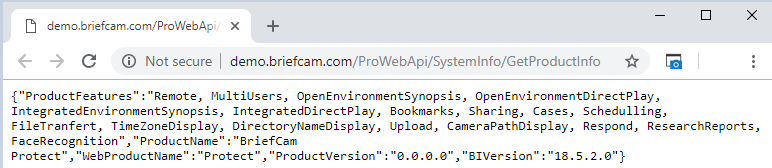
If you get an error, try to see if you can determine whether it’s a BriefCam error or an IIS level error.
Check the IIS logs:
%SystemDrive%\inetpub\logs\LogFiles.When accessing the server from a different machine, check that the server firewall is open for ports 80 (http) and/or 443 (https).
Check that the
web configfiles exist inC:\Program Files\BriefCam\WebServices\AdminApiandC:\Program Files\BriefCam\WebServices\ProWebApi.The IIS Manager manages all BriefCam web services. Make sure that the status of the application pools marked below in red are all Started. If you had to start any of them, restart IIS. If one of them is stopped, you will get a “service unavailable” error.
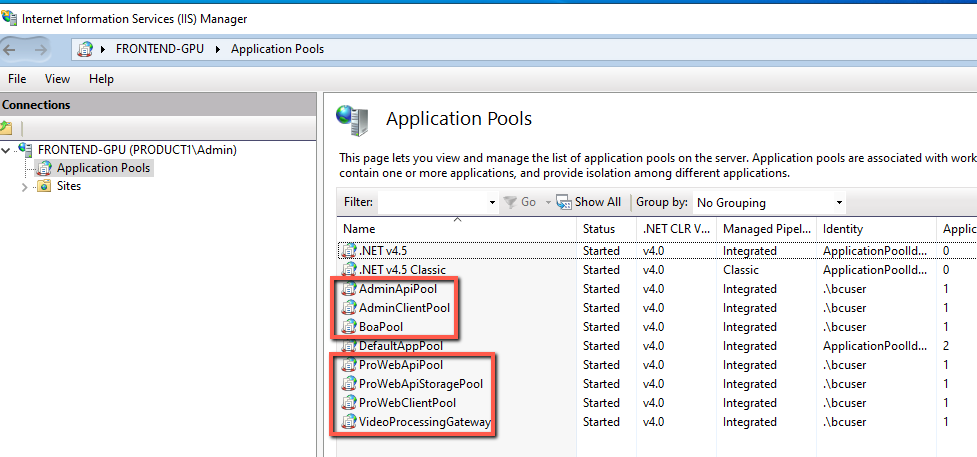
Check that the values in the
WebConfig.jsfile match the names of the Application Pools’ Sites.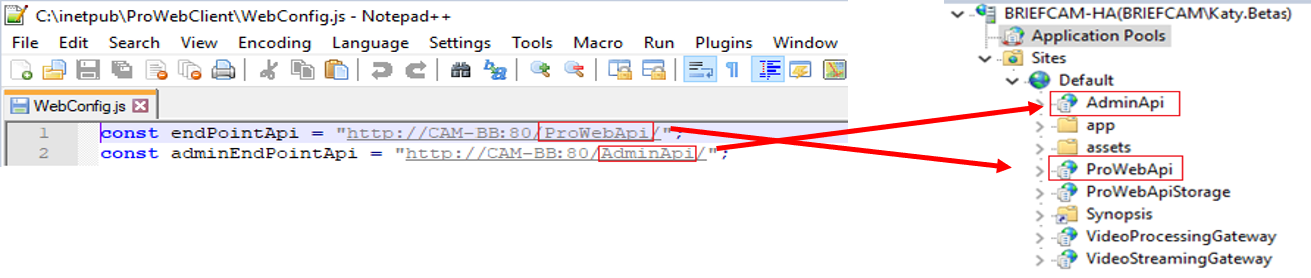
Check that the host names in the URL match the server host name.
If
localhostwas used during the installation, the URLs in theWebConfig.jsfile will havelocalhostas the hostname and you will only be able to work with the Web client from the server machine. It is recommended during the installation not to uselocalhostas the hostname where the web services are running.In a distributed environment, make sure that the user of the Application Pool identity has rights to the storage folder.
If the computer is in a domain, the user also has to be in the domain and should have admin privileges.
See also:
Why am I getting the HTTP Error 530: The service is unavailable?