RESEARCH Module Issues
If you suspect that you have encountered an error related to the RESEARCH module, try the following:
BriefCam uses Qlik Sense technology to display dashboards in the RESEARCH solution. Check that the Qlik Services are running.
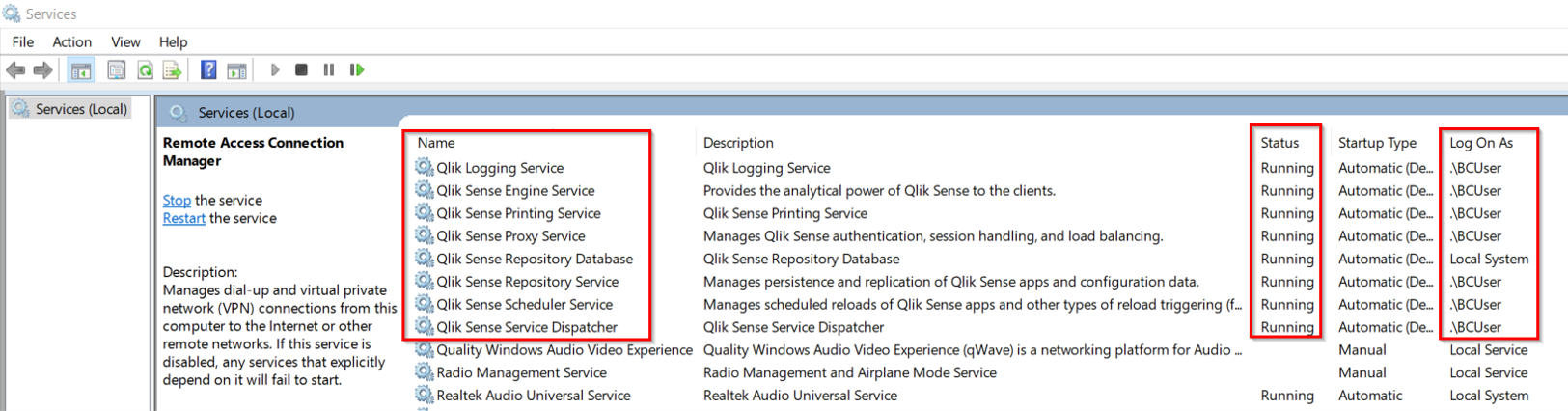
Clear the browser's cache.
Check the log files at:
C:\ProgramData\Qlik\Sense\Log\.If the timezone in the Postgres SQL database was changed, the BIRuleEngine cannot work correctly. Therefore, if you changed the timezone, edit it back in the
postgresql.conffile, which is usually located at:C:\PostgreSQL. The timezone is defined in thelog_timezoneparameter.The Qlik Sense services run as Microsoft Windows services, which you can deploy on a single server or on separate server nodes that have dedicated roles in a Qlik Sense (BriefCam RESEARCH) site.
Check that the required ports are open:
RESEARCH (Qlik) | Port # | |
HTTP | TCP 8090 | Inbound / Outbound |
HTTPS | TCP 443 | Inbound / Outbound |
API ports | TCP 4242, TCP 4243 | Inbound / Outbound |
Qlik Sense Engine Service | TCP 4747 | Inbound / Outbound |
Broker Service | TCP 4900 | Inbound / Outbound |
Qlik Sense Repository Database (QRD) | TCP 4432 | Inbound |
Qlik Sense Printing Service (QPR Listen Port) | TCP 4899 | Inbound / Outbound |
Qlik Sense Logging Service | TCP 7070 | Outbound |
License Service | TCP 9200 | Outbound |
See also:
When installing the RESEARCH component, I get this error. What should I do?
How come the dashboards are not accessible via Firefox or Chrome?
The qlik_migrate tool returned a fail message. What should I do?
The Number of Objects Ready for Dashboards in RESEARCH source groups remains low. Why?