설치 문제 해결사
성공적인 설치에 필요한 기존의 BriefCam모든 환경 속성을 추출하려면 설치 문제 해결 도구를 사용하십시오. 이 도구는 Server 2012, Server 2016, Windows 10 및 Windows 11 운영 체제와 함께 사용할 수 있습니다.
해당 폴더 로
{BriefCam Server installation folder}tools이동하여 모든 내용이 포함된installation_troubleshooter폴더를 실행 중인 디렉토리로 복사합니다.관리자 권한으로
installation_troubleshoot.bat파일을 실행합니다.BriefCam Administrator Console설정에 대한 자세한 내용을 보려면 파일을 여십시
db_tool_input.txt오.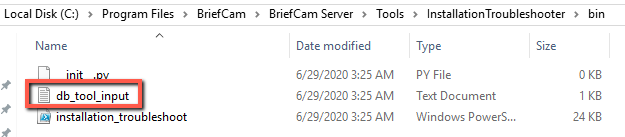
다음에서 검색하려는 설정을 추가하거나 제거합니다.BriefCam Administrator Console
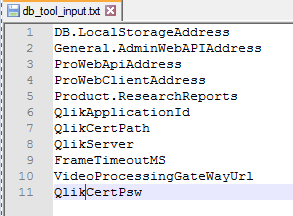
실행 중인 디렉토리에서
<hostname>__out__<date-time>.txt와installation_troubleshoot.log파일 을 확인합니다.
자세한 내용은 파일을 참조하십시README오.