シングルサインオン(SSO)の設定
BriefCamは、シングルサインオンのための3つの準備済みオプションと、カスタムシングルサインオンソリューションを実装するためのインターフェースを提供しています。
内蔵されている3つのSSOオプションは次のとおりです。
既存のSAMLトークンプロバイダーを認証できるSAMLベースのSSO。これをデプロイする方法の詳細についてはSAMLベースのSSO、「」を参照してください。
Active Directoryシングルサインオンでは、active directoryに接続し、そこからユーザーとグループを同期します。これをデプロイする方法については、『BriefCam管理者ガイド』のMicrosoft Active Directoryとの統合セクションを参照してください。
MilestoneXProtectシングルサインオン。Milestoneのインストールでは、シングルサインオンソリューションを提供するために、Milestoneクライアントとディレクトリを使用するオプションを提供します。
SAMLベースのSSO
SAMLベースのSSOに必要な必須属性(SAMLアサーション/メタデータ)はBriefCam次のとおりです。
Eメール
名
姓
UPN
SSOプロセス中に自動的に作成されるBriefCamユーザーは、SAMLレスポンスで受信したメール属性に基づいて作成されます。
既存のSAMLトークンプロバイダー(Microsoft ADFSなど)をBriefCamと統合するには、環境設定のPro Web APIセクションの適切な場所に独自のトークンプロバイダーの情報とURLを入力して、BriefCam SAMLインフラストラクチャを使用します。
SamlLoginUrl – これはSAMLログインエンドポイントであり、SAML認証リクエストに応答するSAMLトークンプロバイダーです。にログインすると、ユーザーはBriefCam、ログインBriefCam後にログイン情報を返すようエンドポイントに指示するパラメータを使用して、このアドレスに再ルーティングされます。
SamlLogoutUrl – これはログアウト機能を提供するSAMLログアウトエンドポイントです。ユーザーがサインアウトすると、このアドレスにリダイレクトされます。BriefCam
SamlCertificate – これはSAML証明書のフィンガープリントであり、このSAML証明書に対してWindowsによって与えられる一意の識別子です。この証明書はローカルPCにインストールする必要があり、のSAMLクライアントとSAMLトークンプロバイダー間BriefCamの通信を暗号化するために使用されます。
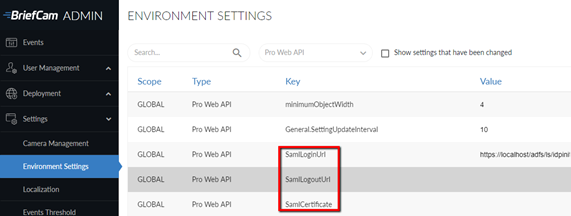
SAML - BriefCam要件のためのADFS証明書利用者設定もご参照ください。
サンプルの応答の例
<samlp:Response xmlns:samlp="urn:oasis:names:tc:SAML:2.0:protocol"
xmlns:saml="urn:oasis:names:tc:SAML:2.0:assertion"
ID="_abc123"
Version="2.0"
IssueInstant="2025-01-20T12:00:00Z"
Destination="https://briefcamhost.domain.com/ProWebApi/AuthenticationApi/AuthenticateSaml">
<saml:Issuer>https://idp.example.com</saml:Issuer>
<samlp:Status>
<samlp:StatusCode Value="urn:oasis:names:tc:SAML:2.0:status:Success"/>
</samlp:Status>
<saml:Assertion ID="_def456"
IssueInstant="2025-01-20T12:00:00Z"
Version="2.0">
<saml:Issuer>https://idp.example.com</saml:Issuer>
<saml:Subject>
<saml:NameID Format="urn:oasis:names:tc:SAML:1.1:nameid-format:emailAddress">
user@example.com
</saml:NameID>
<saml:SubjectConfirmation Method="urn:oasis:names:tc:SAML:2.0:cm:bearer">
<saml:SubjectConfirmationData NotOnOrAfter="2025-01-20T13:00:00Z"
Recipient="https://briefcamhost.domain.com/ProWebApi/AuthenticationApi/AuthenticateSaml"/>
</saml:SubjectConfirmation>
</saml:Subject>
<saml:Conditions NotBefore="2025-01-20T12:00:00Z" NotOnOrAfter="2025-01-20T13:00:00Z">
<saml:AudienceRestriction>
<saml:Audience>https://briefcamhost.domain.com/ProWebApi/AuthenticationApi/AuthenticateSaml</saml:Audience>
</saml:AudienceRestriction>
</saml:Conditions>
<saml:AttributeStatement>
<saml:Attribute Name="http://schemas.xmlsoap.org/ws/2005/05/identity/claims/emailaddress">
<saml:AttributeValue>user@example.com</saml:AttributeValue>
</saml:Attribute>
<saml:Attribute Name="http://schemas.xmlsoap.org/ws/2005/05/identity/claims/givenname">
<saml:AttributeValue>John</saml:AttributeValue>
</saml:Attribute>
<saml:Attribute Name="http://schemas.xmlsoap.org/ws/2005/05/identity/claims/surname">
<saml:AttributeValue>Doe</saml:AttributeValue>
</saml:Attribute>
<saml:Attribute Name="http://schemas.xmlsoap.org/ws/2005/05/identity/claims/upn">
<saml:AttributeValue>john.doe@example.com</saml:AttributeValue>
</saml:Attribute>
</saml:AttributeStatement>
<saml:AuthnStatement AuthnInstant="2025-01-20T12:00:00Z">
<saml:AuthnContext>
<saml:AuthnContextClassRef>
urn:oasis:names:tc:SAML:2.0:ac:classes:PasswordProtectedTransport
</saml:AuthnContextClassRef>
</saml:AuthnContext>
</saml:AuthnStatement>
</saml:Assertion>
<ds:Signature xmlns:ds="http://www.w3.org/2000/09/xmldsig#">
<ds:SignedInfo>
<ds:CanonicalizationMethod Algorithm="http://www.w3.org/2001/10/xml-exc-c14n#"/>
<ds:SignatureMethod Algorithm="http://www.w3.org/2001/04/xmldsig-more#rsa-sha256"/>
<ds:Reference URI="#_def456">
<ds:Transforms>
<ds:Transform Algorithm="http://www.w3.org/2000/09/xmldsig#enveloped-signature"/>
<ds:Transform Algorithm="http://www.w3.org/2001/10/xml-exc-c14n#"/>
</ds:Transforms>
<ds:DigestMethod Algorithm="http://www.w3.org/2001/04/xmlenc#sha256"/>
<ds:DigestValue>Base64EncodedDigestValue</ds:DigestValue>
</ds:Reference>
</ds:SignedInfo>
<ds:SignatureValue>Base64EncodedSignatureValue</ds:SignatureValue>
</ds:Signature>
</samlp:Response>