Filtering Settings
The first time that you open a case, all the objects are loaded into memory (which may take some time – this is a one-time process) and then filtering is performed in-memory, which makes the filtering much faster than with previous versions.
Note that for a 32 GB all-in-one environment it is recommended to not enable the cached filtering by setting the CachedFilteringEnabled environment setting to false.
When the Filtering service consumes a specific amount of RAM it will release memory by removing the oldest entities (the entities that haven't been in use for the longest time). This behavior is controlled by the following environment settings:
CachedFilteringMaxMemoryGB (default: 32) – The maximum amount of memory (in GB) for a Filtering service instance. For all-in-one environments with less than 250,000 objects per case, the value should not be more than 20 GB (one million objects requiring 50 GB). Note that a system investigating several cases simultaneously may require additional memory.
CachedFilteringRecycleMemoryThreshold (default: 0.9) – When 90% of the maximum memory is reached, the memory will be released. It is recommended not to change this setting. However, if you do change it, the value should not be less than 0.5.
If the environment has cases with over 250K objects, according to the BriefCam recommended sizing, you should allocate a dedicated machine with 128GB RAM for the Filtering service (or add additional memory to the existing machine). If you have a dedicated 128 GB RAM machine it is recommended to set the CachedFilteringMaxMemoryGB setting to 110.
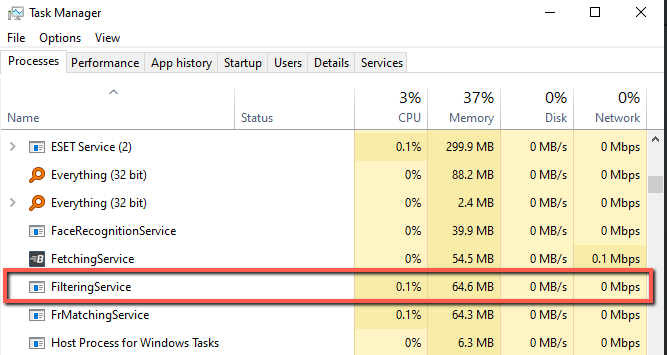
In the Task Manager, you can see how much memory the Filtering service is using.
If several users are using the same case in REVIEW, they will both share the same in-memory cache.
If there is not enough memory on the machine or not enough memory allocated, the performance will be decreased because the system will use the first-in-first-out (FIFO) method or will use the virtual memory.