Encryption
This section gives you an introduction to encryption and certificates.
XProtect systems support secure communication:
From | To |
|---|---|
Recording Server | Management Server |
Management Server | Recording Server |
Clients, servers, and integrations that retrieve data streams from the recording server | Recording Server |
Mobile devices | Mobile Server |
Management Server | Data Collector servers affiliated with remote servers |
Data Collector servers affiliated with remote servers | Management Server |
Introduction to certificates
Certificate distribution
The graphic illustrates the basic concept of how certificates are signed, trusted, and distributed in XProtect VMS.
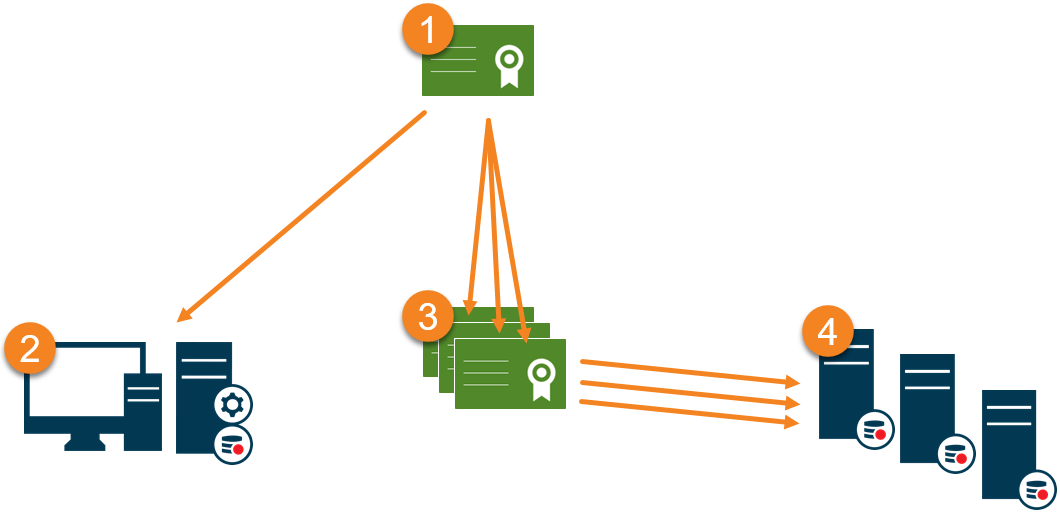
 A CA certificate acts as a trusted third-party, trusted by both the Subject/owner (server) and by the party that verifies the certificate (clients).
 The public CA certificate must be trusted on all client computers. In this way the clients can verify the validity of the certificates issued by the CA.
 The CA certificate is used to issue private server authentication certificates to the servers.
 The created private SSL certificates must be imported to the Windows Certificate Store on all servers.
Requirements for the private SSL certificate:
Issued to the server so that the server's host name is included in the certificate, either as subject (owner) or in the list of DNS names that the certificate is issued to
Trusted on all computers running services or applications that communicate with the service on the servers, by trusting the CA certificate that was used to issue the SSL certificate
The service account that runs the server must have access to the private key of the certificate on the server.
Important
Certificates have an expiry date. XProtect VMS will not warn you when a certificate is about to expire. If a certificate expires, the clients will no longer trust the server with the expired certificate and thus cannot communicate with it.
Important
To renew the certificates, follow the steps in this guide as you did when you created certificates.