The Smart Wall control
The Smart Wall control is a virtual representation of the video wall showing one Smart Wall definition at a time and the Smart Wall monitors that it consists of. The control allows operators to push cameras and other types of content onto the video wall.
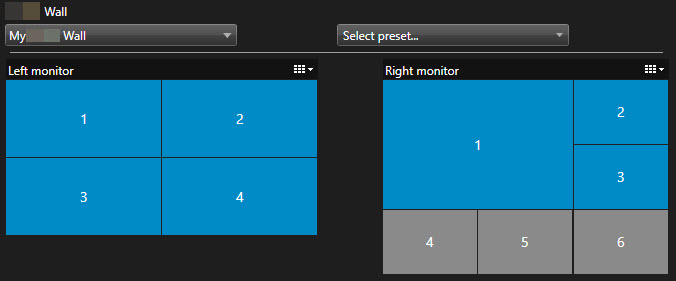
The Smart Wall control in the image above displays a Smart Wall definition with two monitors:
Left monitor has a 2x2 layout
Right monitor has a 1+5 layout
Blue items in the Smart Wall control are currently displaying content. Gray items are empty.
How does it work? Some elements you can drag directly onto the Smart Wall monitors in the Smart Wall control, or to specific view items within a Smart Wall monitor. Other elements you need to send to a video wall, for example images. See also Displaying content on video walls.
If your organization has multiple video walls, you can select the video wall you need in the Smart Wall list.
The Select preset list allows you to select and activate preconfigured Smart Wall presets.