Mobile server data encryption
In XProtect VMS, encryption is enabled or disabled per mobile server. When you enable encryption on a mobile server, you will have the option to use encrypted communication with all clients, services, and integrations that retrieve data streams.
Certificate distribution for mobile servers
The graphic illustrates the basic concept of how certificates are signed, trusted, and distributed in XProtect VMS to secure the communication with the mobile server.
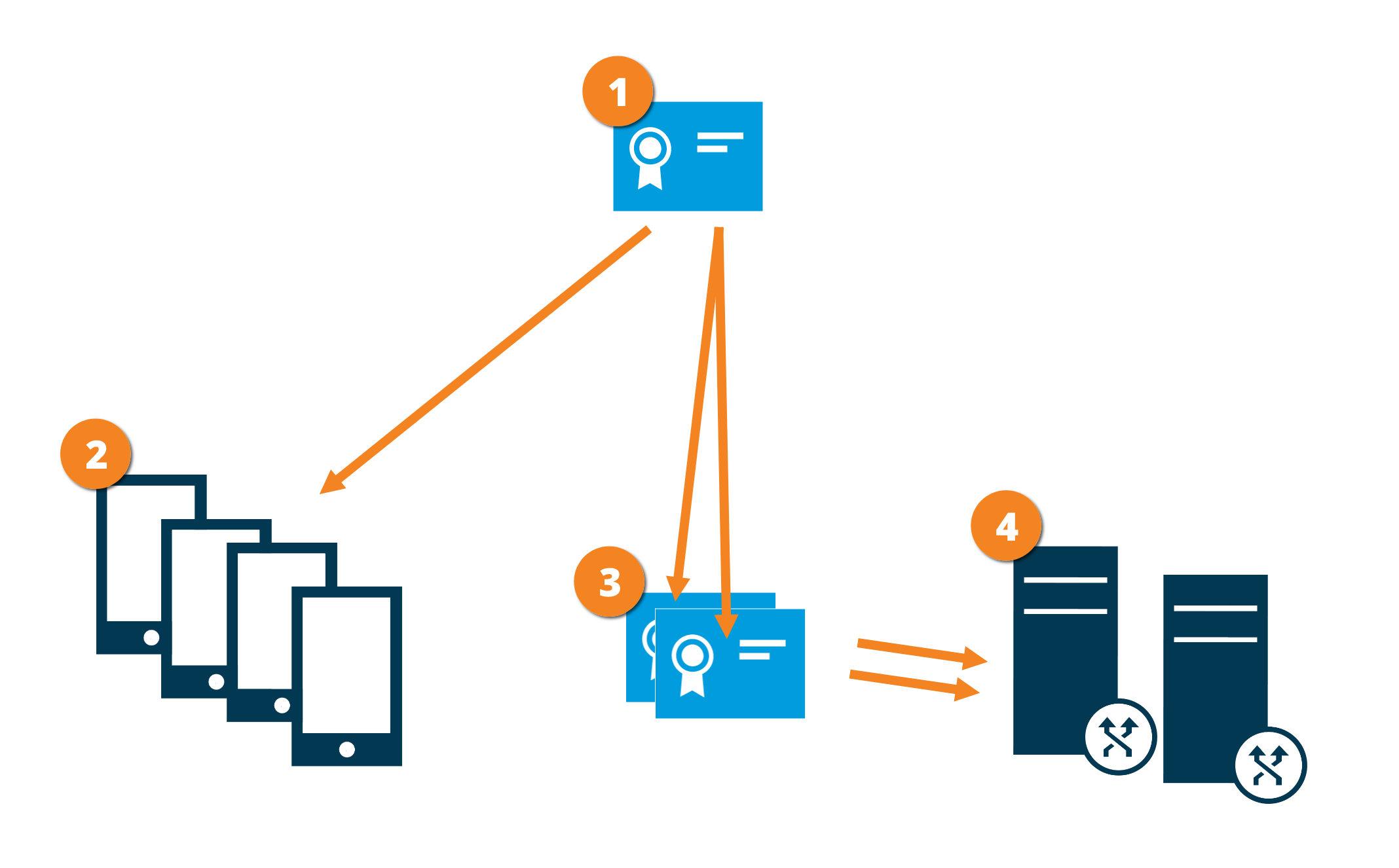
 A CA certificate acts as a trusted third party, trusted by both the subject/owner (mobile server) and by the party that verifies the certificate (all clients)
 The CA certificate must be trusted on all clients. In this way, clients can verify the validity of the certificates issued by the CA
 The CA certificate is used to establish a secure connection between the mobile server and clients and services
 The CA certificate must be installed on the computer on which the mobile server is running
Requirements for the CA certificate:
The mobile server's host name must be included in the certificate, either as subject/owner or in the list of DNS names that the certificate is issued to
The certificate must be trusted on all devices that are running services that retrieve data streams from the mobile server
The service account that runs the mobile server must have access to the private key of the CA certificate