Failover recording server
Failover recording server functionality
A failover recording server checks the state of relevant recording servers every 0.5 seconds. If a recording server does not reply within 2 seconds, the recording server is considered unavailable and the failover recording server takes over
A cold standby failover recording server takes over for the recording server that has become unavailable after five seconds plus the time it takes to connect to the cameras. In contrast, a hot standby failover recording server takes over faster because the Recording Server service is already running with the correct configuration and only has to start its cameras to deliver feeds. During the startup period, you can neither store recordings nor view live video from affected cameras
When a recording server becomes available again, it automatically takes over from the failover recording server. Recordings stored by the failover recording server are automatically merged into the standard recording server's databases. The time it takes to merge, depends on the amount of recordings, network capacity and more. During the merging process, you cannot browse recordings from the period during which the failover recording server took over
If a failover recording server must take over from another recording server during the merging process in a cold standby failover recording server setup, it postpones the merging process with recording server A, and takes over from recording server B. When recording server B becomes available again, the failover recording server takes up the merging process and allows both recording server A and recording server B to merge back recordings simultaneously.
In a hot standby setup, a hot standby server cannot take over for an additional recording server because it can only be hot standby for a single recording server. But if that recording server fails again, the hot standby takes over again and keeps the recordings from the previous period. The recording server keeps recordings until they are merged back to the primary recorder or until the failover recording server runs out of disk space
A failover solution does not provide complete redundancy. It can only serve as a reliable way of minimizing the downtime. If a recording server becomes available again, the Failover Server service makes sure that the recording server is ready to store recordings again. Only then is the responsibility for storing recordings handed back to the standard recording server. So, a loss of recordings at this stage of the process is very unlikely
Client users hardly notice that a failover recording server is taking over. A short break occurs, usually only for a few seconds, when the failover recording server takes over. During this break, users cannot access video from the affected recording server. Client users can resume viewing live video as soon as the failover recording server has taken over. Because recent recordings are stored on the failover recording server, they can play back recordings from after the failover recording server took over. Clients cannot play back older recordings stored only on the affected recording server until that recording server is functioning again and has taken over from the failover recording server. You cannot access archived recordings. When the recording server is functioning again, a merging process takes place during which failover recordings are merged back into the recording server's database. During this process, you cannot play back recordings from the period during which the failover recording server took over
In a cold standby setup, setting up a failover recording server as backup for another failover recording server is not necessary. This is because you allocate failover groups and do not allocate particular failover recording servers to take over from specific recording servers. A failover group must contain at least one failover recording server, but you can add as many failover recording servers as needed. If a failover group contains more than one failover recording server, more than one failover recording server can take over.
In a hot standby setup, you cannot set up failover recording servers or hot standby servers as failover for a hot standby server
Failover steps
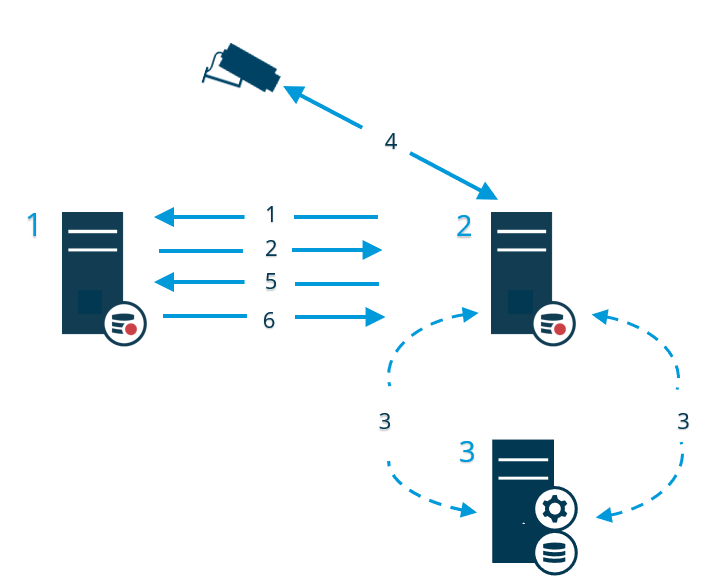
Description |
|---|
Involved servers (numbers in blue):
|
Failover steps for Cold standby setups:
|
Failover steps for Hot standby setups:
|