About certificates
In this guide, the following are referred to as clients:
XProtect Smart Client
Management Client
Management Server (for System Monitor and for images and AVI video clips in email notifications)
XProtect Mobile Server
XProtect Event Server
XProtect LPR
Milestone Open Network Bridge
XProtect DLNA Server
Sites that retrieve data streams from the recording server through XProtect Interconnect
Third-party MIP SDK integrations that support HTTPS
For solutions built with MIP SDK 2018 R3 or earlier that access recording servers:
If the integrations are made using MIP SDK libraries, they need to be rebuilt with MIP SDK 2019 R1
If the integrations communicate directly with the Recording Server APIs without using MIP SDK libraries, the integrators must add HTTPS support themselves
If in doubt, ask your vendor who supplied the integration
Certificate distribution
The graphic illustrates the basic concept of how certificates are signed, trusted, and distributed in XProtect VMS.
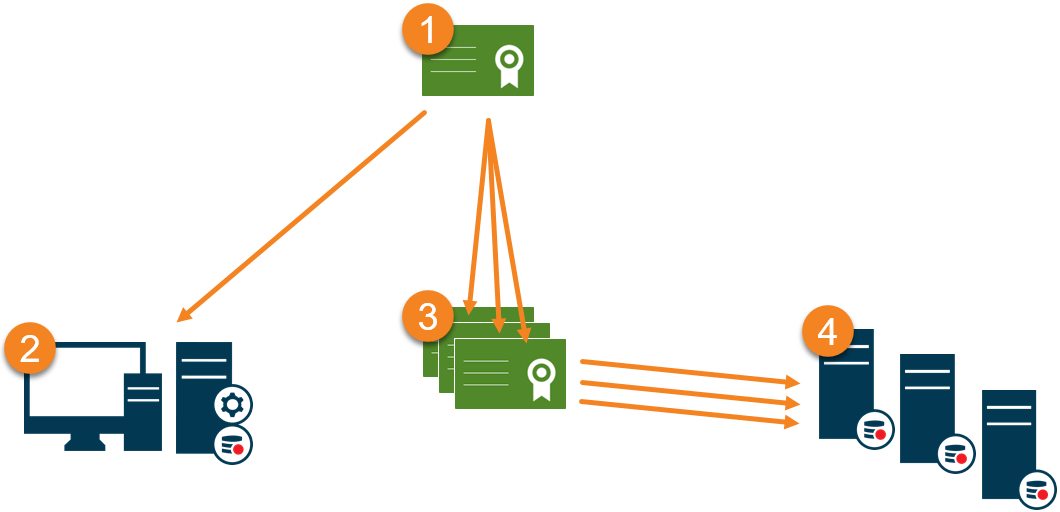
 | A CA certificate acts as a trusted third-party, trusted by both the subject/owner (server) and by the party that verifies the certificate (clients) (see Create CA certificate). |
 | The public certificate must be trusted on all client computers. In this way the clients can verify the validity of the certificates issued by the CA (see Install certificates on the clients). |
 | The CA certificate is used to issue private server authentication certificates to the servers (see Create SSL certificate). |
 | The created private SSL certificates must be imported to the Windows Certificate Store on all servers (see Import SSL certificate). |
Requirements for the private SSL certificate:
Must include the server's host name as the subject (owner) or in the DNS names list
Must be trusted on all computers running services or applications that communicate with the service on the servers, by trusting the issuing CA certificate
The server's service account must have access to the private key of the certificate on the server.
Important
You will not receive a warning when a certificate is about to expire. If a certificate expires, the clients will no longer trust the server with the expired certificate and cannot communicate with it. To renew the certificates, follow the same steps used to create certificates.