Managing Device Access
From the Devices page, you can also manage access to an onboarded device. Each device in the list provides a action, which allows you to view and configure local users on the device.
Managing local device users
To manage local users for a device:
Go to the Devices page.
Locate the device in the list.
From the Actions column, click Manage Users .
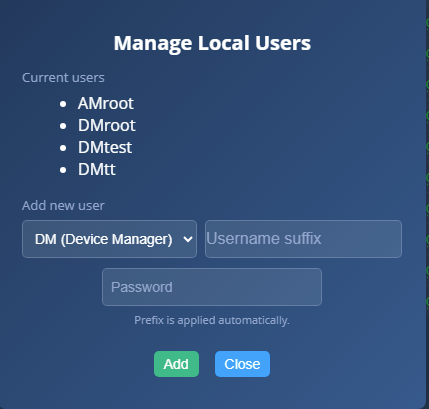
The Manage Local Users dialog opens and displays all existing local users configured on the device.
To add a new local user:
Enter a username and password.
Click .
Note
The username must be prefixed with DM or AM.
Enter the required credentials and click Add. A notification in the upper‑right corner confirms that the account was successfully created.
Note
Local device usernames must be prefixed with DM (Device Management) or AM (Administrator) to define the user's role on the device.
AM users are required for managing advanced device configuration, including metadata and analytics settings, while DM users are intended for general device management.
 |