Drivers and FIPS 140-2
This section discusses FIPS 140-2 and how to configure and use the Milestone drivers to operate in FIPS 140-2-compliant mode.
Requirements for FIPS 140-2 compliant mode
Device requirements
For a device to be able to communicate with a driver running in FIPS 140-2 compliant mode it must fulfill all of these:
The device must support HTTPS communication with at least one FIPS 140-2 compliant cipher suite (for examples see Example of FIPS 140-2 compliant cipher suites)
The device must support RTSP over HTTPS (Tunneling RTSP and RTP over HTTP) using HTTP Basic Authentication (RFC2068 Section 11.1) or HTTP Digest Authentication (RFC2069, RFC7616)
or
The device must support media streaming using SRTP and RTSPS (RFC3711)
Supported drivers
Currently only a subset of drivers is FIPS 140-2 compliant. These drivers support communication through a secured channel for all available features.
Axis 1 channel | Axis 1 channel PTZ | Axis 2 channel | Axis 3 channel |
Axis 4 channel | Axis 8 channel | Axis 11 channel | Axis 12 channel |
Axis Audio | Bosch PTZ | Bosch 1 channel | Bosch 2 channel |
Bosch 3 channel | Bosch 16 channel | Bosch X20XF | Bosch X40XF |
Canon 1 channel | Canon 1 channel PTZ | Canon VBM | Canon VBM 40 |
Canon VBS | Canon VBS No Ptz | Digital Barriers TVI Decoder | Hanwha Generic |
ONVIF | ONVIF16 | Universal | Universal 16 channel |
Universal 64 channel | VideoPush |
The drivers in the table are capable of running in FIPS 140-2 compliant mode when configured properly. This list is not final and may expand in the future. Some drivers are FIPS 140-2 compliant with limited capabilities. Refer to specific driver sections below for information on how to configure them and any limitations.
FIPS 140-2 compliant mode for drivers is available since Device Pack 11.1.
Effects of running in FIPS 140-2 compliant mode
When operating in FIPS 140-2 compliant mode, some drivers will be unavailable for use. Drivers which are listed as FIPS 140-2 might not be able to connect to devices that do not fulfill the device requirements.
A driver is FIPS 140-2 compliant and the communication with the device is FIPS 140-2 compliant if the FIPS 140-2 capable driver:
Operates in an environment with the FIPS Group Policy enabled
Is connected to a device that fulfills the device requirements (see Device requirements)
Is configured properly (see How to configure the device and the driver for FIPS 140-2)
If any of the requirements for FIPS 140-2 compliant mode are not fulfilled, then there is no guarantee about the FIPS 140-2 compliancy of the driver or the communication with the device.
How to configure the device and the driver for FIPS 140-2
The configuration of the device and driver for FIPS 140-2 compliant mode is device and driver specific. Some general guidelines apply:
The communication channels between the driver and the device must be secure and encrypted (HTTPS, RTSP over HTTPS, SRTP).
The device must be configured for operation using secure channels.
The driver and device must be configured to use secure channels for communication in XProtect VMS.
Axis drivers
Do the following:
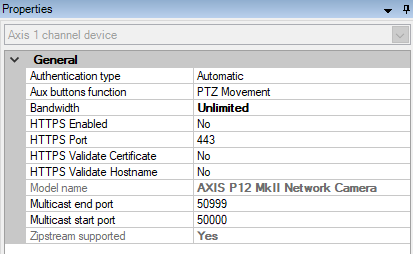
Set HTTPS Enabled to Yes.
Set HTTPS Validate Certificate to Yes.
Set HTTPS Validate Hostname to Yes.
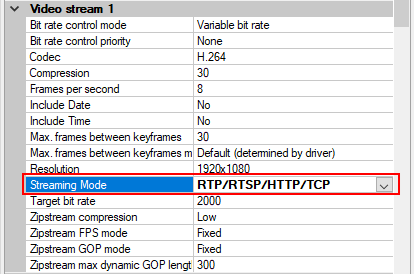
For every enabled media channel and media stream, set Streaming Mode to RTP/RTSP/HTTP/TCP.
Canon drivers
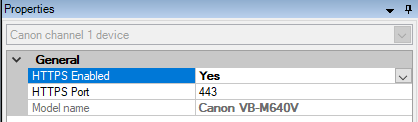
Set the HTTPS Enabled to Yes.
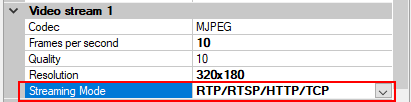
For every enabled media channel and media stream, set Streaming Mode to RTP/RTSP/HTTP/TCP.
Bosch drivers
Do the following:
Set HTTPS Enabled to Yes.
Set HTTPS Validate Certificate to Yes.
Set HTTPS Validate Hostname to Yes.
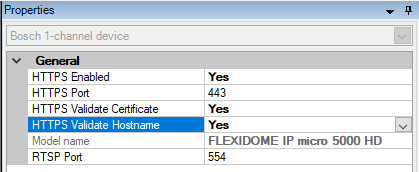
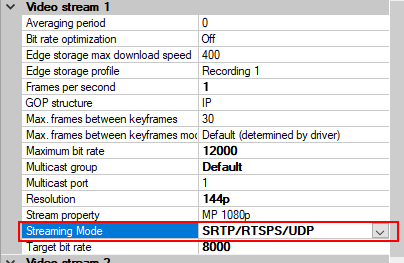
For every enabled media channel and media stream, set Streaming Mode to one of the following:
RTP/RTSP/HTTP/TCP
SRTP/RTSPS/UDP
SRT/RTSPS/UDP multicast
Hanwha drivers
Set the HTTPS Enabled to Yes.
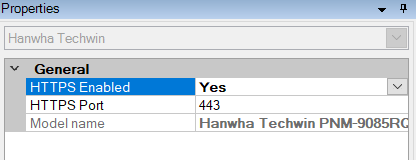
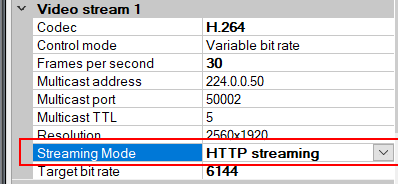
For every enabled media channel and media stream, set Streaming Mode to HTTP streaming.
ONVIF drivers
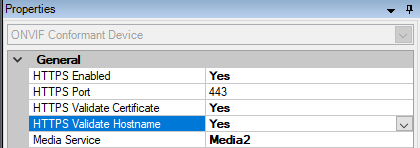
Do the following:
Set HTTPS Enabled to Yes.
Set HTTPS Validate Certificate to Yes.
Set HTTPS Validate Hostname to Yes.
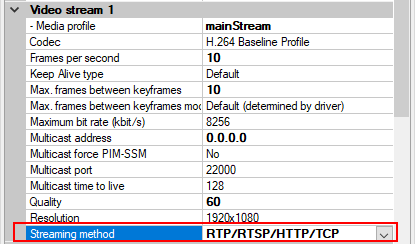
For every enabled media channel and media stream, set Streaming method to RTP/RTSP/HTTP/TCP.
The Audio backchannel (Audio Out, Device Speaker) must not be used when the driver is running in FIPS 140-2 compliant mode.
Universal drivers
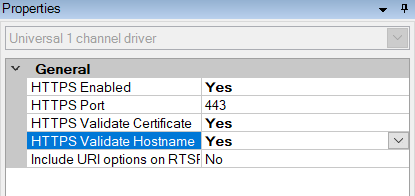
Do the following:
Set HTTPS Enabled to Yes.
Set HTTPS Validate Certificate to Yes.
Set HTTPS Validate Hostname to Yes.
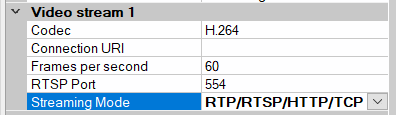
For every enabled media channel and media stream, set Streaming Mode to either RTP/RTSP/HTTP/TCP or HTTP, depending whether streaming or snapshot retrieval mode is used.
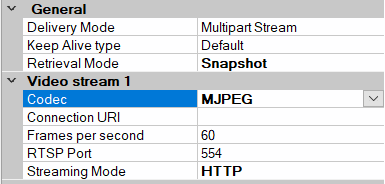
VideoPush driver
No specific configuration is needed. Enabling the FIPS Group Policy will force the driver to communicate with the XProtect Mobile serverin a FIPS 140-2 compliant way.
Example of FIPS 140-2 compliant cipher suites
0x1302 | TLS_AES_256_GCM_SHA384 |
0x1303 | TLS_CHACHA20_POLY1305_SHA256 |
0x1301 | TLS_AES_128_GCM_SHA256 |
0xC02C | TLS_ECDHE_ECDSA_WITH_AES_256_GCM_SHA384 |
0xC030 | TLS_ECDHE_RSA_WITH_AES_256_GCM_SHA384 |
0x00A3 | TLS_DHE_DSS_WITH_AES_256_GCM_SHA384 |
0x009F | TLS_DHE_RSA_WITH_AES_256_GCM_SHA384 |
0xC02B | TLS_ECDHE_ECDSA_WITH_AES_128_GCM_SHA256 |
0xC02F | TLS_ECDHE_RSA_WITH_AES_128_GCM_SHA256 |
0x00A2 | TLS_DHE_DSS_WITH_AES_128_GCM_SHA256 |
0x009E | TLS_DHE_RSA_WITH_AES_128_GCM_SHA256 |
0xC024 | TLS_ECDHE_ECDSA_WITH_AES_256_CBC_SHA384 |
0xC028 | TLS_ECDHE_RSA_WITH_AES_256_CBC_SHA384 |
0x006B | TLS_DHE_RSA_WITH_AES_256_CBC_SHA256 |
0x006A | TLS_DHE_DSS_WITH_AES_256_CBC_SHA256 |
0xC023 | TLS_ECDHE_ECDSA_WITH_AES_128_CBC_SHA256 |
0xC027 | TLS_ECDHE_RSA_WITH_AES_128_CBC_SHA256 |
0x0067 | TLS_DHE_RSA_WITH_AES_128_CBC_SHA256 |
0x0040 | TLS_DHE_DSS_WITH_AES_128_CBC_SHA256 |
0x00AD | TLS_RSA_PSK_WITH_AES_256_GCM_SHA384 |
0x00AB | TLS_DHE_PSK_WITH_AES_256_GCM_SHA384 |
0x009D | TLS_RSA_WITH_AES_256_GCM_SHA384 |
0x00A9 | TLS_PSK_WITH_AES_256_GCM_SHA384 |
0x00AC | TLS_RSA_PSK_WITH_AES_128_GCM_SHA256 |
0x00AA | TLS_DHE_PSK_WITH_AES_128_GCM_SHA256 |
0x009C | TLS_RSA_WITH_AES_128_GCM_SHA256 |
0x00A8 | TLS_PSK_WITH_AES_128_GCM_SHA256 |
0x003D | TLS_RSA_WITH_AES_256_CBC_SHA256 |
0x003C | TLS_RSA_WITH_AES_128_CBC_SHA256 |
0x0035 | TLS_RSA_WITH_AES_256_CBC_SHA |
0x002F | TLS_RSA_WITH_AES_128_CBC_SHA |
Note
This list is not exhaustive. There are other cipher suites that are FIPS 140-2 compliant. This list is given only as a sample of cipher suites that are FIPS 140-2 compliant.