How Data Central is organized
Data Central is organized by cases. Each case is independent of the others, and multiple cases can be carried out simultaneously. Within each case, folders can be created and organized in the order you specify. Within each folder, the files can also be organized in the order you specify.
UI Component overview
There are a few main parts in the Data Central user interface: the case view, canvas, information pane (metaform), tree pane, file workflow dashboard, and a case workflow dashboard. This section provides a general overview of the location of these components within the user interface.
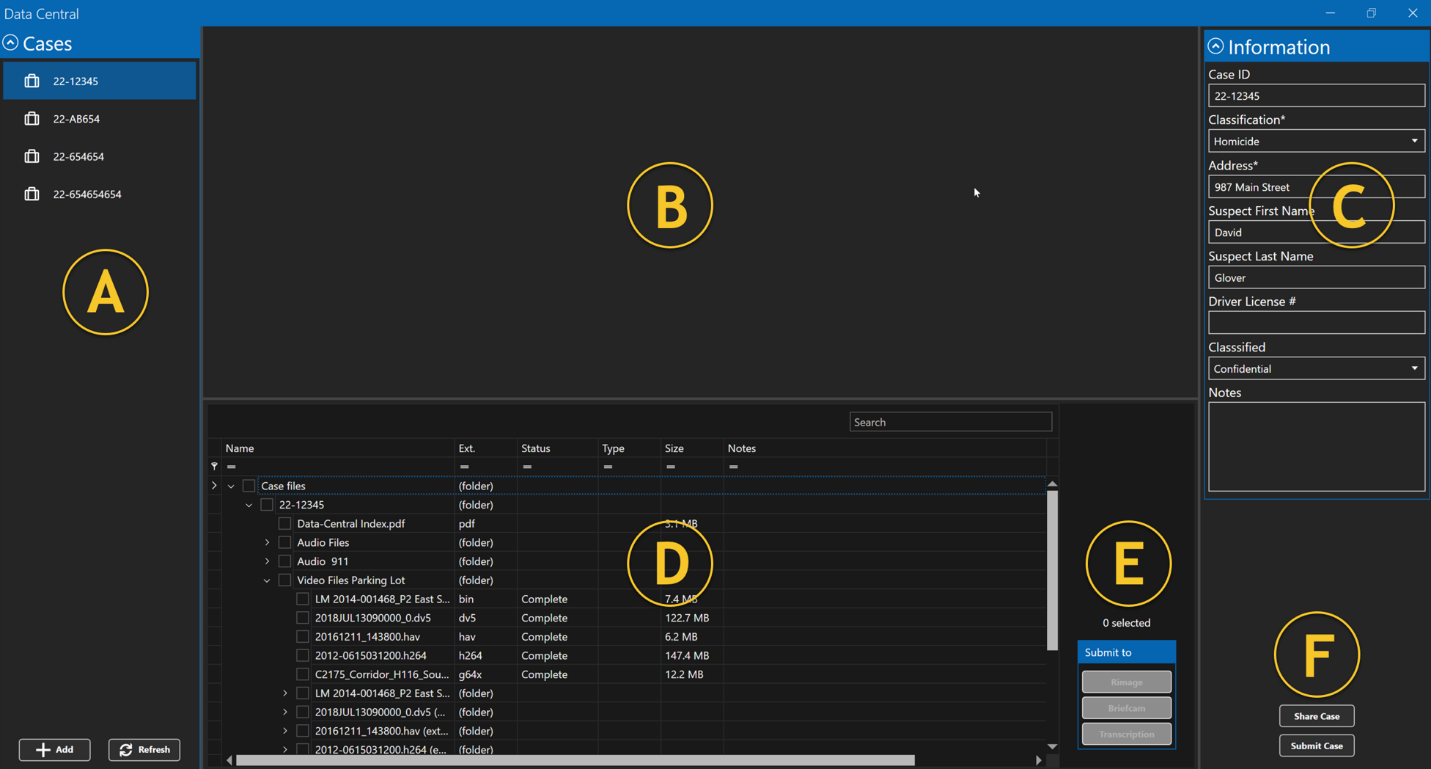
A | Case view | This displays a list of all current cases you are working on. |
B | Canvas | Allows you to view and control entities such as videos, photos, and so on. |
C | Information pane | Displays the configured metaform, allowing you to enter in metadata related to the case. |
D | Tree pane | Lists all the folders and files that are part of the specific case you’re working on and allows you to bring them into the canvas. |
E | File workflow dashboard | Contains workflow commands to be executed on the selected files in the Tree Pane. |
F | Case workflow dashboard | Contains workflow commands to be executed on the selected case from the Case View. |