Register software license codes (SLCs)
If you register a software license code (SLC) in Milestone Customer Dashboard, you can:
Track the licenses that you sell to customers.
Assign licenses to customers.
Set up monitoring of your customers' VMS installations.
Important
Distributor, resellers, integrators and end-users can all register licenses. Each role can only register a license once.
To register an SLC:
Log in to Milestone Customer Dashboard (https://online.milestonesys.com/).
In the main menu, select Licenses or Customers
 , then select Register new license (SLC)
 .
.
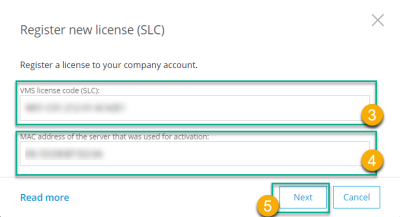
In the Register new license window, in the License code (SLC) field, enter the SLC
 .
.In the MAC address of the server that was used for activation field, enter the MAC address of the server that you used to activate the license on
 .
.Click Next
 .
.
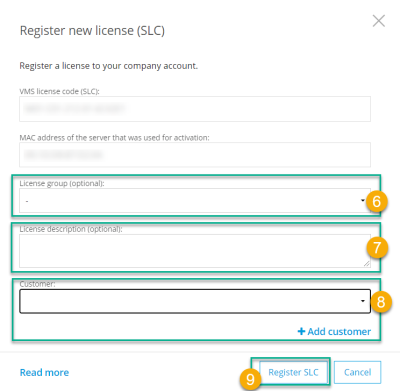
Optional: In the License group field, assign the SLC to an existing license group
 .
.Optional: In the License description field, enter a custom description of the license
 .
.Note
You can search by license description on the Licenses page in the Search field.
To associate the SLC with a customer
 :
:For an existing customer, select a customer in the Customer list
For a customer that has not yet been created in Milestone Customer Dashboard, select Add customer, enter a new customer name, and select Save
Note
Only distributors, resellers and integrators can associate SLCs with customers.
Select Register SLC
 . The new license is added to the Licenses list.