Information tag and model label
The information tag
You can identify your system by the information tag. Pull out the information tag in front of the system to view the unique identifiers. The information tag contains the following information:
Service tag | The unique express service code and service tag. Always provide the details when contacting support. |
iDRAC password | A password used for remote management via the iDRAC interface. NoteYou can find the IP address of the iDRAC interface in Husky Assistant > support. |
iDRAC port MAC address | The physical address (MAC address) of the iDRAC port. |
Main board ethernet card MAC address | The physical address (MAC address) of the on-board ethernet card. |
Note
The information tag can sometimes be referred to as the luggage tag.
The model label
The model label is located on the top of the unit cover. The label displays the revision number of your Husky IVO unit.
Revision numbers change when the physical machine a Husky IVO product is based upon, is changed. This is because a different physical machine may result in different hardware and software configurations, that will in turn require a revision of the Husky IVO product. Sometimes the change is substantial, other times the change is negligible.
The image below illustrates a model label for a Husky IVO 700R Rev. 2 unit.
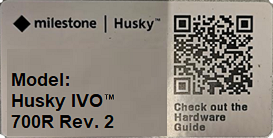
The model label for other Husky IVO products will only vary by product name.
Note
Only revisions 2 and above are displayed on the model label. Revision 1 is considered the baseline model and is not displayed.
Tip
When contacting support, it is recommended to have the revision number ready as some hardware and software configurations may vary from revision to revision.