People Counting Use Cases
BriefCam’s people counting is a valuable tool that can be used across a variety of industries and use cases.
Below is a summary of the typical use cases and what modules and counting type to use in BriefCam for each of the use cases.
Module/Tool | Counting Type | Typical Use Cases |
REVIEW | Flow counting | Calculate how many people appeared in a scene in a certain timeframe and traveled through a certain path, crossed a certain line or entered or dwelled in an area |
RESPOND or Occupancy Tool | Flow counting | Trigger notifications when certain pre-determined threshold quantities of people traveling through a certain scene have been exceeded |
RESPOND | Concurrent |
|
RESEARCH | Flow counting | Foot traffic estimation, occupancy (by counting the number of people entering and exiting an area), count people traveling through a specific area, measure the time people spend in a scene |
RESEARCH | Concurrent | Understand trends and averages, such as the average number of people at a checkout or occupancy in a small area covered by a single camera |
People Counting: REVIEW Module Use Cases
The REVIEW module can be used for flow counting use cases. For example, you can calculate how many people appeared in a scene in a certain timeframe and traveled through a certain path, crossed a certain line or dwelled in an area.
The REVIEW module can be a powerful tool for trying different filters in an attempt to quantify a subset of the people seen in the video. Different filters, such as paths, line crossing or areas in combination with direction and dwell can be used. The results of the count are shown instantaneously for the duration of the video in the case.
Visual layers can help in identifying patterns that were not known to the user, such as areas of high activity, dwell areas or common paths. The findings can later be utilized to more accurately set a specific filter, such as an Area filter, for quantifying people. Visual layers consist of objects matching a certain filter so they are very useful for determining which of the objects adhere to a certain filter criteria (or an exclude filter) and then you can see which objects will not be counted under a certain filtering condition.
For example, the image below shows the Dwell visual layer configured to show people. There are three distinct areas where the dwelling is the highest.
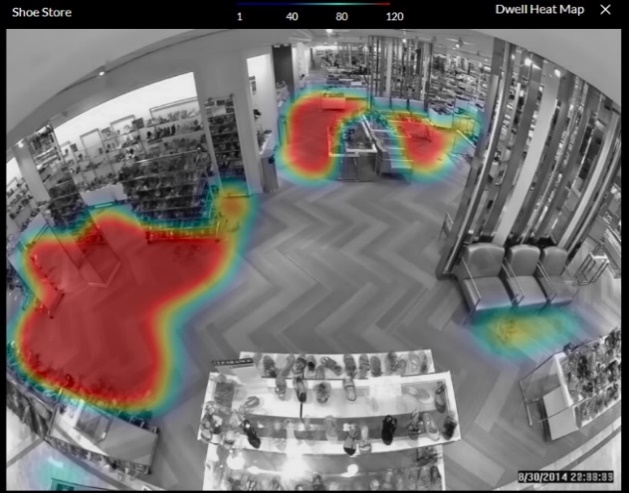
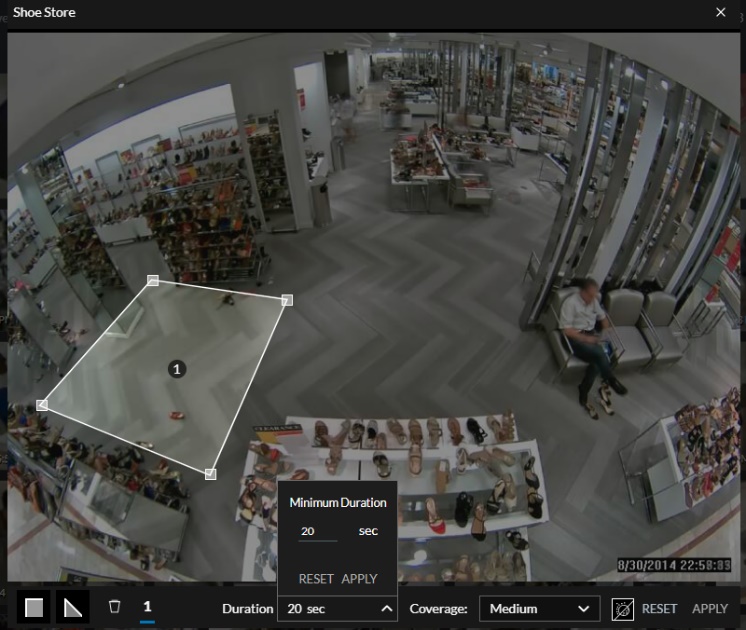
To further investigate any of these hot spots, an Area filter can be set (as shown in the image below) to zoom into the area and show, for example, only people that dwelled in the area for 20 seconds or longer.
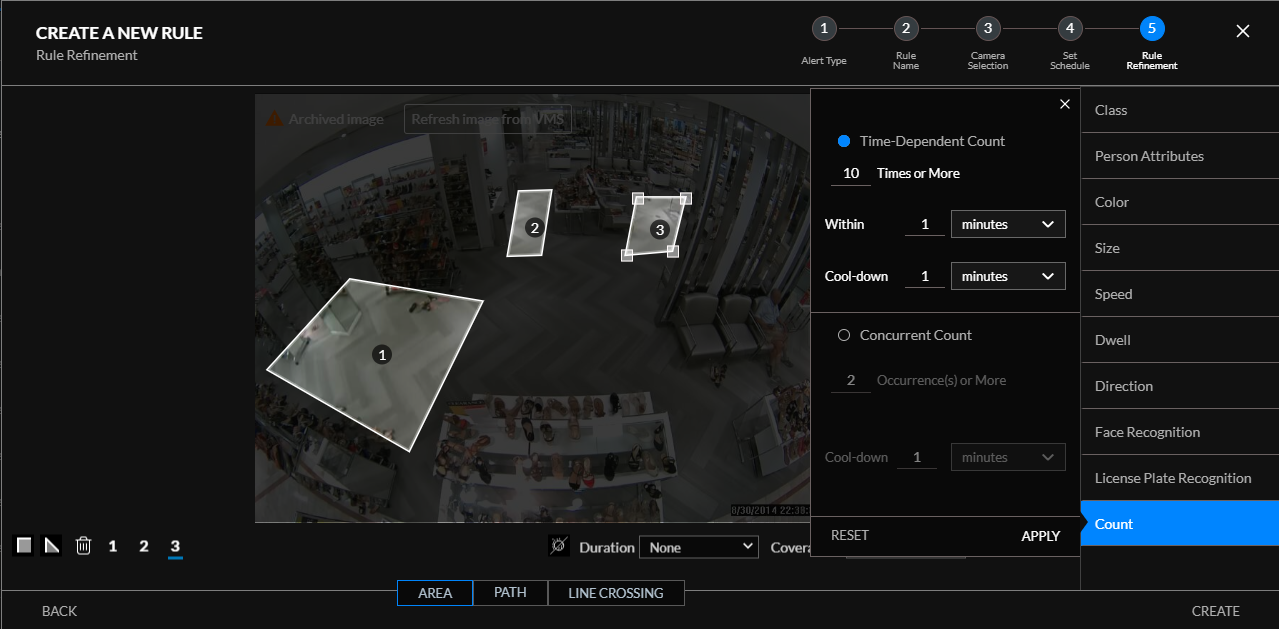
A RESPOND rule or a RESEARCH source can then be set on each of these areas to trigger when a certain number of people pass through this area.
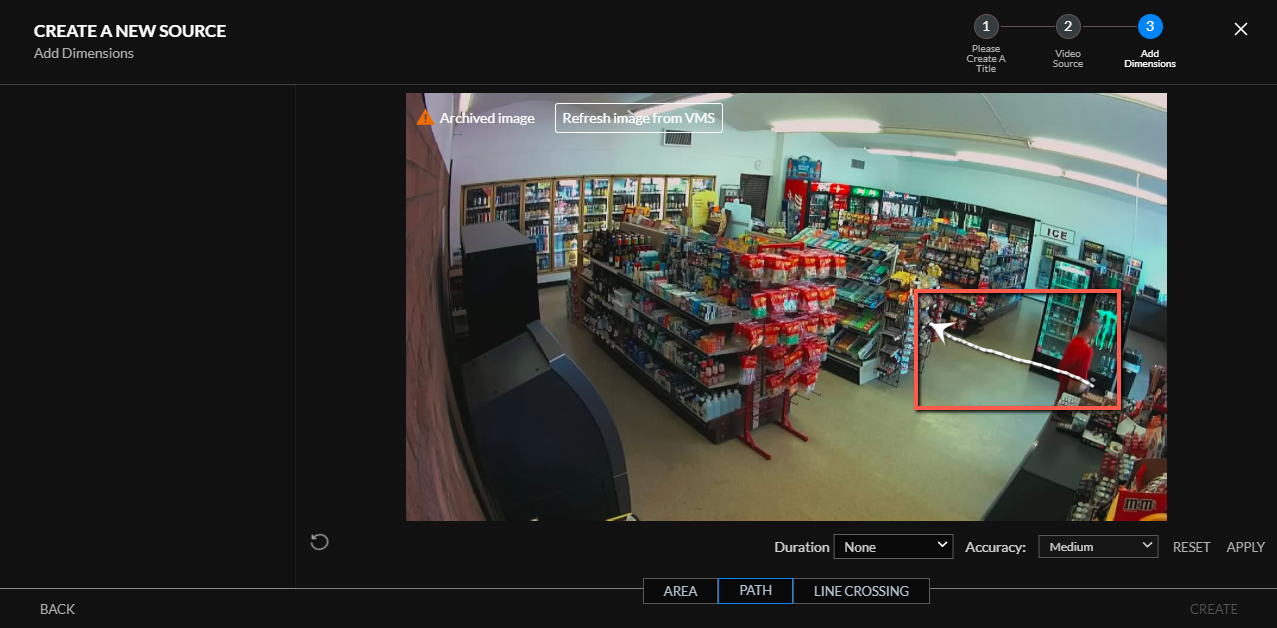
Another example is illustrated in the image below with the Path visual layer. The red arrow indicates the most active path and it can be assumed that this is the direction that people come through the door.
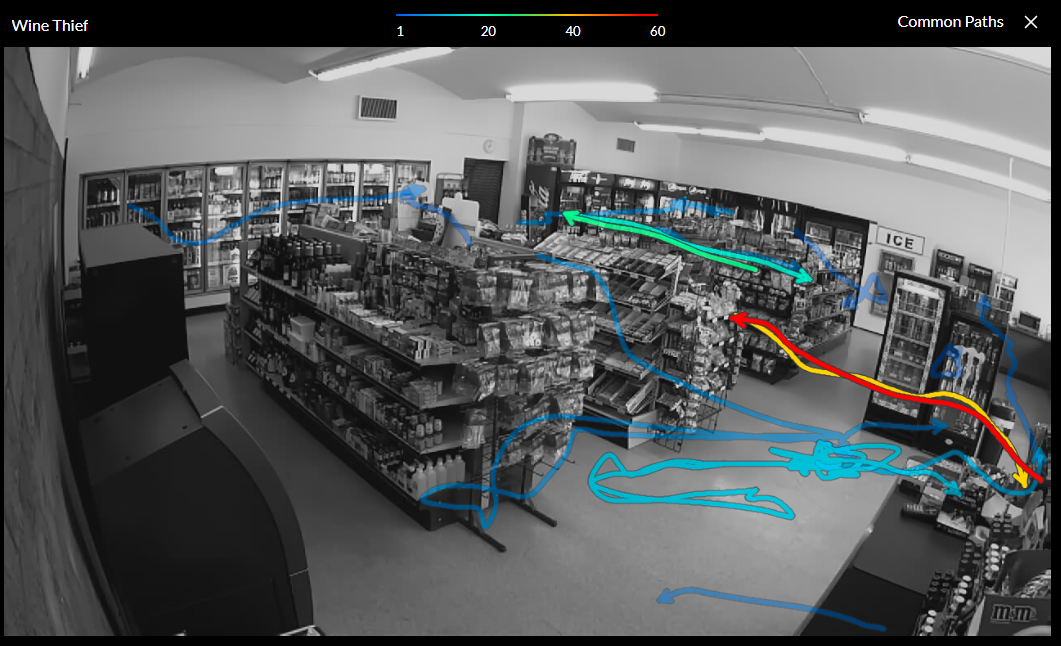
If we draw this same path in the RESEARCH source, we will be able to use this to count the number of people that entered the store.
People Counting: RESPOND Module Use Cases
The RESPOND module can be used both for flow counting use cases and for concurrent counting use cases.
Flow Counting in the RESPOND Module
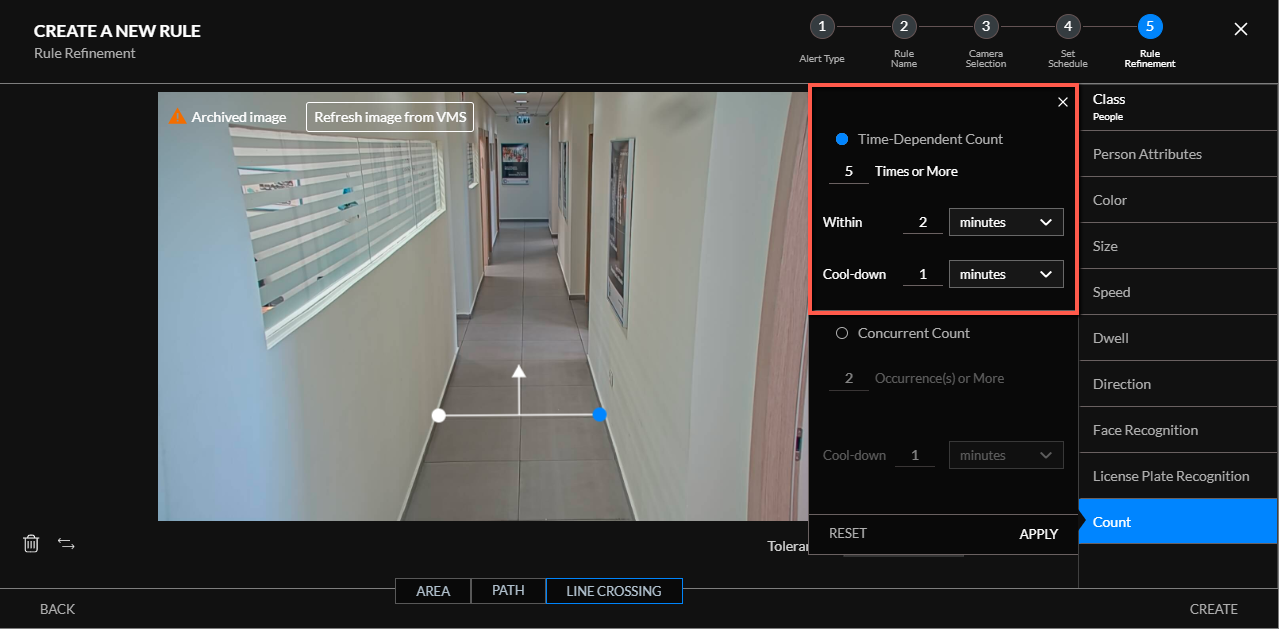
Flow counting in the RESPOND module is carried out using Smart and Real-Time alerts together with the Count filter’s time-based count. These rule-based alerts trigger notifications when certain pre-determined threshold quantities of people have been exceeded. Count-based alerts utilize BriefCam’s range of object classes and filters – and are based on the normal object extraction and tracking. For additional information about the filters, see the Object Filtering section.
Real-Time Alerts vs. Smart Alerts for Counting
A user can select time-based counting as Real-Time alerts or as Smart alerts. When choosing Real-Time alerts, the tracking mechanism is not as comprehensive as in Smart alerts – so geospatial filtering, such as path and line crossing, might be less accurate. Since in time-based counting there is less sensitivity to the alert time it is recommended not to use Real-Time alerts when counting people, but rather only for the purpose of generating Real-Time alerts.
This is also the case when using the Outbound API with BriefCam’s Occupancy Tool or other third-party alert counting mechanisms to count the flow of objects.
Concurrent Counting in the RESPOND Module
Concurrent counting in the RESPOND module is carried out using either the regular Count filter or the special People Counting alerts.
The People Counting alerts are based on a separate engine, count only people, and cannot be used in conjunction with BriefCam’s filters.
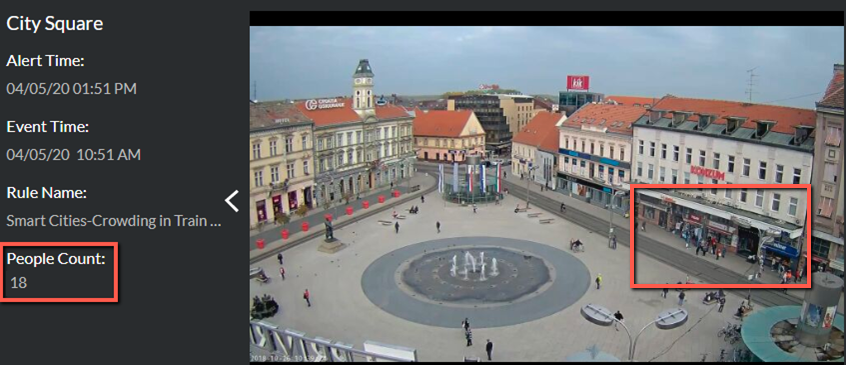
These People Counting alerts can be used for queue counting and crowd counting (starting with 5 people and up to 250 people) in order to mobilize additional staff when there are too many people waiting in line, whether in a supermarket, at a bank, at a concert, and more.
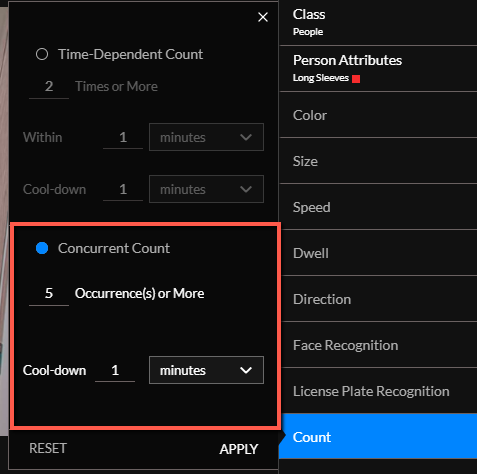
Concurrent count-based filter alerts can be used in conjunction with the other filters to alert, for example, if there are concurrently more than a predefined number of people with red long-sleeve shirts (which might be staff uniforms) in a section of the store.
Counting via the RESPOND Outbound API
Another way a user can count objects is via BriefCam’s Outbound API by setting a rule with a geospatial filter (area, path, or line crossing filter) and some of BriefCam’s other filters as required. This rule will trigger an alert for every object that matches the applied filters – and on every such alert, an API message will be sent.
You can use BriefCam’s Occupancy Tool or any other third-party method to monitor these alerts and count them – effectively creating a flow counter.
You can then combine alerts from several rules (sources) to create “entrance” flows and then combine alerts from other rules to create “exit” flows – and aggregate them to create an occupancy approximation.
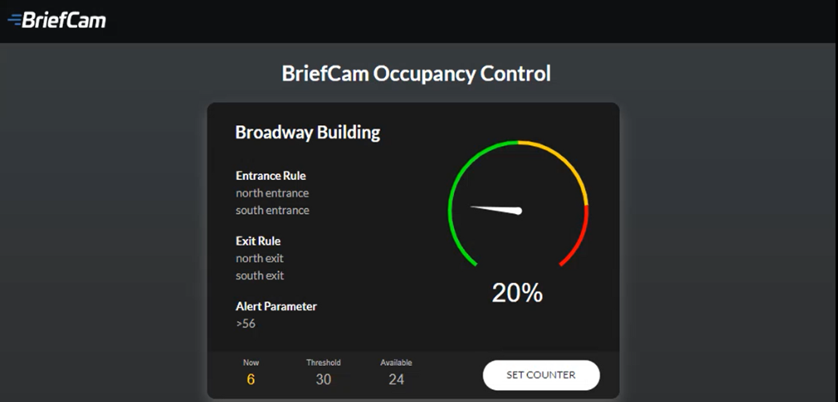
BriefCam’s Occupancy Tool (as seen in the image below) has other features, such as a customizable gauge display and an occupancy limit alert. An important aspect in Occupancy Control is that any error that occurred will carry over to the next days unless it is manually fixed. For example, if there were 0 people in the beginning of the day and BriefCam counted an excess of 40 people throughout the day, on the next day the counter will start from 40 unless it is programmed to be reset back to 0.
People Counting: RESEARCH Module Use Cases
The RESEARCH module can be used both for flow counting use cases and for concurrent counting use cases.
Flow Counting in the RESEARCH Module
For flow counting, you can analyze data about the number of objects. For this type of counting, a database record is created for each object that appears in the scene and then analyzed by the BI system embedded in the RESEARCH module.
The typical use cases for this type of counting are:
Foot traffic estimation – Count the number of people passing through the scene. This can be combined with path, area or line crossing to refine and count only the number of people traveling on a certain path, entering or dwelling in a certain area, or crossing a certain line. Foot traffic estimation can be used for measuring the number of people entering a store, going through a certain corridor or entering the storage room.
Occupancy – Count the number of people entering and the people exiting to calculate occupancy and the number of visitors to analyze and spot occupancy trends.
Location – Count the number of people that passed through a specific area within a scene. For additional information about the filters, see the Object Filtering section.
Dwell – Measure the number of people spending time in a scene for a certain amount of time.
The measures that are most often used for this type of counting are:
# of People
# of People in Specific Source and Custom Dimensions
Max People/Hour
Note
Additional measures are available. For further information, refer to Adding Measures.
BriefCam has a number of out-of-the-box dashboards that illustrate how to use this functionality:
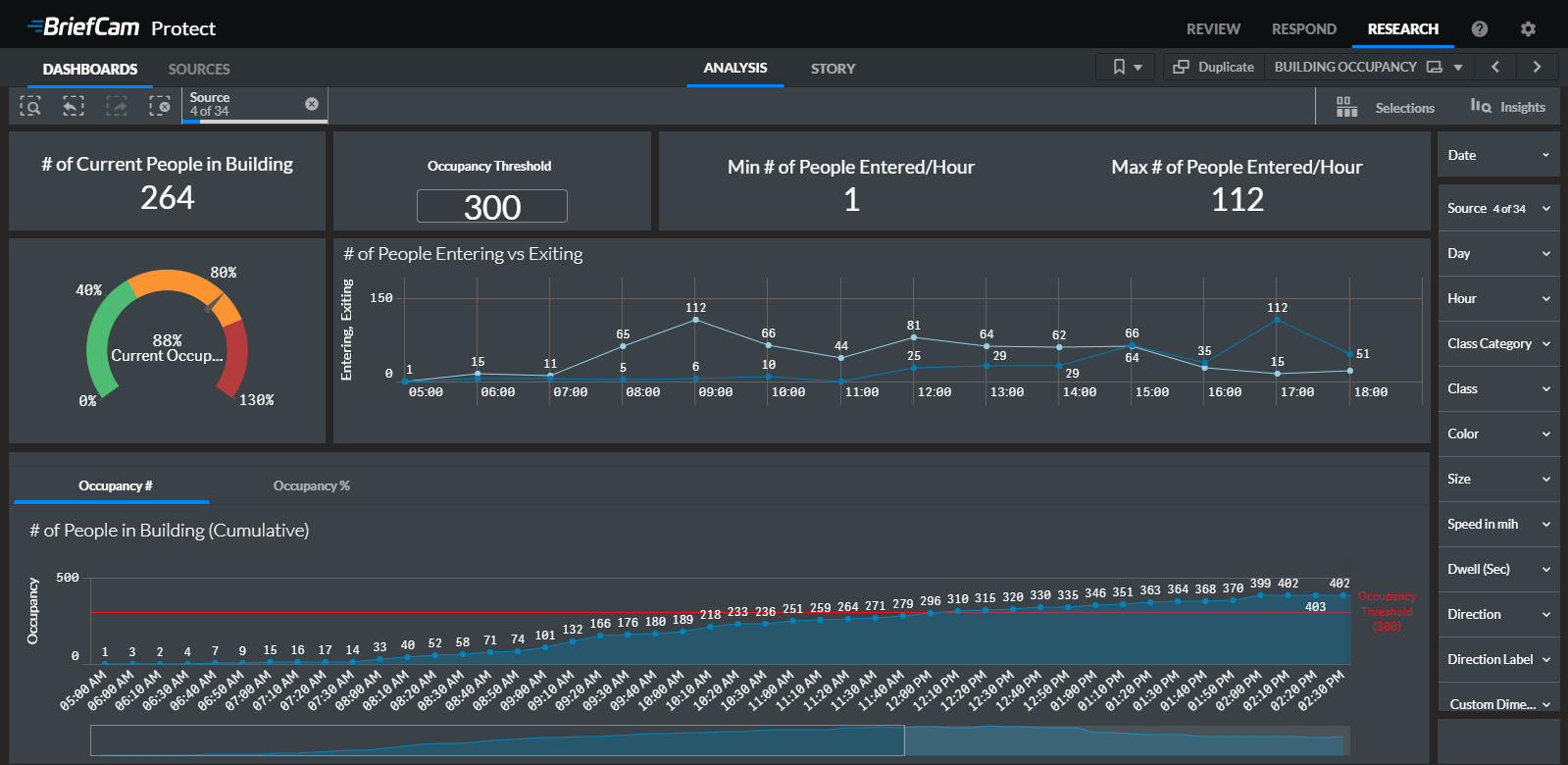
Building Occupancy (see the image below)
Retail Trends
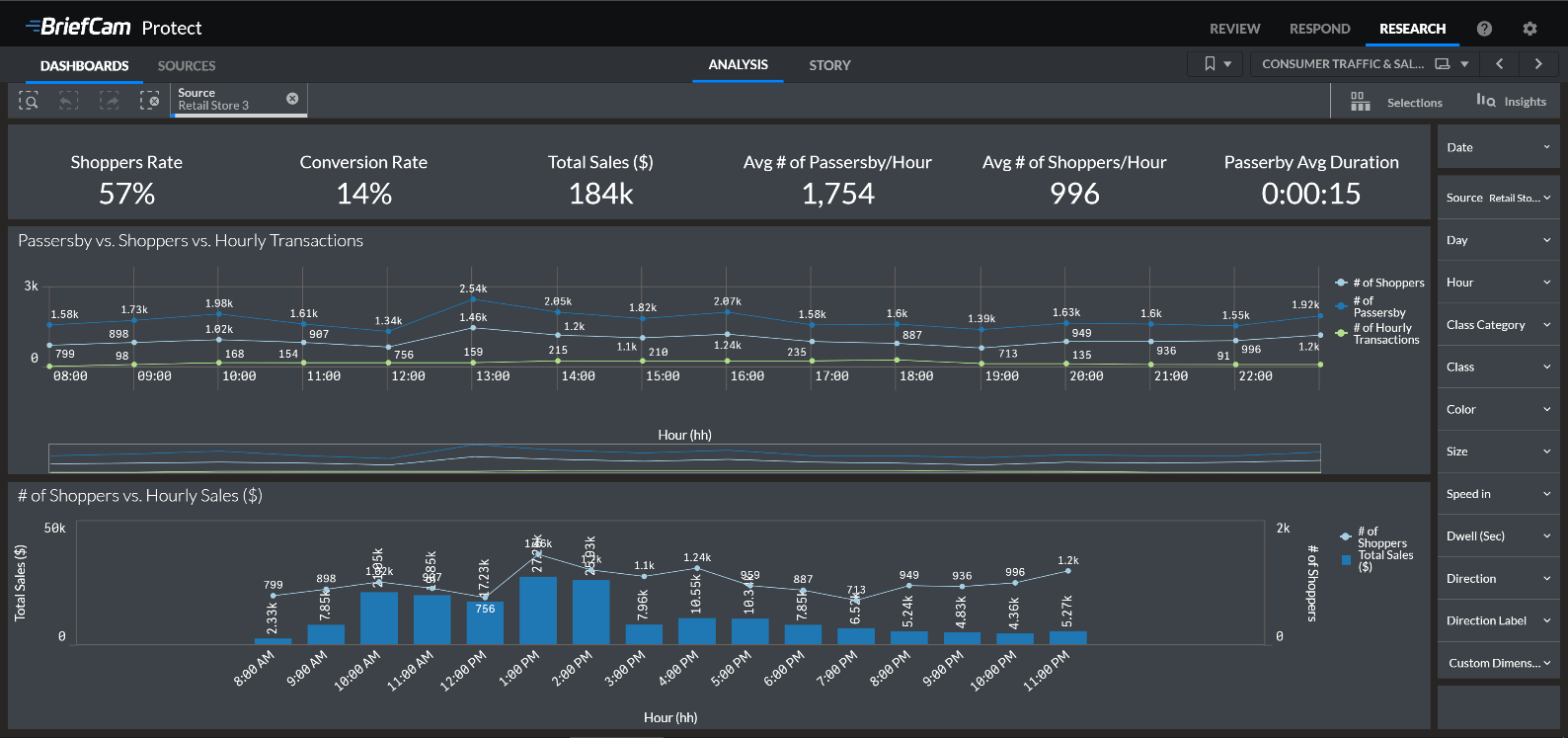
Consumer Traffic & Sales (see the image below)
Shopper Analysis
Airport Checkpoint
Airport Terminal
Concurrent Counting in the RESEARCH Module
For concurrent counting, the special engine used for People Counting alerts is used, and a database record is created every few minutes (2 minutes by default) with the concurrent count of the number of persons in a frame or an area within a frame.
The typical use case for concurrent counting is to understand trends and averages, such as what are the average number of people at a checkout or at a waiting area per time.
Dashboards can be built to combine counts of people from multiple cameras if the area you want to cover is larger than the field of view of a single camera, as long as there are no “blind spots” that can’t be covered by any camera. Overlapping areas that are seen in more than one camera can be masked in one of the cameras by using the area filter to prevent duplicated counting.
This type of counting is not suitable for the following use cases:
If the people you want to count do not appear simultaneously in the scene
If the area you want to cover cannot be viewed with cameras in full. If the number of people is dynamically changed every few seconds, and counting the people every 2 minutes is not accurate enough
Count people together with Line Crossing or Paths
The measures that are most often used for this type of counting are:
People Counting: Avg # of People
People Counting: Avg # of People in Specific Source and Area
People Counting: Max # of People/Hour
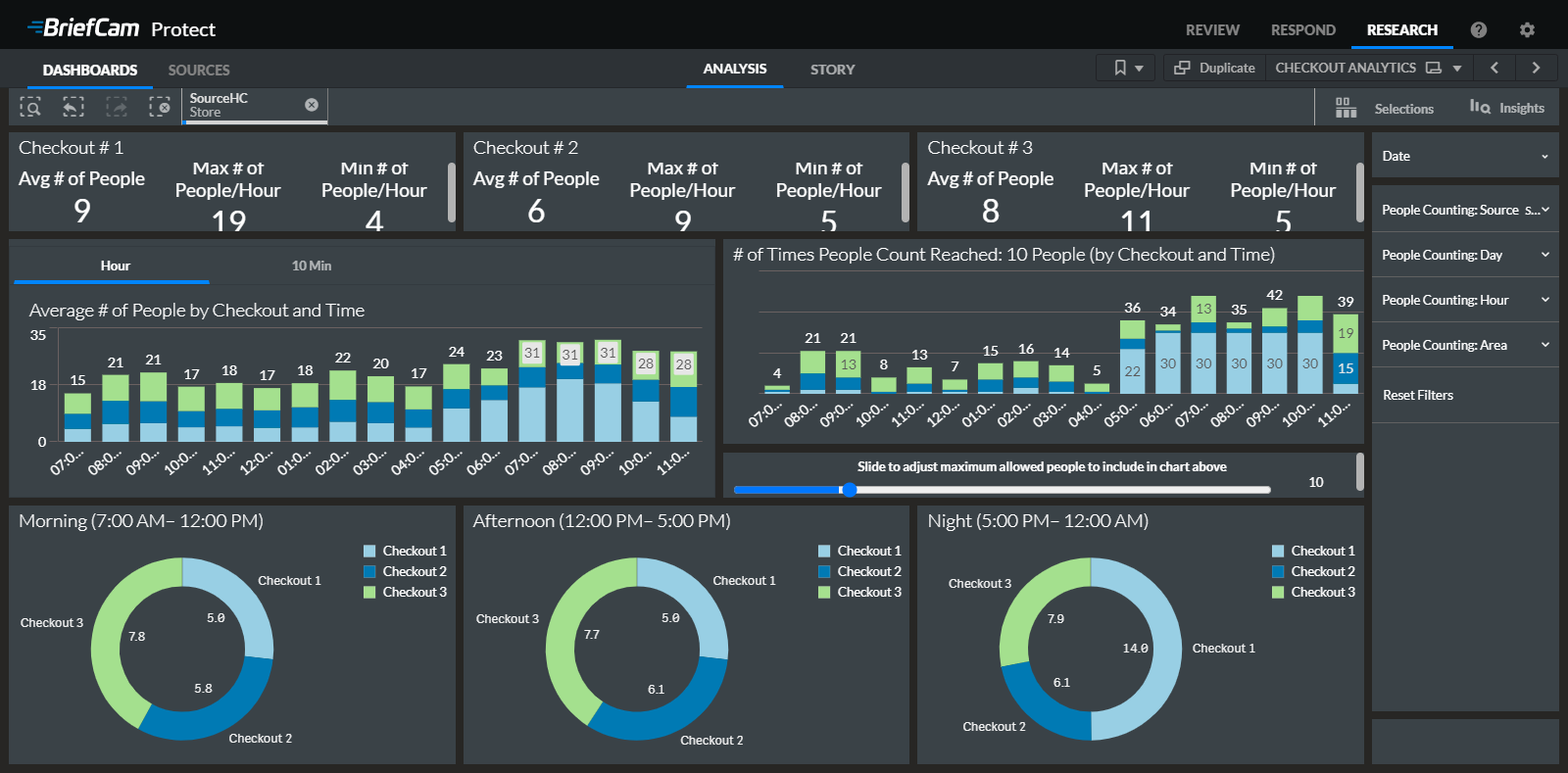
BriefCam’s Checkout Analytics out-of-the-box dashboard illustrates how to use this functionality:
Unique vs. General Counts
Normally, when we perform counts, we do not have any unique identifiers and we count all people that pass the set filters. In the RESEARCH module, if we have a camera that counts people and also captures the people’s faces, we can perform unique counts (not count the same person twice). BriefCam can also exclude people on a watchlist (such as employees in a store).