Object Filtering
You can use Area, Line Crossing, and Path filters to filter out objects of interest to be counted. These filters have different ways of interacting with objects.
An Area filter filters any object whose bounding box overlaps with the area. Area filters can also be set to exclude objects whose bounding box overlaps with the area. In addition, you can count only people that spend a certain amount of time within the area. You can also adjust the tolerance level (low, medium and high) of the area which affects how much overlap there needs to be between the object’s bounding box and the selected area in order to consider the object as interacting with the area. In low mode, any overlap is considered an interaction, and in medium and high mode there needs to be a growing overlap between them.
A Line Crossing filter operates on specific parts of the bounding box (according to the filter’s tolerance) in a specific direction. The tolerance affects which part of the bounding box interacts with the line:
Strict – Search for objects where two points of the bounding box cross the line, 5% from the bottom and 30% inwards from each side (these approximately correspond with a person’s feet).
Normal – Search for objects where one of the two points of the bounding box (5% from the bottom and 30% inwards from each side) crosses the line.
Loose – Search for objects where any of four points at the corners of the bounding box crosses the line.
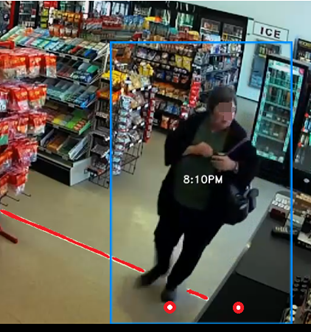
For example, in the image below the two dots indicate the 5% from the bottom and 30% inwards from each side. This woman will appear in the search with Normal tolerance (since she is touching one of the dots) and may not appear with Strict tolerance (since both dots are not touching the line that was drawn).
The Path filter works on the bottom part of the bounding box, in a specific direction, and over a specific path (in a sequence of frames). This path detects objects whose lower part (legs, wheel) travelled along those paths and does not take into account the object’s center. You can fine tune the search using the filter’s tolerance. Choosing the High accuracy level will result in only events closely adhering to the drawn path being filtered, whereas a Low accuracy setting will result in the inclusion of additional events that only loosely follow the defined path.
It might be preferable (depending on the use case) to position the camera so that movement is sideways (and not towards or away from the camera) as it is easier to extract and analyze the progression of a path in a sideways (perpendicular) movement. If you would like to detect deviations from a path – it is better to use motion towards or away from the camera.
Attributes
You can also use filters, such as class, clothing color, direction of movement, and speed, to further filter objects to be counted.