BriefCam’s Services in High Availability
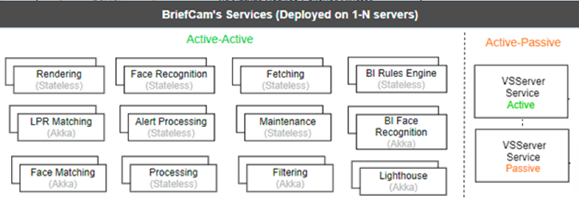
BriefCam’s services provide the core functionality of BriefCam.
BriefCam’s services were designed with high availability in mind, and therefore they do not require a load balancer for clustering and redundancy. Their architecture natively supports redundancy, as described below.
The supported redundancy models for BriefCam services are:
Redundancy Model | Services | Service Architecture |
Active-Active | Rendering Face Recognition Fetching BI Rules Engine Alert Processing Maintenance Processing | These services support redundancy using a queue-based architecture. Service instances pull tasks directly from the database. There is no communication between services and each service you add increases the system’s capacity. When a single service fails, the system will continue to work under reduced capacity. |
Active-Active | Lighthouse LPR Matching BI Face Recognition Face Matching Filtering | These services use a service-mesh architecture provided by Akka.Net that automatically constructs failover clusters as more instances are added to the system. There is no need for load balancing or any additional configuration and each service you add increases the system’s capacity. The Lighthouse service is the seed node of the cluster. When a single service fails, the system will continue to work under reduced capacity. To construct a failover cluster, all you need to do is deploy multiple instances for each one of these services. |
Active-Passive | VSServer Service |
Failover for Services that Support Active-Active Redundancy Model
To construct a failover cluster for Active-Active services all you need to do is deploy multiple instances from each one of the master services. In small systems, where all the services are grouped together on a single server, you can simply deploy a similar redundant server. On larger systems, where there are many instances spread across different servers, you need to design the servers properly to make sure you will have multiple instances available when a server fails.
Additional Considerations for Connectivity to the VMS
The Fetching service is responsible for fetching the video footage from the VMS. This service can be installed on multiple hosts to provide high availability.
When connecting to VMS systems that require a license per client concurrent connection, the system integrator must obtain the required number of licenses from the VMS vendor to support the number of deployed Fetching services.
By default, a Fetching service is configured to use two concurrent workers. Therefore, deploying two Fetching services means that there will be four concurrent workers to the VMS.
Failover for Services that Support Active-Passive Redundancy Model (VSServer Service Only)
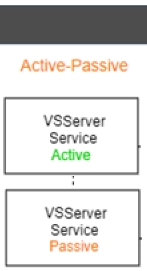
The VSServer Service does not support an Active-Active deployment model and, therefore, you need to set up an Active-Passive deployment model for the VSServer Service.
To construct a failover cluster, you need to deploy another instance of the VSServer Service on a different server and keep it on standby. This means that the standby server includes the VSServer Service and the service is stopped and not in use. Your primary instance needs to be monitored, and if it goes down, you can activate the redundant instance either manually or automatically by starting the service on the redundant server. Once the service starts, it will connect to the database and continue where the failing service left off.