BriefCam Make and Model Recognition White Paper
Introduction
Vehicle Make and Model Recognition (VMMR), a subset of video analytics, focuses on identifying and categorizing vehicles based on their make and model, enhancing security and traffic management. This white paper explores the significance of VMMR in video analytics, its applications, and challenges.
BriefCam’s VMMR can be used in conjunction with other integrated analytics, such as in-the-wild License Plate Recognition (LPR) and vehicle classes, to accelerate investigations and increase policing efficiency.
The accuracy of make and model recognition is dependent on many factors including camera location (placement), resolution (pixels), exposure time, video quality, lighting, and angle of camera.
It’s important to note that BriefCam constantly updates the networks used for filters.
Main VMMR Use Cases
The main use cases for Vehicle Make & Model Recognition (VMMR) are:
Law Enforcement
In law enforcement, Make & Model recognition plays a pivotal role in advancing investigative capabilities including:
Automated vehicle identification for criminal investigations.
Tracking and monitoring vehicles of interest.
Enhancing border security through make and model recognition.
Enhancing security by identifying unauthorized vehicles.
Traffic Management
VMMR can be used to better manage traffic including:
Optimizing traffic flow by analyzing vehicle types and patterns.
Monitoring compliance with traffic regulations.
Example of Using BriefCam for the Main Use Cases
The following are examples of how you can use BriefCam’s VMMR capabilities:
Searching for a specific make or make and model during a forensic investigation. This is done in BriefCam’s REVIEW module.
Setting a rule to alert when a vehicle with a specific make and model appears. This is done in BriefCam’s RESPOND module.
Quantifying trends using make and model appearance counts in a specific scene or determining trends in vehicles’ routes according to the sequence of appearances across different cameras. This is done in BriefCam’s RESEARCH module.
Using BriefCam’s Make & Model Feature
RESPOND Module
Create a rule.
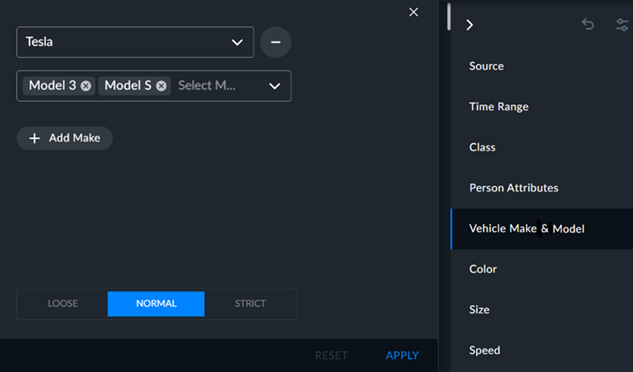
Click the Vehicle Make & Model filter.
Select a make from the drop-down list. You can also type in the name or part of the name of the make to narrow down the selection.
You can add models to the search from the second drop-down list.
You can add additional makes by clicking the +Add Make button.
You can fine-tune your search using the Loose, Normal, or Strict tolerance level. For additional information, see the Filter Tolerance Adjustment section.
To apply your selections to the search, click APPLY.
Best Practices
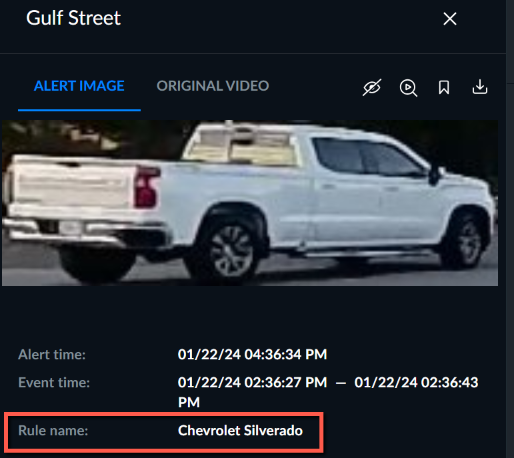
It is recommended to only select one make per rule and to add the name of the make and model in the name of the rule (as shown in the image below). This is because currently the Make & Model information is not displayed for each alert received.
REVIEW Module
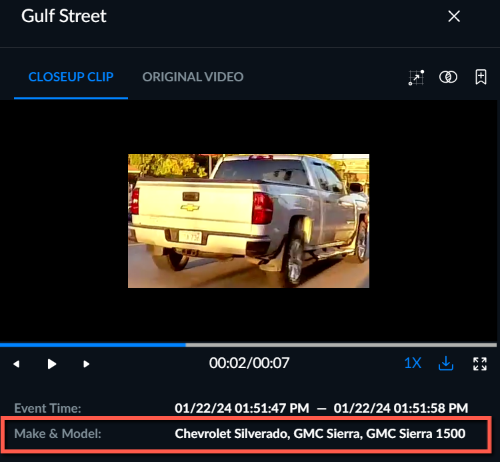
When you look at an object, you’ll see there all the possible make and models for this object with the most probably match listed first. The filter will return all chosen makes and models that passed the threshold (normal, strict, loose) in the order of probability.
RESEARCH Module
In the RESEARCH module, information about the make and models appears in three of the built-in detailed dashboards:
Vehicle Details
Traffic Violations
Intersection Analysis
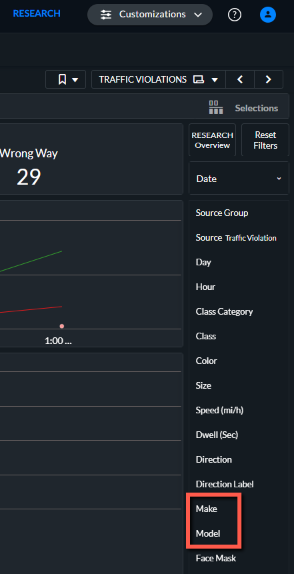
In each of the dashboards, you’ll see a chart with the 10 top makes and models. You can click on any of the makes to drill-down to the models for that make. In the Vehicle Details dashboard, you’ll also see a Make column and a Model column.
If the make and model information is not presented, it means that the model did not have enough confidence for it to be logged (or that only the make and model information above a certain threshold is presented).
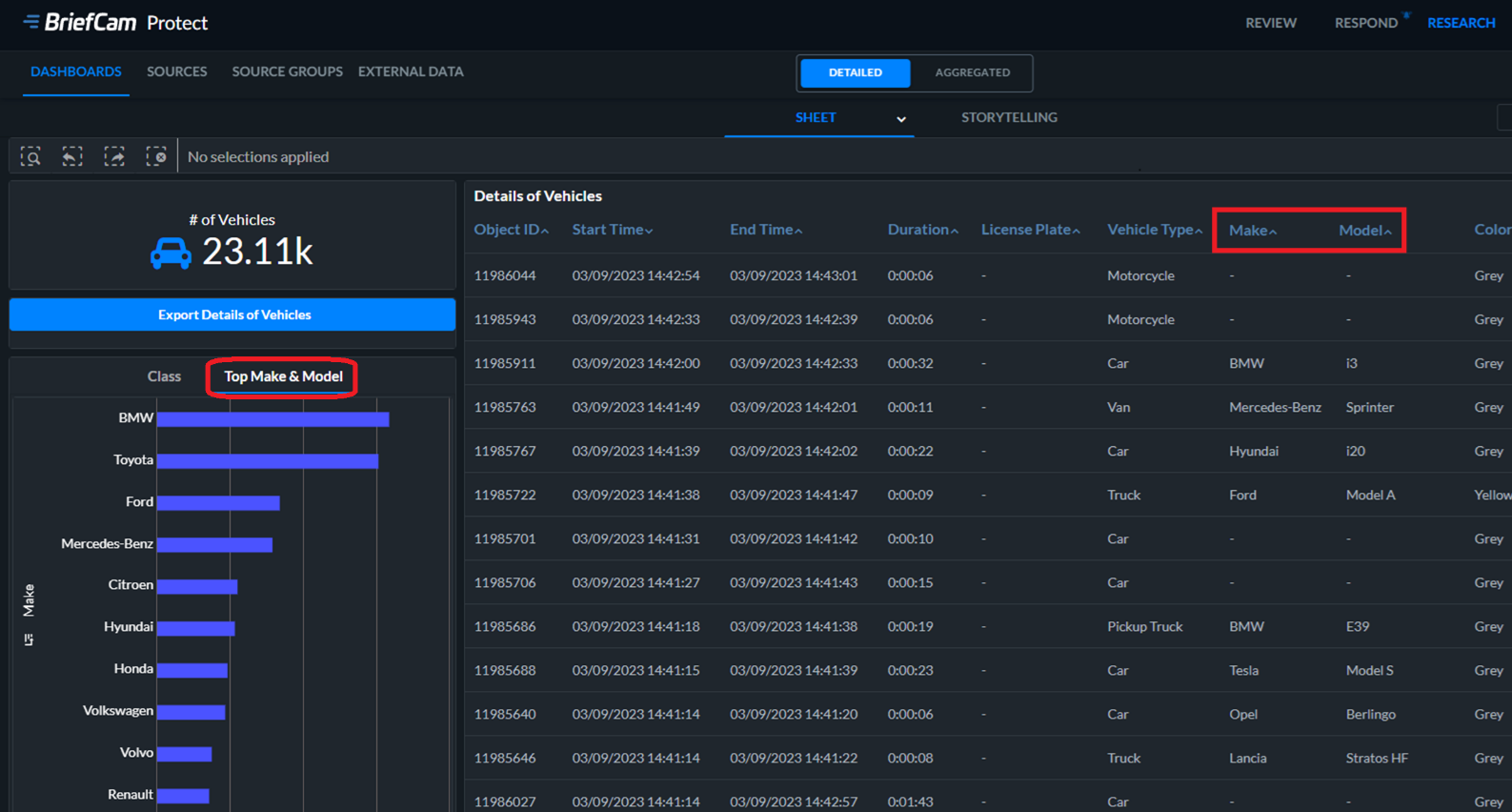
There are two dimensions, one for Make and one for Model, that you can use in your dashboards. In addition, in all dashboards, using the Filters pane you can filter by Make and Model.
Tolerance Levels
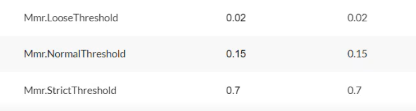
When using the Tolerance levels, the three confidence levels can be adjusted using the following three environment settings:
Mmr.LooseThreshold
Mmr.NormalThreshold
Mmr.StrictThreshold
BriefCam’s Make & Model Main Limitations
The following are current limitations when using BriefCam and VMMR:
There is no dependency between the BriefCam generators for VMMR and Four wheel classes. This means, for example that a four wheel ‘Truck’ may also be recognized as ‘Kia Picanto’, even though a Kia Picanto is not a truck.
The results in the RESPOND and REVIEW module are not always identical.
Make and Model data is currently not available in aggregated dashboards.
Make & Model-specific Challenges
Make and model recognition poses several unique challenges including the following:
Model diversity – There is a wide range of vehicle makes and models, each with distinct features and characteristics.
Shared chassis – Many automobile manufacturers utilize a shared or common chassis across multiple models.
Constant model updates – Automobile manufacturers frequently update existing models and introduce new ones.
Sister models – Some manufacturers produce sister models that share a considerable number of design elements. These models may have subtle differences, making it challenging for recognition systems to accurately distinguish between them.
Geographical and regional variations – Recognition accuracy may vary across different countries due to regional variations in vehicle models and specifications. Some models may be exclusive to certain regions, and others may undergo modifications to meet regional standards.
An accurate and robust make & model recognition system needs to be able to handle all these challenges and more.
Maximizing Performance
In addition to the Make & Model-specific challenges listed about, there are many factors that affect the performance of VMMR including camera angles and placement, resolution, camera types, vehicle speed, and more.
Resolution
The minimum resolution required is 2MP (1920x1080). You can also use HD (1920x1080) and the most recommended resolution is Full HD (1280x720) resolution. Although 4K (3840x2160) resolution can also be used, the recognition will take longer.
Camera Types
The type of cameras that are installed affects the performance of VMMR.
A camera with a built-in illuminator is recommended.
For 24-hour surveillance, the camera should include low light sensitivity and active illumination capabilities, for maintaining a fast exposure (shutter) rate to prevent motion blur.
Both visible light and near infrared cameras are supported, provided that the contrast between the characters and the plate’s background is high.
Camera Placement
For VMMR, a good recommendation when using BriefCam, is to position the cameras in such a way that the complete vehicle is in the field of view, the occlusions are minimal (and there is good separation between vehicles), with a slight vertical angle (less than 40 degrees) and overlapping cars are avoided in the field of view. In general, VMMR produces the best results when:
The cameras are positioned so that the angle of capture is at a minimum and the vehicles are seen as “head-on” as possible.
The camera is angled to avoid direct glare from headlights and taillights as well as from the trunk and hood (in the case of active illumination). Alternatively, the camera should have a wide dynamic range so it can clearly capture strong illumination and very low illumination in a single shot.
The lighting is sufficient, resulting in a quick shutter speed that produces a crisp image.
At nighttime, active illumination is needed.
The camera is steady to prevent image smearing.
Framerate Per Second (FPS)
A framerate is how often a camera produces frames and is usually measured in FPS or frames per second. In general, when possible, always set the video input to a constant framerate.
BriefCam works at a framerate of approximately 3 FPS (or lower). Due to the low-FPS processing, high-speed objects across the frame may not be detected.
Bitrate
The bitrate is the rate in seconds that bits are transmitted from one location to another. However, bitrate is not directly related to the number of pixels per frame (the resolution).
Bitrate can be used to control the quality of the video. On the one hand, the higher the bitrate, the better the quality. On the other hand, low bitrates save storage and transmission bandwidth. Two video streams of the same resolution can be configured to a different bitrate, where the higher the bitrate, the higher the quality, if all other parameters are identical.
Because the bitrate determines the quality of the video, the bitrate affects the accuracy of license plate recognition. The better the quality of the video, the better the accuracy of license plate recognition since more characters will be extracted accurately.
To achieve successful license plate recognition, higher bitrates are necessary in scenes that are more challenging, such as partial occlusions or dark scenes. When the camera’s field of view is very wide and objects look smaller, a higher resolution and bitrate contribute to the license plate recognition accuracy.
Higher bitrates may lead to more storage used.
Speed of Objects
The speed that a vehicle is traveling affects the accuracy of VMMR. This is because the vehicle may become blurred as the speed increases, due to the way cameras capture the image. Another factor is that when an object is traveling faster, it appears in less frames, which also affects the accuracy, because the VMMR algorithm has less frames to choose from, when selecting images of the plate to transcribe. Cameras should be configured in a way to generate sharp images with good contrast even though the vehicle is moving fast – and in a way that the vehicle is visible for long enough in the frame.
In general, if you have the appropriate camera, enough light and a good angle, BriefCam should be able to capture the make and model even if the vehicle is moving very fast. In addition, the VMMR algorithm can even handle blurry images.