Teleste Integration
Integration Summary
VMS Partner | Product | Version | Last Tested BriefCam Version | Integration Level | H.265 Support |
Teleste | Teleste | 5 | 5.4.1 UP1 | Forensics only integration (L1) | No |
Caution
The RESPOND module is currently not supported for this VMS.
Teleste API Token Setup
An API token (software key) should be provided by Teleste to allow integration with the VMS. This token should be manually added into the BriefCam Teleste plugin ini file’s API Token section. The ini file is located on the BriefCam Server at: …\plugins\BriefCam.TelesteIntegration.ini.
Known Limitations
In Teleste integrations, although the processing is reported to be completed successfully, occasional frames may be dropped and indicated in the logs.
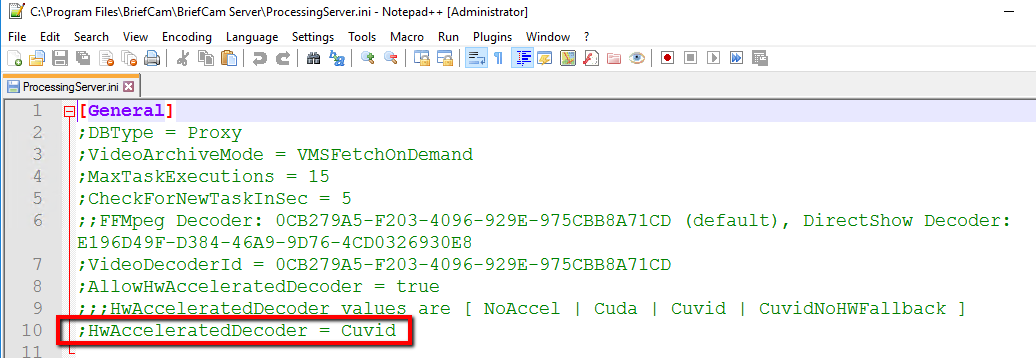
The FFmpeg tool cannot process Teleste V5 video files using the cuvid hardware acceleration method, which is BriefCam’s default method. To solve this use, change the method in the
ProcessingServer.inifile’sHwAcceleratedDecoderparameter. Remove the semicolon and change the value to either:NoAccel– for no hardware acceleration. Note that disabling the hardware decoding is not advisable since it will impact performance.Cuda– for CUDA hardware acceleration
Support for the H.265 format is done per request. If you want to use the H.265 format with this VMS, please contact BriefCam’s support.