Salient Integration
Integration Summary
VMS Partner | Product | Version | Last Tested BriefCam Version | Integration Level | H.265 Support |
Salient | CompleteView Pro | 5.5 | 6.2 | Integration for on-demand and real-time (L2) | No |
Salient Integration Modes
With Salient integrations, video streams can be pulled directly from the cameras or from Salient’s RTSP server.
Pull streams directly from the cameras: Salient provides a .json file with all the cameras and their links to the RTSP. In this mode, network access to the cameras is needed.
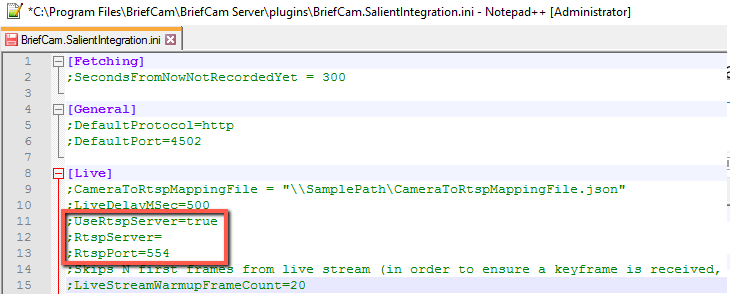
Pull streams from Salient's RTSP server: The customer needs to install Salient's RTSP Server (a separate component) and set the following connection details in the BriefCam.SalientIntegration.ini file:
;UseRtspServer=true
;RtspServer= [address]
;RtspPort=[port]
Port Configuration
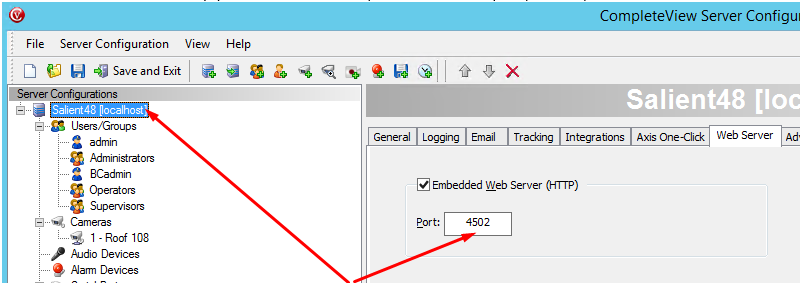
When configuring the Salient directory using the BriefCam Administrator Console, it is important to specify the VMS HTTP port number. The port number can be found on the Salient CompleteView Server configuration application, as shown below:
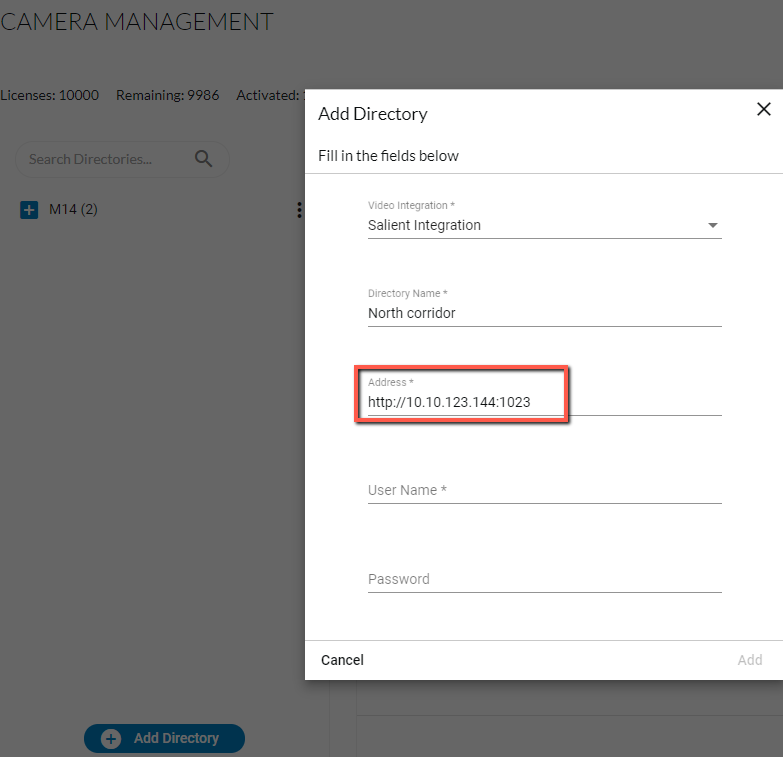
To configure the directory in the BriefCam Administrator Console, set up the Server IP followed by the port number in the following format: http://IP_Address:Port#.
Known Limitations
In Salient 5.2 integrations, in some environments, RTSP streams take longer than expected to initialize. This delay causes new RESPOND tasks appear in Recovery mode, miss objects and fail due to timeout. To avoid failures, increase the BriefCam timeout configuration by modifying the Live.MaxGetLiveImageRetries environment setting.
Salient's RTSP stream does not support timestamps.
This can lead to object clips that play in fast forward in some configurations.
This can lead to a small offset when playing the original video playback. To correct this offset, consider adding a constant offset to BriefCam's playback request by editing the
LiveDelayMSecparameter in theBriefCam.SalientIntegration.inifile.
In Salient integrations, motion detection does not work when the clips are shorter than 5 seconds long. Some objects will not be detected if the clips are shorter than 5 seconds. To solve this, configure the cameras to either disable motion detection or create clips that are always longer than 5 seconds.
Support for the H.265 format is done per request. If you want to use the H.265 format with this VMS, please contact BriefCam’s support.