License Plate Recognition (LPR) Watchlists
To add an LPR watchlist:
Open the Customizations menu at the top right-hand side of the screen.
Click the LPR Watchlists option.
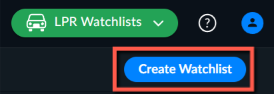
In the top right-hand corner of the screen, click Create Watchlist.
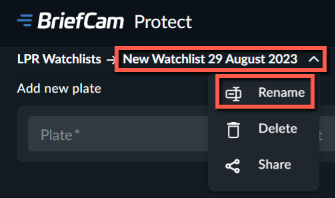
Give the watchlist a name by clicking on the New Watchlist entry and clicking Rename.
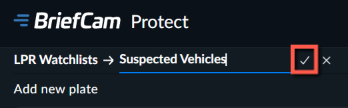
When you finish typing in the new name, click the checkmark to the right of the name.
Manually enter the license plate numbers in the Plate field or upload them using a file by clicking the Upload CSV File button.

If you are manually entering the license plates, for each license plate enter the license plate number and a comment if you want and then click Add.
The string can be 4-10 characters long, or 2-10 characters long with wildcards.
The license plate number can include letters and numbers (0-9) as well as wildcards.
The supported wildcards are:
Wildcard
Description
?
Replaces any single character or number. Question marks can be used anywhere in the string. The string ???JK will match any license plate that has J and K as the fourth and fifth character. For example, the following will be found for this search: ABCJK, 251JK and more.
*
Replaces any number (zero or more) of characters and numbers. Asterisks can be used at the beginning or end of the string.
For example: The string *JK will match with the following: 0974JK, 25JK, JK and more.
The string *JK? will match with the following: 0974JK2, 25JK0, JK1 and more.
If you clicked the Upload CSV File button, upload a CSV file with data about the license plates in two headerless columns:
License Plate NumberandDescription. Note that you can only upload one CSV file at a time.
If there is an error in the CSV file that you uploaded (such as too many characters in a license plate), an error will appear with the line number of the first error.
When you hover over a watchlist, you have options to rename, share or delete the watchlist.
Watchlists added via the Watchlist tabs are not deleted by the maintenance process. However, an internal watchlist that was created within a case will be deleted once the case is deleted (by maintenance or by the user).
Tip
The recommended maximum number of objects for a watchlist is 200,000.