Appearance Similarity
To filter objects down to similar objects only, select one or more objects (by hovering over them and clicking their selection button), then click the Appearance activity button ( ) in the top right-hand corner of the screen. You can alternatively do so by clicking the Appearance Similarity option displayed to the right of an object’s close-up clip playback.
The Appearance Similarity filter will open and display all selected objects. Selected objects have a blue frame around them. Once you select the required objects, click APPLY. This will filter all case objects to display only objects similar to those selected.
For people, similar objects are objects that look similar to a human operator, mostly when wearing the same clothes in all appearances.
For vehicles and animals, similar objects are objects with the same identified classes and attributes (class, size and color), such as two objects both classified as blue bicycles will be considered “similar” even though a human operator may not consider them similar. Two red pickup trucks may be considered similar by BriefCam, even if they look different to a human eye. The objects’ behavior, such as speed and direction, are also taken into account when finding similar objects. Note that this method will also be used for people if the image is of low resolution, there is little visibility, or the person is far away.
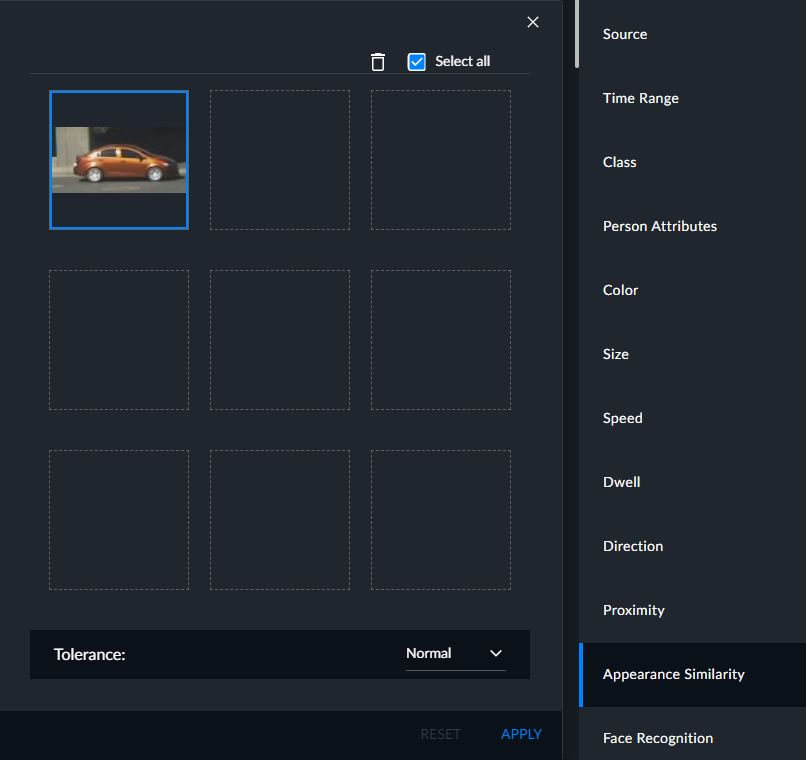
You can click Reset to remove all selected objects from the filter and resume display of all case objects.
You can hover over an individual object in the Appearance Similarity filter and click its delete button (trash can) to remove it from the filter or click the zoom button (magnifying glass) to see the entire thumbnail.
You can select all the objects on the current page by checking the Select All checkbox and you can then delete them all. You can also use Shift+Click to select multiple consecutive objects.