Alerts with Count Filter
The last filter option is the Count option. Click on this option and you can then create alerts that are triggered when a certain number of objects meets a set filter in a predefined period (Time-Dependent Count) or concurrently (Concurrent Count).
When using the Next-Gen engine, you will also have People Counting, Crowd Counting, Group Detection, and Airplane Counting options.
For queue counting, use People Counting alerts (see: People Counting Alerts). People Counting alerts are ideal when you want to count people in semi-crowded scenes and people that are static (not moving a lot).
Time-Dependent Count
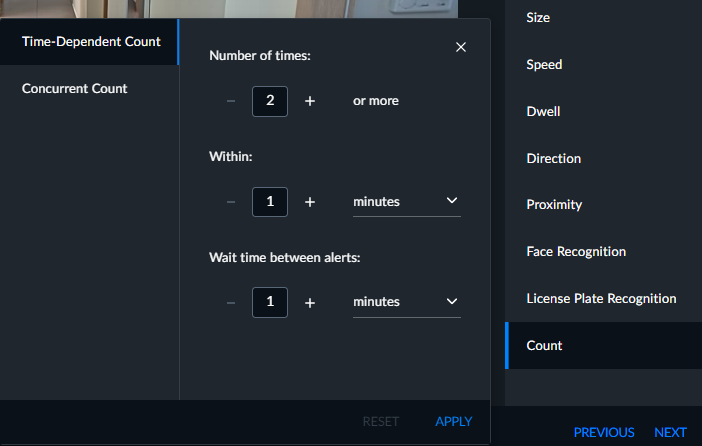
Select Time-Dependent Count to create an alert when a certain number of objects meets a certain filter in a predefined period of time.
For example, you can set an alert that is triggered when more than 100 people entered a park in a single hour after 9 PM. Or, you can set an alert when more than three employees on the watchlist entered a certain area of the store.
In the Number of times field, enter the number of objects that will trigger the alert. The maximum number of objects that can be set is 1,000 and the maximum time period is 24 hours.
In the Within field, enter the period of time within which the objects must appear in order to trigger an alert.
In the Wait time between alerts field, set the time to wait before starting to count objects again for the next alert. The counter starts at zero when the cool-down period ends. The minimum cool-down period is 1 second and the maximum is 24 hours.
Concurrent Count
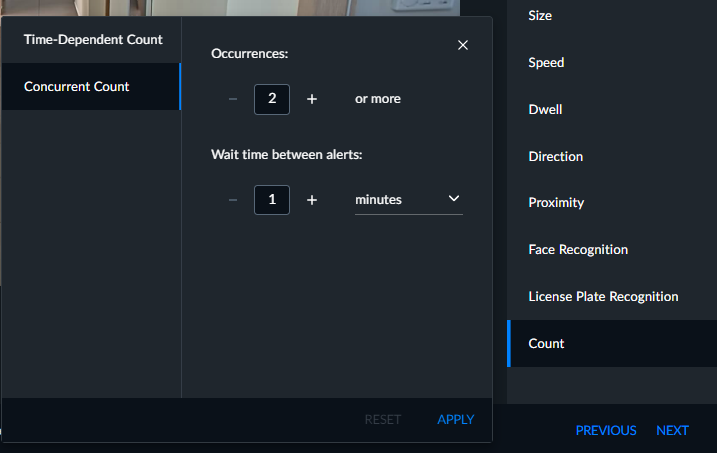
Select Concurrent Count to create an alert that is triggered when a certain number of objects meets a certain filter concurrently.
For example, you can set an alert that is triggered when more than 10 people are in a predefined area concurrently. However, if one person left the area before the tenth person entered, the alert will not be triggered. Another example is that you can trigger an alert when there are less than five people in a predefined area in a given time.
In the Occurrences field, enter the number of objects that will trigger the alert. The maximum number of objects that can be set is 1,000 and the maximum time period is 24 hours.
In the Wait time between alerts field, set the time to wait before starting to count objects again for the next alert. The counter starts at zero when the cool-down period ends. The minimum cool-down period is 1 second and the maximum is 24 hours.