Why is the RESPOND tab greyed out?
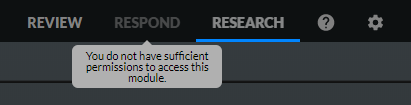
If the RESPOND tab is grayed out, this is because the user does not have sufficient permissions to access the RESPOND module. For additional information, see Access to Modules section below.
Access to Modules
Use the Allow Access to RESPOND checkbox to assign access permissions to the RESPOND module for specific users and/or groups.
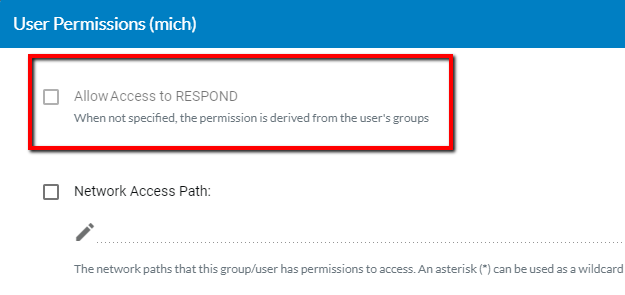
When this checkbox is not selected, the RESPOND module will appear greyed out for these users and groups.
The following rules apply to this policy:
The Everyone group gives RESPOND permissions to all users. To change this:
Uncheck the checkbox in the Everyone group.
Check the checkbox for specific users or specific groups.
If a specific user is the owner of existing assets, such as RESPOND rules, and if this module was restricted for this user, all assets remain in the system and can be accessed by other users. If the user is given back access to the RESPOND module, the user can continue where they left off. It is recommended to make sure that a user does not have rules set up before restricting them from accessing the RESPOND module.
If the permission is changed while the user is logged into the client, the change will be applied in the next user login or browser refresh.