Why am I getting the Filtering failed message?

This error may appear in the following cases:
Timeout – In this case, try increasing the value of the: AkkaRequestTimeOut environment setting.
DB Timeout – In large cases with many objects, there may be a DB timeout. In this case, you will want to increase the command timeout, which by default is 30. To do this, open the
FilteringService.dll.configfile (located at:C:\Program Files\BriefCam\BriefCam Server\netcoreapp3.1) and at the end of theconncectionString, add;CommandTimeout=60(or any other relevant number above 30).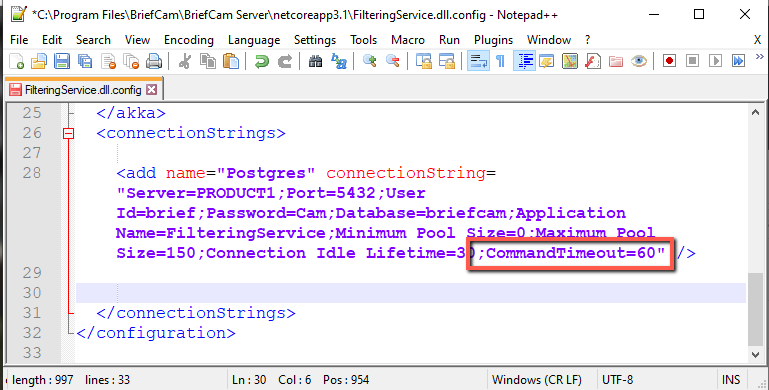
Service Disconnection – Check that the following are running: ProWebAPI, Filtering Service, Notification Service, Lighthouse Service, FR Matching Service, LPR Matching Service, and BI Face Recognition Service. If they are not running, restart the services.
If the problem still happens, examine the logs.