When using a Genetec integration, why do I have BriefCam rules that are stuck in the Recovering status?
If you are trying to get a live stream from Genetec and have rules that are in the Recovering status, this may occur when you have many cameras, many rules, and/or a slow environment.
In the Genetec Media Gateway’s Event Viewer log, you may also see a number of errors:
Genetec.MediaGateway.exe - Writer queue full 3001/3000, dropping channel
Event ID 0 from source Genetec.MediaComponent32.exe cannot be found
The description for Event ID 0 from source Genetec.MediaComponent32.exe cannot be found
To solve this issue:
In the
VideoNative.inifile (located by default at:C:\Program Files\BriefCam\BriefCam Server), set theAllowUdpparameter totrue. This set the RTSP streaming transport protocol to UDP instead of TCP.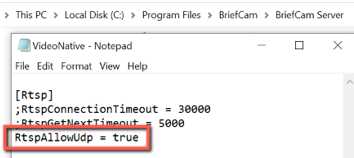
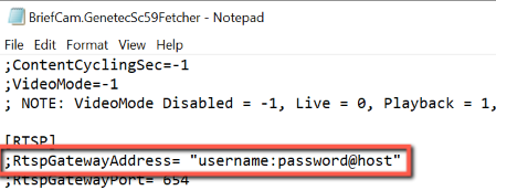
It is also recommended to move the Genetec gateway to a separate server and add the RTSP’s IP and credentials to the plugin configuration file in the following format:
RtspGatewayAddress= "username:password@host"wherehostis the media gateway's IP address. Remember also to uncomment the row in the configuration file (by deleting the semicolon).