设定单一登入(SSO)
BriefCam 提供单一登入的三个现成选项,以及实作自订单一登入解决方案的介面。
三个内建SSO选项为:
基于SAML的SSO,您可以在其中验证现有的SAML令牌提基于SAML的SSO供程序。请参阅以取得有关如何部署的资讯。
Active Directory单点登录,在这里我们连接到一个活动目录并从中同步用户和组。有关如何部署此功能的详细信息,请参阅《管理员指南》中的相应章MicrosoftActive Directory整合节。BriefCam
MilestoneXProtect单一登入。在Milestone安装中,我们提供使用Milestone Client和Directory的选项,以提供单一登入解决方案。
基于SAML的SSO
基于SAML的SSOBriefCam所需的必备属性(SAML断言/元数据)包括:
電子郵件
名字
姓氏
UPN
在BriefCamSSO过程中自动创建的用户是根据SAML响应中收到的电子邮件属性创建的。
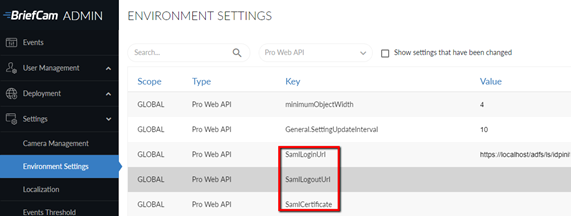
要将现有SAML令牌提供程序(如Microsoft ADFS)与进行集成BriefCam,请使用BriefCamSAML基础架构,方法是在环境设置的Pro Web API部分的适当位置输入您自己的令牌提供程序的信息和URL:
SamlLoginUrl –这是SAML登录端点,它是SAML令牌提供程序,用于响应SAML身份验证请求。在登入时BriefCam,使用者会使用一个参数重新路由至此位址,该参数告知端点在登入BriefCam后将登入资讯传回至。
SamlLogoutUrl –这是SAML登出端点,提供登出功能。一旦登出,使用者将重新导向至此位址。BriefCam
SamlCertificate –这是SAML证书指纹,是Windows为此SAML证书提供的唯一标识符。证书应安装在本地PC上,用于加密SAML客户BriefCam端与SAML令牌提供程序之间的通信。
示例响应示例
<samlp:Response xmlns:samlp="urn:oasis:names:tc:SAML:2.0:protocol"
xmlns:saml="urn:oasis:names:tc:SAML:2.0:assertion"
ID="_abc123"
Version="2.0"
IssueInstant="2025-01-20T12:00:00Z"
Destination="https://briefcamhost.domain.com/ProWebApi/AuthenticationApi/AuthenticateSaml">
<saml:Issuer>https://idp.example.com</saml:Issuer>
<samlp:Status>
<samlp:StatusCode Value="urn:oasis:names:tc:SAML:2.0:status:Success"/>
</samlp:Status>
<saml:Assertion ID="_def456"
IssueInstant="2025-01-20T12:00:00Z"
Version="2.0">
<saml:Issuer>https://idp.example.com</saml:Issuer>
<saml:Subject>
<saml:NameID Format="urn:oasis:names:tc:SAML:1.1:nameid-format:emailAddress">
user@example.com
</saml:NameID>
<saml:SubjectConfirmation Method="urn:oasis:names:tc:SAML:2.0:cm:bearer">
<saml:SubjectConfirmationData NotOnOrAfter="2025-01-20T13:00:00Z"
Recipient="https://briefcamhost.domain.com/ProWebApi/AuthenticationApi/AuthenticateSaml"/>
</saml:SubjectConfirmation>
</saml:Subject>
<saml:Conditions NotBefore="2025-01-20T12:00:00Z" NotOnOrAfter="2025-01-20T13:00:00Z">
<saml:AudienceRestriction>
<saml:Audience>https://briefcamhost.domain.com/ProWebApi/AuthenticationApi/AuthenticateSaml</saml:Audience>
</saml:AudienceRestriction>
</saml:Conditions>
<saml:AttributeStatement>
<saml:Attribute Name="http://schemas.xmlsoap.org/ws/2005/05/identity/claims/emailaddress">
<saml:AttributeValue>user@example.com</saml:AttributeValue>
</saml:Attribute>
<saml:Attribute Name="http://schemas.xmlsoap.org/ws/2005/05/identity/claims/givenname">
<saml:AttributeValue>John</saml:AttributeValue>
</saml:Attribute>
<saml:Attribute Name="http://schemas.xmlsoap.org/ws/2005/05/identity/claims/surname">
<saml:AttributeValue>Doe</saml:AttributeValue>
</saml:Attribute>
<saml:Attribute Name="http://schemas.xmlsoap.org/ws/2005/05/identity/claims/upn">
<saml:AttributeValue>john.doe@example.com</saml:AttributeValue>
</saml:Attribute>
</saml:AttributeStatement>
<saml:AuthnStatement AuthnInstant="2025-01-20T12:00:00Z">
<saml:AuthnContext>
<saml:AuthnContextClassRef>
urn:oasis:names:tc:SAML:2.0:ac:classes:PasswordProtectedTransport
</saml:AuthnContextClassRef>
</saml:AuthnContext>
</saml:AuthnStatement>
</saml:Assertion>
<ds:Signature xmlns:ds="http://www.w3.org/2000/09/xmldsig#">
<ds:SignedInfo>
<ds:CanonicalizationMethod Algorithm="http://www.w3.org/2001/10/xml-exc-c14n#"/>
<ds:SignatureMethod Algorithm="http://www.w3.org/2001/04/xmldsig-more#rsa-sha256"/>
<ds:Reference URI="#_def456">
<ds:Transforms>
<ds:Transform Algorithm="http://www.w3.org/2000/09/xmldsig#enveloped-signature"/>
<ds:Transform Algorithm="http://www.w3.org/2001/10/xml-exc-c14n#"/>
</ds:Transforms>
<ds:DigestMethod Algorithm="http://www.w3.org/2001/04/xmlenc#sha256"/>
<ds:DigestValue>Base64EncodedDigestValue</ds:DigestValue>
</ds:Reference>
</ds:SignedInfo>
<ds:SignatureValue>Base64EncodedSignatureValue</ds:SignatureValue>
</ds:Signature>
</samlp:Response>