インストールのトラブルシューティング
のインストールを成功させるために必要な既存の環境プロパティをすべて抽出するにはBriefCam、Installation Troubleshooter(インストールトラブルシューティング)ツールを使用します。このツールは、Server 2012、Server 2016、Windows 10、およびWindows 11のオペレーティングシステムで使用できます。
{BriefCam Server installation folder}toolsに移動し、installation_troubleshooterフォルダーのすべてのコンテンツを実行中のディレクトリにコピーします。installation_troubleshoot.batファイルを管理者権限で実行してください。BriefCam Administrator Console設定に関する情報は、
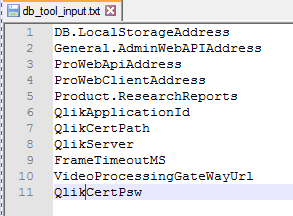
db_tool_input.txtファイルを開いてください。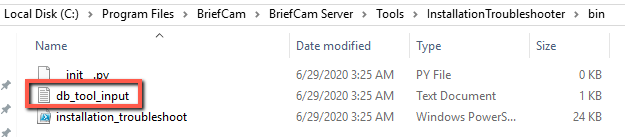
BriefCam Administrator Consoleから取得したい設定を追加または削除します。
実行ディレクトリで、
<hostname>__out__<date-time>.txtおよびinstallation_troubleshoot.logファイルを参照してください。
詳細については、READMEファイルを参照してください。