Configuring Single Sign-On (SSO)
BriefCam offers three ready-made options for single sign on, and an interface to implement a custom single sign on solution.
The three built-in SSO options are:
SAML-based SSO where you can authenticate an existing SAML token provider. See SAML-based SSO for information about how to deploy this.
Active Directory single sign on, where we connect to an active directory and synchronize users and group from there. See the Microsoft Active Directory Integration section in the BriefCam Administrator Guide for information about how to deploy this.
Milestone XProtect single sign on. In Milestone installations we offer an option to use the Milestone Client and Directory to provide a single sign on solution.
SAML-based SSO
The mandatory attributes (SAML assertions/metadata) that BriefCam, requires for SAML-based SSO are:
Email
First Name
Last Name
UPN
The BriefCam users that are automatically created during the SSO process are created based on the email attribute received in the SAML response.
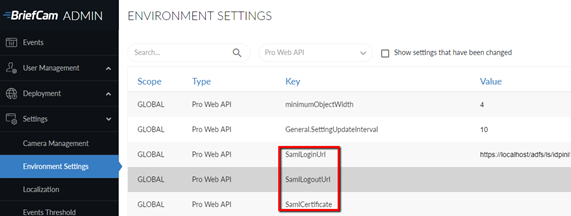
To integrate an existing SAML token provider (such as Microsoft ADFS) with BriefCam, use the BriefCam SAML infrastructure, by entering your own token provider’s information and URLs in the appropriate places in the Environment Settings’ Pro Web API section:
SamlLoginUrl – This is the SAML login endpoint, which is a SAML token provider that responds to SAML authentication requests. When logging in to BriefCam, the user is rerouted to this address with a parameter that tells the endpoint to return the login information to BriefCam after logging in.
SamlLogoutUrl – This is the SAML logout endpoint, which provides logout functionality. Users will get redirected to this address once they sign out of BriefCam.
SamlCertificate – This is the SAML certificate fingerprint, which is a unique identifier given by Windows for this SAML certificate. The certificate, which should be installed on the local PC, is used to encrypt the communication between BriefCam’s SAML client, and the SAML token provider.
See also SAML – ADFS Relying Party Setup for BriefCam Requirements.
Sample Response Example
<samlp:Response xmlns:samlp="urn:oasis:names:tc:SAML:2.0:protocol"
xmlns:saml="urn:oasis:names:tc:SAML:2.0:assertion"
ID="_abc123"
Version="2.0"
IssueInstant="2025-01-20T12:00:00Z"
Destination="https://briefcamhost.domain.com/ProWebApi/AuthenticationApi/AuthenticateSaml">
<saml:Issuer>https://idp.example.com</saml:Issuer>
<samlp:Status>
<samlp:StatusCode Value="urn:oasis:names:tc:SAML:2.0:status:Success"/>
</samlp:Status>
<saml:Assertion ID="_def456"
IssueInstant="2025-01-20T12:00:00Z"
Version="2.0">
<saml:Issuer>https://idp.example.com</saml:Issuer>
<saml:Subject>
<saml:NameID Format="urn:oasis:names:tc:SAML:1.1:nameid-format:emailAddress">
user@example.com
</saml:NameID>
<saml:SubjectConfirmation Method="urn:oasis:names:tc:SAML:2.0:cm:bearer">
<saml:SubjectConfirmationData NotOnOrAfter="2025-01-20T13:00:00Z"
Recipient="https://briefcamhost.domain.com/ProWebApi/AuthenticationApi/AuthenticateSaml"/>
</saml:SubjectConfirmation>
</saml:Subject>
<saml:Conditions NotBefore="2025-01-20T12:00:00Z" NotOnOrAfter="2025-01-20T13:00:00Z">
<saml:AudienceRestriction>
<saml:Audience>https://briefcamhost.domain.com/ProWebApi/AuthenticationApi/AuthenticateSaml</saml:Audience>
</saml:AudienceRestriction>
</saml:Conditions>
<saml:AttributeStatement>
<saml:Attribute Name="http://schemas.xmlsoap.org/ws/2005/05/identity/claims/emailaddress">
<saml:AttributeValue>user@example.com</saml:AttributeValue>
</saml:Attribute>
<saml:Attribute Name="http://schemas.xmlsoap.org/ws/2005/05/identity/claims/givenname">
<saml:AttributeValue>John</saml:AttributeValue>
</saml:Attribute>
<saml:Attribute Name="http://schemas.xmlsoap.org/ws/2005/05/identity/claims/surname">
<saml:AttributeValue>Doe</saml:AttributeValue>
</saml:Attribute>
<saml:Attribute Name="http://schemas.xmlsoap.org/ws/2005/05/identity/claims/upn">
<saml:AttributeValue>john.doe@example.com</saml:AttributeValue>
</saml:Attribute>
</saml:AttributeStatement>
<saml:AuthnStatement AuthnInstant="2025-01-20T12:00:00Z">
<saml:AuthnContext>
<saml:AuthnContextClassRef>
urn:oasis:names:tc:SAML:2.0:ac:classes:PasswordProtectedTransport
</saml:AuthnContextClassRef>
</saml:AuthnContext>
</saml:AuthnStatement>
</saml:Assertion>
<ds:Signature xmlns:ds="http://www.w3.org/2000/09/xmldsig#">
<ds:SignedInfo>
<ds:CanonicalizationMethod Algorithm="http://www.w3.org/2001/10/xml-exc-c14n#"/>
<ds:SignatureMethod Algorithm="http://www.w3.org/2001/04/xmldsig-more#rsa-sha256"/>
<ds:Reference URI="#_def456">
<ds:Transforms>
<ds:Transform Algorithm="http://www.w3.org/2000/09/xmldsig#enveloped-signature"/>
<ds:Transform Algorithm="http://www.w3.org/2001/10/xml-exc-c14n#"/>
</ds:Transforms>
<ds:DigestMethod Algorithm="http://www.w3.org/2001/04/xmlenc#sha256"/>
<ds:DigestValue>Base64EncodedDigestValue</ds:DigestValue>
</ds:Reference>
</ds:SignedInfo>
<ds:SignatureValue>Base64EncodedSignatureValue</ds:SignatureValue>
</ds:Signature>
</samlp:Response>