User Data and Security
User and Credential Types
BriefCam internal users – These users are created and maintained by the Administrator. They are allowed to log in and work with the web client and API.
BriefCam Administrator user – The Administrator manages users’ permissions and camera authorizations for BriefCam users and AD-imported users.
BriefCam Active Directory (AD) users – These users are created and maintained by the AD Administrator. Users and groups are synchronized into BriefCam in order to apply permissions. Camera permissions are assigned by the BriefCam Administrator.
BriefCam SAML users – These users are created and maintained by the SAML authentication provider.
VMS credentials – These credentials are used for accessing the videos on a Video Management System (VMS).
AD credentials – These credentials are used to read the list of users and groups from the AD server.
Restricted Groups
By default, any user can share any case, watchlist or rule with any other user. This means that the user is getting the list of any group or user defined in BriefCam to select from.
There are scenarios that do not allow users to see that other users exist or allow the users to see only a subset of the other users.
For this scenario there is a configuration to first disable the option for a user to see and select other users when sharing and then to allow the user to see only a subset of the existing users and groups.
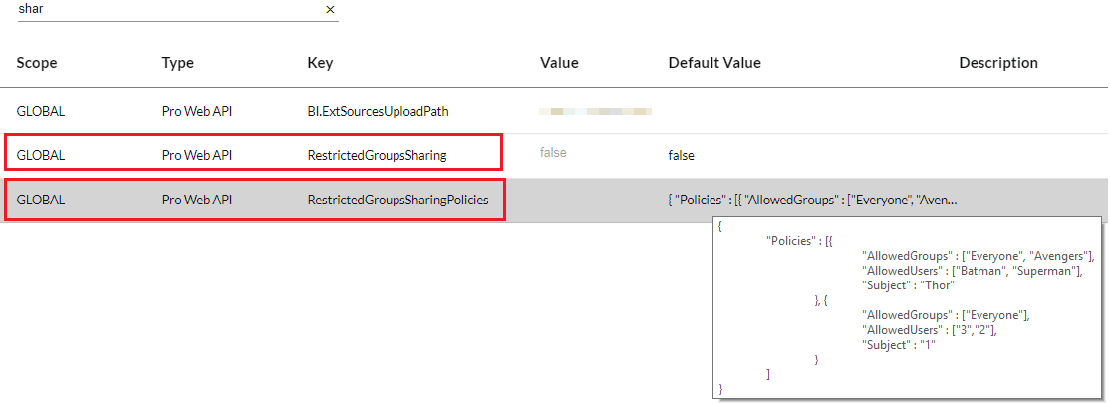
When the RestrictedGroupsSharing environment setting is set to true, when a user is trying to share, the user will get an empty list of users and groups.
In addition, when the RestrictedGroupsSharingPolicies environment setting defines a list of users and their AllowedUsers and AllowedGroups, only those users will have the permission to share and see other users but only from the permitted users and groups.
In the example below, user Thor can share a case, but only with users Batman and Superman and only with users belonging to the groups: Everyone and Avengers.