

Configure the Management Server service as a generic service in the failover cluster
Descriptions and illustrations might differ from what you see on your screen.
- On the last server on which you have installed the management server, go to Start > Administrative Tools, open Windows' Failover Cluster Management. In the Failover Cluster Management window, expand your cluster, right-click Roles, and select Configure Role.
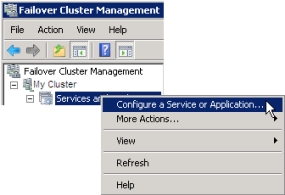
- In the High Availability Wizard, select Next.
- On the Select Role page, select Generic Service and click Next.
- On the Select Service page, select the Milestone XProtect Management Server service and click Next.
- On the Client Access Point page, specify the name (host name of the cluster) that clients will use when accessing the service. The host name must be different from the name of the cluster. Click Next.
- On the Select Storage page, click Next as no storage is required for the service.
- On the Replicate Registry Settings page, click Next as no registry settings are to be replicated.
- On the Confirmation page, click Next after you have verified that the cluster service is configured according to your requirements.
- On the Configure High Availability page, click Next.
- On the Summary page, click Finish to complete configuration of the management server as a generic service in the failover cluster.
- Right-click the role you just created and click Add resource > Generic Script. Select Milestone XProtect Event Server to add the Milestone XProtect Event Server service as a resource to the Milestone XProtect Management Server Cluster service.
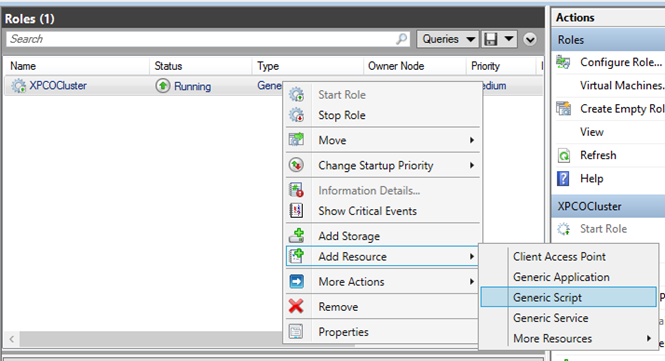
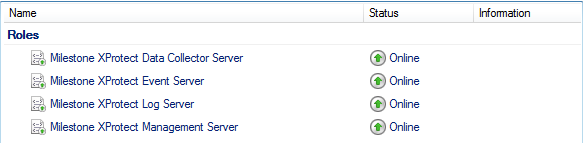
- Repeat step 11 and add all required services in the cluster, for example the Log Server. The Milestone XProtect Event Server and the Data Collector server should both be added as services to achieve an optimal deployment. Additionally, the Milestone XProtect Event Server should be set as a dependent service of the management server to ensure the event server also will stop when the management server is stopped.
- All added services are displayed in the bottom pane of the window.
Update the cluster URL
구성 변경 시, Microsoft 장애 조치 클러스터 관리자에서, 서비스 제어 및 모니터링을 중단하여 Server Configurator 이(가) 변경 후 Management Server 서비스를 시작 및/또는 중지할 수 있게 해줍니다. 장애 조치 클러스터 서비스 시작 유형을 수동으로 변경한 경우, Server Configurator 와(과) 아무런 충돌이 일어나지 않게 됩니다.
Management Server 컴퓨터에서:
- 관리 서버사 설치된 각 컴퓨터에서 Server Configurator 을(를) 시작합니다.
- 등록 페이지로 이동합니다.
- 연필(
 ) 기호를 클릭하여 관리 서버 주소를 편집할 수 있도록 합니다.
 - 관리 서버 주소를 Management Server을(를) 호스팅하는 클러스터 역할 이름(예: http://MyCluster)으로 변경합니다.
- 등록 을 클릭합니다.
Management Server을(를) 사용하는 구성 요소가 포함된 컴퓨터에서(예: Recording Server, Mobile Server, Event Server
- 각 컴퓨터에서 Server Configurator 을(를) 시작합니다.
- 등록 페이지로 이동합니다.
- 관리 서버 주소를 Management Server을(를) 호스팅하는 클러스터 역할 이름(예: http://MyCluster)으로 변경합니다.
- 등록 을 클릭합니다.